GPU Graphics Card Buying Guide for Beginners: 10 Simple Tips to Choose the Right GPU
Table of Contents
GPU Graphics Card Buying Guide for Beginners: Venturing into the world of PC building or upgrading can be exhilarating, but for many, the graphics card, or GPU, remains the most intimidating component to choose. Often referred to interchangeably as a video card, the Graphics Processing Unit is arguably the single most important piece of hardware for overall visual performance in a computer, dictating the quality and speed of graphics rendered on your screen. Whether you’re aiming for immersive gaming experiences, demanding content creation, or simply a smoother computing experience, selecting the right GPU is paramount. This comprehensive guide aims to demystify the process, providing beginners with the knowledge needed to make an informed decision for their specific needs and budget.
1. What is a GPU and Why is it Essential?
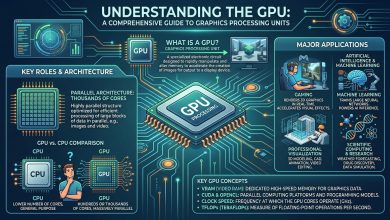
At its core, a Graphics Processing Unit (GPU) is a specialized electronic circuit designed to rapidly manipulate and alter memory to accelerate the creation of images, frames, and videos for output to a display device. While the Central Processing Unit (CPU) handles a broad range of tasks sequentially, GPUs are built with thousands of smaller, specialized cores that can process multiple calculations simultaneously, making them exceptionally efficient for parallel processing tasks like rendering graphics. This parallel processing capability is why GPUs are not only vital for displaying high-quality visuals but also increasingly used in other computationally intensive fields such as artificial intelligence, machine learning, and cryptocurrency mining.
For gamers, the GPU is the powerhouse that translates game data into the stunning, fluid visuals seen on screen, directly impacting frame rates (frames per second, or FPS) and resolution. Higher frame rates mean smoother gameplay, which can offer a competitive advantage in fast-paced titles. For content creators, such as video editors, 3D modelers, and graphic designers, a powerful GPU accelerates rendering times, enabling quicker workflows and the handling of complex projects. Even for general users, a dedicated GPU can offer smoother video playback and better multitasking capabilities compared to relying solely on integrated graphics.
There are two main types of GPUs: integrated and discrete. An integrated GPU (iGPU) is built directly into the computer’s CPU and shares the system’s main memory (RAM) and power. These are found in most laptops and many budget-friendly desktop PCs, suitable for basic tasks, web browsing, and light gaming. In contrast, a discrete GPU, or dedicated graphics card, is a separate component with its own dedicated, high-speed memory called Video RAM (VRAM). Discrete GPUs deliver significantly better performance but consume more power and generate more heat, necessitating adequate cooling solutions. For any demanding visual task, a discrete GPU is essential.
2. Decoding KeyGPU Graphics Card Buying Guide for Beginners
Understanding the jargon associated with GPU specifications can be daunting. Here’s a breakdown of the most critical terms for beginners:
2.1. GPU Cores: The Processing Powerhouses
Just like a CPU has cores, so too does a GPU, though they are designed very differently. GPU cores are thousands of smaller processing elements optimized for parallel tasks. NVIDIA calls its cores CUDA cores, while AMD refers to them as Stream Processors. More cores generally mean greater processing capability and better performance, allowing the card to handle complex calculations simultaneously. However, direct comparison between NVIDIA’s CUDA cores and AMD’s Stream Processors is not accurate due to fundamental differences in their underlying architectures. Intel’s discrete GPUs use Xe-cores.
2.2. Clock Speed: How Fast Does it Think?
Clock speed, measured in Megahertz (MHz) or Gigahertz (GHz), indicates how many cycles the GPU’s cores can complete per second. A higher clock speed generally implies faster processing of instructions and graphically intensive tasks. GPUs often have a Base Clock (guaranteed minimum speed) and a Boost Clock (maximum speed achievable under optimal conditions, like good cooling and sufficient power). While higher clock speeds are desirable, they are not the sole determinant of performance; architectural efficiency and core count also play significant roles.
2.3. VRAM (Video RAM): The GPU’s Dedicated Memory
VRAM is the dedicated, high-speed memory directly on the graphics card, crucial for storing textures, meshes, shaders, and other graphical data the GPU needs to render frames quickly. Modern games, especially at higher resolutions and with detailed textures, are incredibly memory-hungry. If the VRAM capacity is insufficient, the GPU has to rely on slower system RAM, leading to performance bottlenecks and stuttering.
2.4. Memory Bus and Bandwidth
The memory bus, measured in bits (e.g., 192-bit, 256-bit), represents the width of the data pathway between the GPU and its VRAM. A wider bus allows for more data to be transferred simultaneously. Memory bandwidth, measured in Gigabytes per second (GB/s), indicates the total amount of data the GPU can move to and from VRAM every second. Higher bandwidth is particularly important for higher resolutions and games with detailed assets, ensuring the GPU can access data rapidly. Modern GPUs use faster memory types like GDDR6 or GDDR6X, further enhancing bandwidth.
2.5. TDP/TGP: Understanding Power and Heat
TDP (Thermal Design Power), often referred to as TGP (Total Graphics Power) or TBP (Typical Board Power), is a measurement of the GPU’s power consumption and heat dissipation. High-performance GPUs consume more power and consequently generate more heat, necessitating robust cooling solutions in your PC case. Understanding a GPU’s TDP is crucial for ensuring your power supply unit (PSU) can provide enough wattage and that your system can adequately cool the component.
3. NVIDIA vs. AMD (and Intel): Choosing Your Brand
The graphics card market is primarily dominated by two long-standing competitors: NVIDIA and AMD, with Intel having recently re-entered the discrete GPU space. Each brand offers distinct advantages:
- NVIDIA: NVIDIA generally leads in high-end performance, particularly with its flagship cards like the RTX 4090. Their GPUs are renowned for superior ray tracing performance, which simulates realistic lighting, shadows, and reflections, offering a more immersive visual experience in supported games. NVIDIA also boasts its proprietary DLSS (Deep Learning Super Sampling) technology, an AI-powered upscaling solution that boosts frame rates while maintaining image quality. This makes NVIDIA a strong choice for those prioritizing cutting-edge features, ray tracing, and professional applications that often leverage its CUDA ecosystem and AI capabilities. However, this often comes at a premium price. Upcoming NVIDIA RTX 50 series are expected to launch in late 2024 or early 2025, starting with high-end models.
- AMD: AMD often offers excellent price-to-performance ratio, especially in the mid-range GPU market. Their cards tend to provide more VRAM at lower price points, which can be beneficial for high-resolution gaming and content creation, as well as for future-proofing. AMD’s alternative to DLSS is FSR (FidelityFX Super Resolution), an open-source upscaling technology that works across a wider range of GPUs, including older AMD cards and even NVIDIA or Intel GPUs. While AMD has made significant strides in ray tracing with its RDNA 3 and upcoming RDNA 4 architectures, NVIDIA generally maintains a lead in this specific area. AMD’s RDNA 4 generation is also expected to be unveiled at CES 2025.
- Intel: Intel has re-entered the discrete GPU market with its Arc series. While still newer to the dedicated high-performance space, Intel is making strides and offers competitive options, particularly in the budget segment. For instance, the Intel Arc A580 is mentioned as a choice for budget-conscious buyers. Intel’s presence introduces more competition and choice for consumers.
Ultimately, the choice between NVIDIA and AMD (or Intel) often comes down to balancing desired features, performance targets, and budget. Reviewing benchmarks for specific games and applications you intend to use is always recommended.
4. Defining Your Budget and Use Case
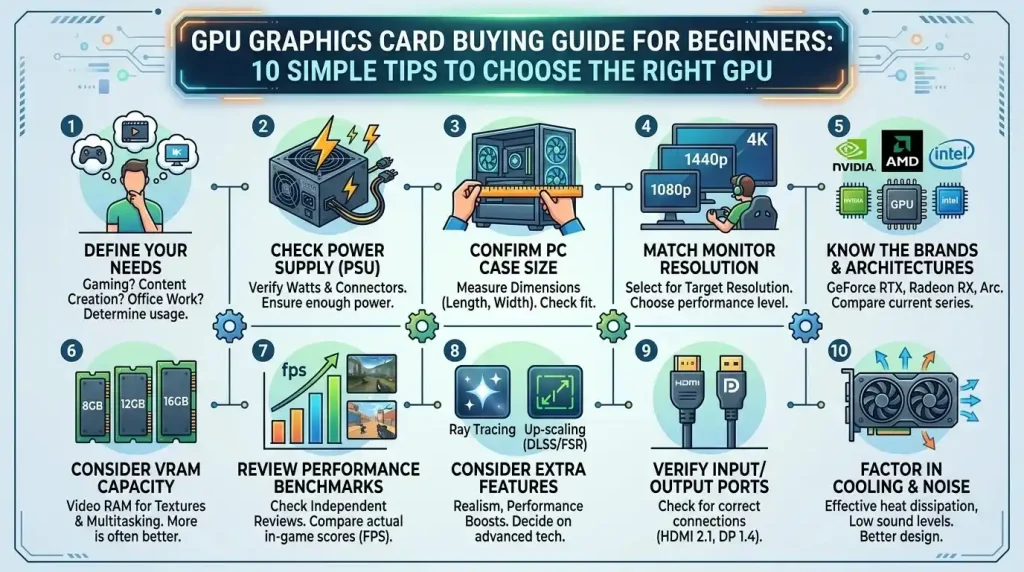
Before diving into specific models, determine your primary use case and set a realistic budget. This will significantly narrow down your options.
- Basic Tasks & Light Gaming: For everyday computing, web browsing, video playback, and very light, older games, an integrated GPU might suffice. If a discrete card is desired for a slight boost, entry-level cards are available.
- 1080p Gaming (60-144 FPS): This is the sweet spot for many budget to mid-range gamers. You’ll want a GPU that can comfortably handle modern AAA titles at 1080p resolution with high to ultra settings, aiming for 60 FPS or higher. Competitive gamers often aim for 144 FPS or higher at 1080p for a smoother experience.
- 1440p Gaming (60-144 FPS): For a significant step up in visual fidelity without the extreme cost of 4K, 1440p resolution is increasingly popular. This requires a more powerful mid-range to upper-mid-range GPU to maintain smooth frame rates, especially with high refresh rate monitors.
- 4K Gaming (60+ FPS) & Enthusiast Performance: This is the most demanding use case, requiring top-tier GPUs to maintain playable frame rates at 4K resolution with high or ultra settings. Expect to invest a substantial amount in a high-end card.
- Content Creation & Professional Workloads: Video editing, 3D rendering, and graphic design benefit immensely from powerful GPUs, often prioritizing higher VRAM capacity and specific architectural features (like NVIDIA’s CUDA cores for certain applications).
Your monitor’s native resolution and refresh rate are critical factors. There’s no point buying an expensive 4K-capable GPU if you only have a 1080p monitor unless you plan to upgrade the monitor soon. Similarly, if you have a high refresh rate monitor (e.g., 144Hz or 240Hz), you’ll need a GPU powerful enough to push those higher frame rates.
4.1. Understanding VRAM Requirements by Resolution
The amount of VRAM a GPU needs is heavily dependent on the resolution you’re playing at and the graphical settings (texture quality, anti-aliasing). Here’s a general guide:
- 1080p Gaming: For most modern titles at 1080p, 8GB of VRAM is considered the current sweet spot and generally adequate for high settings. While 6GB can suffice for medium settings or esports titles, 8GB provides more overhead for maximum details. For ultra settings in demanding games, 12GB can be beneficial.
- 1440p Gaming: For 1440p resolution, 8GB of VRAM can manage medium quality in many current titles, but expect to dial back textures in more demanding games. A GPU with 12GB to 16GB of VRAM is highly recommended for stable high settings and future-proofing, especially if you aim for ultra textures.
- 4K Gaming: At 4K resolution, VRAM demands soar. A minimum of 10GB to 12GB is needed, but compromises at medium settings are likely. For an almost-ideal experience, 16GB is a good target, while 20GB to 24GB is ideal for uncompromised ultra settings, ray tracing, and long-term longevity.
It’s important to note that more VRAM alone isn’t a guarantee of superior performance; the GPU itself must have the raw processing power to effectively utilize that memory.
| Use Case / Resolution | Recommended GPU Tier | Example Cards (Approximate, as of mid-2024) | Typical VRAM | Key Considerations |
|---|---|---|---|---|
| Basic Tasks / Light Gaming (1080p Low) | Entry-Level | Integrated GPUs, older discrete cards | 2-4GB (often shared) | Cost-effective, low power draw. |
| 1080p Gaming (60-144 FPS) | Mid-Range Entry | AMD RX 6600, RX 7600, NVIDIA RTX 4060 | 8GB | Excellent value, handles most games well at high settings. |
| 1080p High Refresh / 1440p Gaming (60-144 FPS) | Mid-Range Performance | AMD RX 6750 XT, RX 7800 XT, NVIDIA RTX 4070, RTX 4070 Super | 12GB – 16GB | Great balance of performance and price for high fidelity. |
| 1440p High Refresh / Entry 4K Gaming | High-End Performance | AMD RX 7900 XT, NVIDIA RTX 4070 Ti Super | 16GB – 20GB | Capable of pushing high frame rates, handles most modern games. |
| 4K Gaming (60+ FPS) / Enthusiast | Flagship | AMD RX 7900 XTX, NVIDIA RTX 4080 Super, RTX 4090 | 20GB – 24GB | Uncompromised performance, ray tracing, future-proof for demanding titles. |
| Content Creation / AI Workloads | High-End to Enthusiast | NVIDIA RTX 4080 Super, RTX 4090, AMD RX 7900 XTX | 16GB – 24GB+ | Prioritizes VRAM, specific architecture support (CUDA for NVIDIA), raw compute power. |
5. Compatibility and Power Considerations
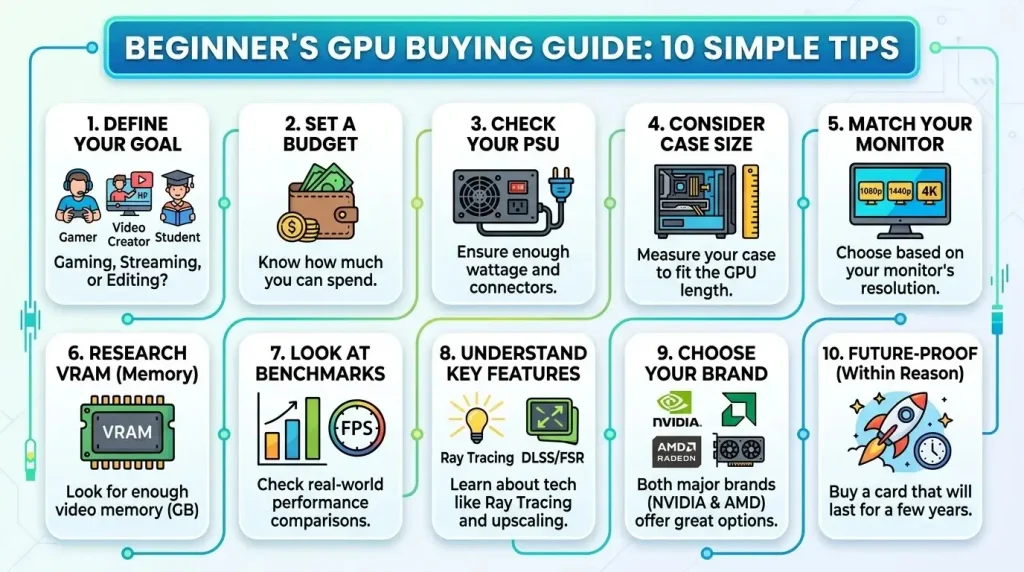
Even the most powerful GPU is useless if it doesn’t fit in your PC or isn’t adequately powered. Compatibility is a crucial step that beginners often overlook.
5.1. Motherboard Compatibility: PCIe Slots
Modern graphics cards connect to your motherboard via a PCIe (Peripheral Component Interconnect Express) x16 slot. Fortunately, PCIe is highly backward compatible, meaning a newer PCIe 4.0 or 5.0 GPU can generally work in an older PCIe 3.0 slot, though it might run at the slower speed of the slot. Most motherboards produced in the last decade or more will have at least one PCIe x16 slot. Ensure your motherboard actually has this slot available and that it’s not obstructed.
5.2. Power Supply Unit (PSU): Fueling Your GPU
GPUs are often the most power-hungry components in a PC, and an insufficient Power Supply Unit (PSU) can lead to system instability or failure. Before purchasing a GPU, check its recommended PSU wattage and ensure your current PSU meets or exceeds it. It’s always better to have more power than you need, as manufacturers’ recommendations might not account for other high-power components in your system.
Furthermore, graphics cards require specific power connectors, typically 6-pin, 8-pin, or even new 12VHPWR (or 12V-2×6) connectors for the latest high-end NVIDIA cards. Verify that your PSU has the correct type and number of connectors needed for your chosen GPU. A general guideline for PSU wattage:
- Mid-range GPUs: 550-650W
- High-end GPUs: 750-850W
- NVIDIA RTX 4090: 1000W recommended
5.3. PC Case Size and Cooling
Modern graphics cards, especially high-performance models, can be physically very large and occupy multiple expansion slots. Measure the available space in your PC case (length, height, and thickness) to ensure the GPU will physically fit. Some larger cards may also require a GPU support bracket to prevent sag due to their weight. Adequate airflow within your case is also crucial, as powerful GPUs generate significant heat, and proper cooling prevents thermal throttling and ensures optimal performance.
5.4. CPU Bottlenecking
A common concern is whether your CPU will “bottleneck” a new, powerful GPU. This occurs when the CPU cannot process data fast enough to keep the GPU fully utilized, leading to lower-than-expected frame rates. For budget and mainstream graphics cards, a Ryzen 5 or Core i5 CPU is usually sufficient. Higher-end GPUs, especially for competitive gaming at high frame rates, benefit from more powerful CPUs like Ryzen 7/9 or Core i7/i9. Before buying, it’s wise to check benchmarks for your desired CPU/GPU combination to ensure a balanced system.
6. Current Generation vs. Waiting for the Future
The GPU market is dynamic, with new generations and models constantly being released. As of mid-2024, the market is described as being at the “end of the current generation product cycle”. NVIDIA’s RTX 50 series (Blackwell architecture) is expected to launch starting in late 2024 or early 2025, with high-end cards like the RTX 5070, 5080, and 5090 debuting first. Similarly, AMD’s RDNA 4 generation is anticipated around CES 2025.
This situation presents a dilemma for buyers: purchase a current-generation card now or wait for the next generation. If you need a GPU immediately, current models like the AMD Radeon RX 7800 XT (often lauded for value in 1440p gaming) or NVIDIA RTX 4070 Super (a strong all-rounder) are excellent choices. However, if you are looking for a high-end card and can afford to wait, holding out for the next generation might offer a significant performance leap, especially in ray tracing and AI features, although initial prices will likely be premium. For lower to mid-range buyers, new models might not be available for 9+ months after the initial high-end launches, making a current-generation purchase more justifiable. The overall GPU market is projected to continue its strong growth, driven by gaming, AI applications, and cloud computing.
6.1. Where to Buy and Warranty
Graphics cards can be purchased from major online retailers (like Amazon, Newegg, Best Buy), dedicated PC hardware stores, and even directly from manufacturers. It’s advisable to compare prices from multiple vendors and look for deals. Always purchase from reputable sources to ensure you receive a genuine product and have access to warranty support. Manufacturers typically offer warranties of 2-3 years, but this can vary by brand and region. Registering your product upon purchase can simplify any future warranty claims.
6.2. Installation and Initial Setup Tips
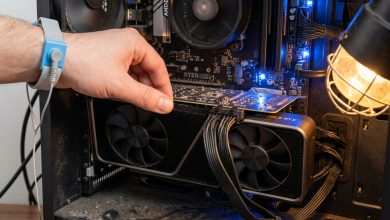
Installing a graphics card involves opening your PC case, inserting the card into the PCIe x16 slot, securing it, and connecting the necessary power cables from your PSU. After physical installation, you’ll need to install the latest drivers from the GPU manufacturer’s website (NVIDIA, AMD, or Intel). These drivers are crucial for optimal performance and access to features like DLSS or FSR. Always download drivers directly from the official source to avoid compatibility issues or malware.
6.3. External Resources for Deeper Dives
For those looking to delve deeper into the technical aspects of GPUs, including their historical development and underlying architectures, a valuable resource is Wikipedia’s page on Graphics Processing Units. This can provide additional context and a more detailed understanding of the technology. For specific comparisons and benchmarks of the latest GPUs across different games and resolutions, reputable tech review sites and YouTube channels offer in-depth analyses that are regularly updated.
Conclusion
Choosing the right GPU graphics card for beginners doesn’t have to be a bewildering experience. By understanding the core functions of a GPU, decoding key specifications, knowing the strengths of NVIDIA and AMD, and most importantly, defining your budget and primary use case, you can confidently navigate the market. Always prioritize compatibility with your existing system components, particularly your motherboard, PSU, and PC case. While the temptation to chase the absolute latest and greatest is strong, the “right” GPU is ultimately the one that best meets your performance needs, fits your budget, and integrates seamlessly into your current or planned PC build. With the insights from this guide, you are well-equipped to make an informed decision and embark on your journey into high-performance computing.