GPU for Gaming PC: 10 Best Graphics Cards for Every Budget
Table of Contents
GPU for Gaming PC selection is arguably the most crucial decision a gamer makes when building or upgrading their system. The graphics processing unit (GPU), often referred to as the graphics card, is the beating heart of any gaming rig, responsible for rendering every pixel you see on your screen. It dictates the frame rates, resolution, and graphical fidelity you can achieve in your favorite titles, directly impacting your gaming experience. With new technologies emerging constantly and a wide array of options from manufacturers like NVIDIA and AMD, navigating the market can be daunting. This comprehensive guide aims to demystify the process, helping you choose the best graphics card for your gaming PC, no matter your budget. From casual gamers seeking a smooth 1080p experience to enthusiasts craving uncompromised 4K visuals, understanding the nuances of GPU performance and value is key to making an informed decision.
Introduction to GPU for Gaming PC
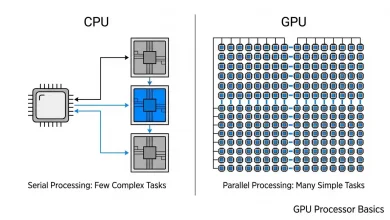
A graphics card is a dedicated piece of hardware designed to accelerate the creation of images, videos, and animations. While your CPU (Central Processing Unit) handles general computing tasks, the GPU specializes in parallel processing, making it exceptionally efficient at rendering complex graphical data required by modern video games. The GPU’s ability to process multiple pieces of data simultaneously is what allows it to deliver the intricate worlds and realistic effects that gamers have come to expect. Without a powerful GPU, even the most capable CPU would struggle to render high-fidelity graphics, resulting in stuttering gameplay and low frame rates. Therefore, investing in a suitable GPU is paramount for any serious gamer, as it directly translates to a more immersive and enjoyable gaming experience.
The market for gaming GPUs is primarily dominated by two major players: NVIDIA and AMD. Each company offers a vast portfolio of graphics cards catering to different performance tiers and price points. NVIDIA’s GeForce RTX series and AMD’s Radeon RX series are the most recognizable lines, each boasting unique architectures, features, and performance characteristics. NVIDIA often highlights its prowess in ray tracing and DLSS (Deep Learning Super Sampling) technologies, which enhance visual realism and boost performance using AI. AMD, on the other hand, frequently emphasizes its strong rasterization performance and open-source FSR (FidelityFX Super Resolution) upscaling technology, providing competitive alternatives for gamers. Understanding the offerings from both manufacturers is essential for making an informed choice.
Understanding GPU Specifications: What Matters Most?
When comparing graphics cards, a multitude of specifications can be overwhelming. Focusing on the most critical metrics will help simplify your decision-making process.
- VRAM (Video Random Access Memory): This is dedicated memory on the GPU that stores graphical data, such as textures and frame buffers. More VRAM allows for higher resolutions, more detailed textures, and smoother performance, especially in graphically demanding games. For 1080p gaming, 8GB of VRAM is generally sufficient, while 1440p and 4K gaming often benefit greatly from 12GB or more.
- CUDA Cores (NVIDIA) / Stream Processors (AMD): These are the GPU’s processing units responsible for executing calculations. A higher count generally indicates greater processing power and better performance.
- Clock Speed: Measured in MHz or GHz, this indicates how fast the GPU’s cores can process data. Higher clock speeds typically mean more operations per second.
- Memory Bus Width and Memory Bandwidth: The memory bus width (measured in bits) dictates the amount of data that can be transferred between the GPU core and its VRAM at once. Memory bandwidth (measured in GB/s) is a combination of VRAM speed and bus width, indicating the overall data transfer rate. Higher bandwidth is crucial for high-resolution gaming.
- TDP (Thermal Design Power): This specifies the maximum amount of heat generated by the GPU, which directly correlates with its power consumption. A higher TDP means the card draws more power and requires a more robust cooling solution and power supply unit (PSU).
- Ray Tracing and Upscaling Technologies: Modern GPUs support real-time ray tracing, which simulates light behavior for hyper-realistic visuals. Technologies like NVIDIA’s DLSS and AMD’s FSR use AI or intelligent algorithms to render games at a lower resolution and then upscale them to a higher resolution, significantly boosting frame rates without a noticeable loss in visual quality.
Entry-Level GPUs: Affordable Gaming Experiences
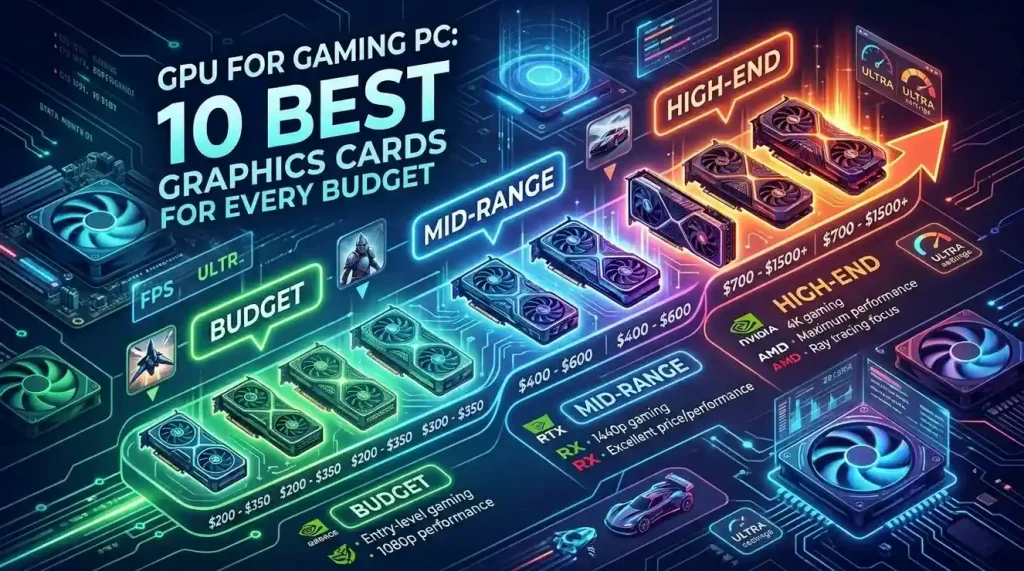
For gamers on a tight budget or those primarily focused on 1080p gaming at modest settings, entry-level GPUs offer a cost-effective path to enjoyable experiences. These cards are perfect for esports titles, older AAA games, or newer games played at lower graphical presets. While they won’t break any performance records, they provide excellent value for money, allowing you to build a functional gaming PC without overspending.
In this segment, you’ll typically find cards that retail for under $300. They are designed to deliver solid 1080p performance, often achieving 60 frames per second (FPS) in many popular games at medium to high settings. Examples often include the NVIDIA GeForce RTX 3050 or the AMD Radeon RX 6600. These cards are also generally more power-efficient, requiring less powerful PSUs and generating less heat, which can simplify your PC build and reduce overall costs. When considering an entry-level GPU, pay close attention to the VRAM; 8GB is highly recommended to prevent performance bottlenecks in newer titles, even at 1080p. Performance benchmarks for specific games you intend to play should be your primary guide, as real-world performance can vary significantly.
- Target Resolution: 1080p
- Typical Frame Rate: 60+ FPS in esports and older AAA titles; 30-60 FPS in demanding new AAA titles at medium settings.
- Key Features: Sufficient VRAM for 1080p, relatively low power consumption, good for casual and competitive gaming.
- Considerations: May struggle with ray tracing or require significant upscaling for newer games.
Mid-Range GPUs: The Sweet Spot for Performance and Value
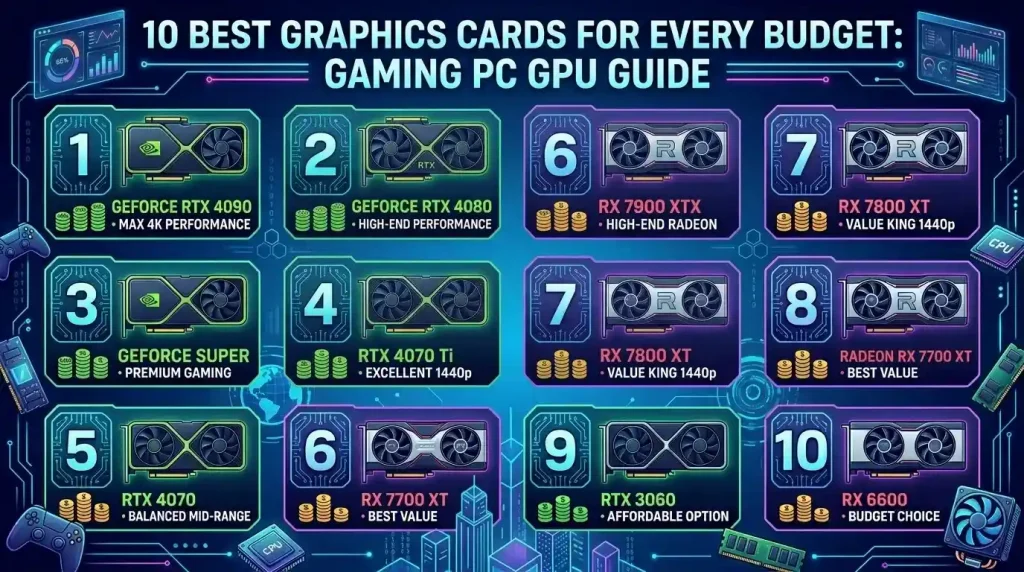
The mid-range GPU segment is often considered the “sweet spot” for most gamers, offering an excellent balance between performance and price. Cards in this category typically retail between $300 and $600, providing robust performance for 1080p gaming at high or ultra settings, and often capable of handling 1440p gaming at respectable frame rates. This is where you start to see more advanced features, improved efficiency, and higher VRAM capacities, making them a future-proof choice for several years.
Many popular choices fall into this category, such as the NVIDIA GeForce RTX 4060, RTX 4060 Ti, or the AMD Radeon RX 7700 XT, and RX 7800 XT. These cards provide a noticeable leap in performance over entry-level options, making them ideal for gamers who want to enjoy the latest AAA titles with immersive graphics without breaking the bank. They also offer better support for ray tracing and upscaling technologies like DLSS and FSR, enabling more visually stunning experiences. When choosing a mid-range GPU, consider your monitor’s resolution and refresh rate. A 1440p monitor with a high refresh rate (e.g., 144Hz) will greatly benefit from the extra horsepower these cards provide.
- Target Resolution: 1080p (high/ultra settings), 1440p (medium/high settings)
- Typical Frame Rate: 90+ FPS at 1080p; 60+ FPS at 1440p.
- Key Features: Strong rasterization performance, good VRAM (8GB-12GB), decent ray tracing capabilities, full support for upscaling technologies.
- Considerations: Provides the best performance-per-dollar for most users.
| GPU Model (Example) | VRAM | Target Resolution/Settings | Typical Price Range | Key Strengths |
|---|---|---|---|---|
| NVIDIA GeForce RTX 3050 | 8GB GDDR6 | 1080p Medium/High | $200 – $250 | Affordable entry, good for esports |
| AMD Radeon RX 6600 | 8GB GDDR6 | 1080p High | $180 – $230 | Excellent value at 1080p |
| NVIDIA GeForce RTX 4060 | 8GB GDDR6 | 1080p Ultra, 1440p Medium | $290 – $350 | Efficient, DLSS 3 support |
| AMD Radeon RX 7700 XT | 12GB GDDR6 | 1440p High | $400 – $450 | Strong rasterization, ample VRAM |
| NVIDIA GeForce RTX 4070 SUPER | 12GB GDDR6X | 1440p Ultra, 4K Medium | $580 – $650 | Excellent 1440p, efficient, strong ray tracing |
| AMD Radeon RX 7900 XT | 20GB GDDR6 | 1440p Ultra, 4K High | $700 – $750 | High VRAM, raw power at 1440p/4K |
| NVIDIA GeForce RTX 4080 SUPER | 16GB GDDR6X | 4K High/Ultra | $980 – $1100 | Top-tier 4K performance, advanced ray tracing |
High-End GPUs: Unleashing Ultimate Performance
For enthusiasts who demand the absolute best in gaming performance, high-end GPUs are the only choice. These cards are engineered to deliver uncompromised frame rates at 1440p ultra settings, and often excel at 4K gaming, even with ray tracing enabled. While they come with a premium price tag (typically above $700), they offer cutting-edge technology, vast amounts of VRAM, and raw processing power that ensures a buttery-smooth experience across all modern titles.
In this category, you’ll find top-tier offerings like the NVIDIA GeForce RTX 4080 SUPER, RTX 4090, or the AMD Radeon RX 7900 XTX. These GPUs are not just for gaming; they also excel in professional workloads such as video editing, 3D rendering, and AI development, making them versatile powerhouses. When investing in a high-end GPU, it’s crucial to pair it with a high-refresh-rate 1440p or 4K monitor to fully appreciate its capabilities. Furthermore, a robust CPU and a high-wattage power supply unit are essential to prevent bottlenecks and ensure stable operation. The performance leap between generations in this segment can be substantial, making careful research into the latest models worthwhile. As reported by Reuters, the demand for high-end GPUs continues to be driven by both gaming and AI applications, influencing pricing and availability.
- Target Resolution: 1440p (ultra settings, high refresh rate), 4K (high/ultra settings)
- Typical Frame Rate: 100+ FPS at 1440p; 60+ FPS at 4K.
- Key Features: Unmatched raw power, exceptional ray tracing, massive VRAM (16GB+), advanced cooling solutions.
- Considerations: Requires a high-wattage PSU, typically expensive, best paired with a high-end monitor and CPU.
Key Factors to Consider When Choosing a Gaming GPU
Beyond raw specifications and budget, several other factors should influence your GPU purchase:
- Your Monitor: The resolution and refresh rate of your monitor are paramount. A powerful GPU is wasted on a low-resolution, low-refresh-rate display, and conversely, a high-end monitor will expose the limitations of an underpowered card. Match your GPU’s capabilities to your monitor for the best experience.
- CPU Compatibility: While the GPU is the star for gaming, an outdated or weak CPU can bottleneck even the most powerful graphics card, preventing it from reaching its full potential. Ensure your CPU is adequately powerful to feed data to your chosen GPU.
- Power Supply Unit (PSU): Graphics cards are major power consumers. Always check the recommended PSU wattage for your chosen GPU and ensure your current PSU can handle the load, with some headroom for stability and future upgrades.
- Case Size and Cooling: High-performance GPUs can be large and generate significant heat. Ensure your PC case has enough physical space for the card and adequate airflow to keep temperatures in check. Larger cards often have more effective cooling solutions but demand more room.
- Driver Support and Software Ecosystem: Both NVIDIA and AMD offer robust driver support and software suites that enhance the gaming experience. NVIDIA’s GeForce Experience and AMD’s Adrenalin Software provide features like game optimization, recording tools, and performance monitoring. Consider which ecosystem you prefer or are already invested in.
- Resale Value and Longevity: While not a primary factor, considering the potential resale value and how long a card will remain relevant can be part of your decision. Higher-end cards often hold their value better and perform well for longer, extending the time before you need to upgrade again.
Future-Proofing Your Gaming PC with the Right GPU
Future-proofing a PC is less about buying the absolute most powerful components and more about making smart investments that will keep your system relevant for several years. For a GPU, this means anticipating future game requirements and technological advancements. While it’s impossible to completely future-proof given the rapid pace of technology, here are strategies to maximize your GPU’s longevity:
- Prioritize VRAM: Games are increasingly demanding more VRAM, especially at higher resolutions and with more detailed textures. Opting for a card with 12GB or more VRAM (for mid-range and high-end) is a wise investment to ensure it can handle upcoming titles without performance degradation.
- Embrace Upscaling Technologies: DLSS (NVIDIA) and FSR (AMD) are game-changers for extending the life of your GPU. These technologies allow you to maintain high frame rates even as games become more graphically intensive, effectively giving your card a performance boost. Ensure your chosen GPU fully supports and benefits from these features.
- Consider Ray Tracing Capabilities: While still resource-intensive, ray tracing is becoming more prevalent in new games. If realistic lighting and shadows are important to you, choose a GPU that offers strong ray tracing performance, even if you need to use upscaling to maintain playable frame rates.
- Balanced System Build: A powerful GPU alone cannot guarantee longevity. Ensure your CPU, RAM, and storage are also up to par to avoid bottlenecks as games evolve. A balanced system will allow each component to perform at its best, extending the overall relevance of your PC.
- Look at Next-Generation Consoles: PC game development is often influenced by console generations. Understanding the hardware capabilities of the latest PlayStation and Xbox consoles can give you an idea of the minimum performance targets developers will aim for in future games, helping you select a PC GPU that surpasses those benchmarks.
Conclusion
Choosing the best GPU for Gaming PC involves a careful consideration of your budget, desired performance, and long-term gaming goals. Whether you’re an entry-level gamer aiming for crisp 1080p visuals, a mid-range enthusiast seeking the perfect balance of performance and value for 1440p, or a high-end aficionado demanding uncompromised 4K experiences, there’s a graphics card tailored for your needs. By understanding key specifications like VRAM, core counts, and clock speeds, and factoring in your monitor, CPU, and power supply, you can make an informed decision that will elevate your gaming setup. Remember to keep an eye on advancements in upscaling technologies like DLSS and FSR, as they play an increasingly vital role in future-proofing your investment. With the right graphics card, you’re not just buying a component; you’re unlocking a world of immersive, high-fidelity gaming experiences that will bring your digital adventures to life.