7 Pro Tips for Buying a Used GPU – Avoid Scams & Bad Deals
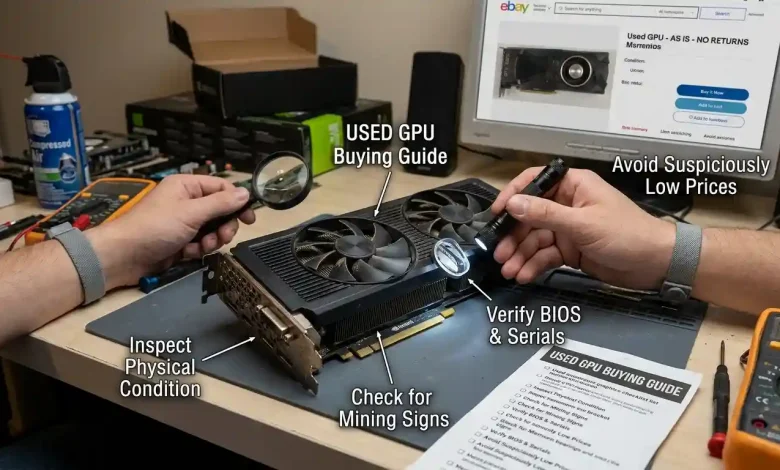
Table of Contents
Used GPU buying has become an increasingly popular and often necessary strategy for PC builders and gamers looking to maximize performance while minimizing costs. With the fluctuating prices of new graphics cards and the rapid pace of technological advancements, the second-hand market offers significant value. However, this market is also rife with potential scams and bad deals, making it a minefield for the unprepared buyer. This comprehensive guide aims to equip you with the knowledge and strategies needed to navigate the used GPU market confidently, ensuring you land a great deal without falling victim to common pitfalls.
Why Buy a Used GPU? Understanding the Market
The allure of a used GPU primarily stems from its cost-effectiveness. Graphics cards, unlike many other electronics, often retain a significant portion of their value, especially those under three years old, typically holding 40-60% of their original price. This impressive value retention, combined with new card launches and market competition, creates opportunities for substantial savings. For instance, if you’re targeting 1080p or 1440p gaming, several older-generation cards can still deliver excellent performance at a fraction of the cost of their brand-new counterparts.
The market for used GPUs is influenced by several factors, including the release of new generations, cryptocurrency mining trends, and overall gaming demand. The crypto mining boom from 2020-2022, for example, introduced a large number of RTX 30-series and RX 6000-series cards into the market, some of which may have been subjected to continuous heavy workloads. While a GPU used for mining isn’t necessarily a bad deal—responsible miners often take good care of their hardware to preserve resale value—it’s a factor to consider and investigate.
Current market trends indicate that while new high-end GPUs continue to push performance boundaries, they often come with premium pricing and limited availability. This drives a strong demand for renewed and used GPUs, particularly for buyers seeking more affordable options. It’s worth noting that prices for used GPUs also follow seasonal patterns, with November and December often being the cheapest months, while February and March tend to be the most expensive. Strategic timing can lead to savings of 10-15% or even more.
Where to Look for Used GPUs: Platforms and Pitfalls
Choosing the right marketplace is crucial for a safe and successful used GPU purchase. Different platforms offer varying levels of buyer protection and cater to different types of sellers.
- Online Marketplaces (eBay, Facebook Marketplace, Craigslist): These are popular choices due to their wide reach and diverse listings. eBay, in particular, offers buyer protection, making it a relatively safer option, though sellers can also fall victim to scams there. Facebook Marketplace and Craigslist are excellent for local pickups, allowing for in-person inspection and testing, which is highly recommended. However, these platforms can also be “wildcards,” with risks ranging from lowball offers to outright scams.
- Dedicated Forums and Communities (Reddit’s r/hardwareswap, Overclock.net): These platforms are often frequented by tech enthusiasts who are more knowledgeable about hardware. Buyers here tend to understand GPU values and conditions better, potentially leading to smoother transactions and fair pricing.
- Specialized Recommerce Sites (e.g., SellGPU): Companies like SellGPU specialize in buying and selling used computer components. They often test components, offer limited warranties, and streamline the selling process, which can provide a layer of trust. While you might not get the absolute lowest price compared to a direct peer-to-peer sale, the added security and convenience can be worth it.
- Local Computer Stores: Some computer stores offer refurbished or used graphics cards, sometimes with testing and a limited warranty. This can be a relatively safe option, although stock might be limited and prices potentially higher than direct sales.
- Friends and Acquaintances: The safest way to buy a used GPU is often from someone you know and trust. While it might not offer the absolute best deal, the transparency about usage history and condition is invaluable.
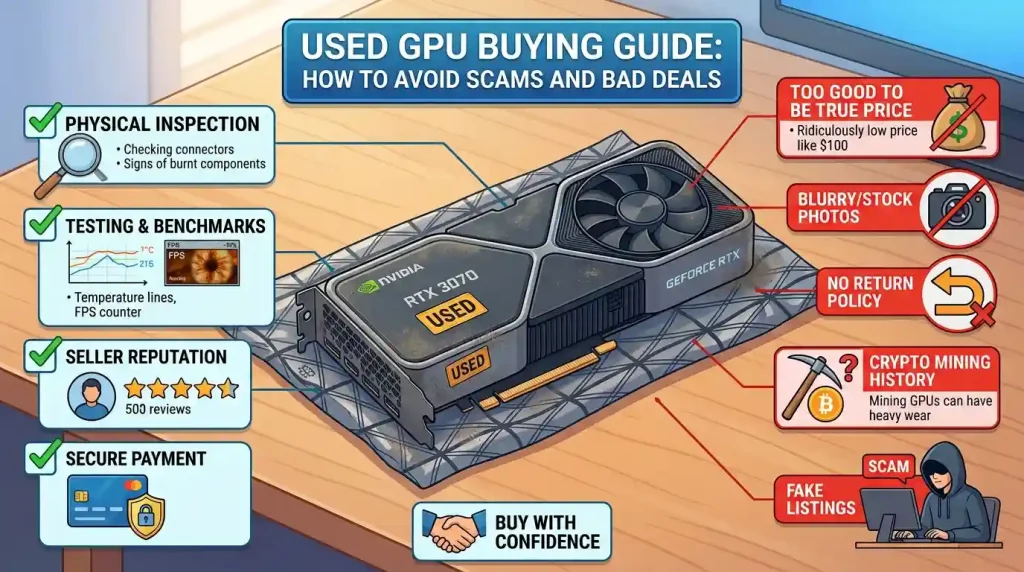
Regardless of the platform, always verify the seller’s legitimacy. Look for an active sales history, multiple positive reviews, and consistency in their listings. Avoid sellers with zero or very few reviews, or those using low-quality stock photos instead of actual pictures of the card.
Essential Pre-Purchase Checks: Research and Seller Vetting
Before even contacting a seller, thorough research is paramount. Understand the specific GPU model you’re interested in, including its original specifications, typical performance benchmarks, and common issues. Resources like GPU comparison websites and benchmark guides are invaluable for this.
Research the GPU Model
- Performance Expectations: Look up benchmarks for the specific card in games and resolutions you plan to use. This helps set realistic expectations and allows you to spot underperforming cards during testing.
- Official Specifications: Familiarize yourself with the card’s CUDA cores (Nvidia) or Stream Processors (AMD), memory size and type (e.g., GDDR6X), base clocks, and display output types (e.g., DisplayPort, HDMI, avoiding older VGA/DVI on modern cards). These details will be crucial for verifying authenticity later.
- Common Issues: Research known problems or common failure points for that specific model or generation. For example, some RTX 30-series cards, if heavily mined, might have had hot GDDR6X memory.
Vetting the Seller
- Seller Reputation: Prioritize sellers with extensive positive feedback and a strong sales history. On platforms like eBay, check for “sold items” to see if they’ve successfully sold similar items recently.
- Detailed Listings and Photos: A legitimate seller will provide clear, high-resolution photos of the actual GPU from various angles. Be wary of listings using only stock images or blurry photos. Ask for additional specific photos if needed, such as close-ups of ports or serial numbers.
- Communication: Engage with the seller. Ask questions about the card’s history, such as how long it was used, for what purposes (gaming vs. mining), and why they are selling it. A transparent seller will be forthcoming. Evasive or vague answers are red flags.
- Proof of Functionality: Request videos of the card working in their system, ideally running benchmarks like 3DMark, Heaven, Superposition, or a FurMark stress test. Ensure the video shows the GPU-Z utility running simultaneously to confirm specs.
- Pricing Reality Check: While looking for a deal, be extremely cautious of prices that seem “too good to be true.” Unrealistically low prices are a common indicator of a scam. Compare the asking price with recent sold listings for the same model on various marketplaces.
Physical Inspection: What to Look for in Person
If possible, always arrange for an in-person meeting where you can physically inspect the GPU. This is one of the most critical steps to avoid scams. Bring a friend if you can, and choose a safe, public location, or ideally, test it in your own system if the seller allows.
- Overall Condition: Examine the card for any visible physical damage, such as bent fins on the heatsink, cracks in the shroud, or missing screws. Minor cosmetic wear is often acceptable for a used card, but significant damage is a major red flag.
- Dust and Cleanliness: While some dust is expected, excessive dust could indicate poor maintenance or prolonged use in a dirty environment. Pay attention to dust patterns that suggest horizontal orientation, which could mean it was used in a mining rig.
- Fans: Gently try to spin the fans. They should spin freely without any grinding or rattling noises. Check that all fans are present and intact.
- Ports: Inspect the display output ports (HDMI, DisplayPort) for any physical damage or bent pins. Ensure there are no outdated ports like VGA or DVI on what should be a modern GPU, which is a common sign of a counterfeit.
- PCIe Connector: Check the gold pins on the PCIe connector for excessive wear or burn marks. They should be clean and uniform.
- PCB and Components: If visible, look at the Printed Circuit Board (PCB). Genuine cards have clean, well-laid-out PCBs with recognizable branding and uniform soldering. Be wary of odd components, shoddy soldering, or wires running where they shouldn’t be. Look for any burn marks or suspicious discolorations on the back of the board.
- Serial Numbers and Stickers: Check for serial number stickers on the back of the card, and ideally, verify they match any serial numbers on the original box (if provided). Look for signs of tampering, such as broken or funny-looking warranty stickers, which indicate the card has been opened. While opening a card to replace thermal paste isn’t inherently bad, it voids the warranty and should be disclosed.
- Weight: Real GPUs, with their substantial heatsinks and cooling systems, have a certain heft. If a card feels unusually light or heavy compared to what you’d expect, it could be a sign of a fake using cheaper materials or hidden weights.
Software Testing: Verifying Performance and Authenticity
The most crucial step after a physical inspection is rigorous software testing. This helps confirm the GPU’s authenticity, stability, and performance under load. It’s best to do this in your own system after purchase (if the return window allows) or, ideally, at the seller’s location if they permit it.
| Test/Tool | Purpose | Key Indicators to Look For |
|---|---|---|
| GPU-Z | Verify authentic specifications (model, VRAM, GPU die, clocks). | “[FAKE]” label, incorrect GPU die (e.g., AD102 for RTX 4090), mismatched VRAM size/type, unusual VBIOS version, incorrect CUDA cores. |
| Stress Testing (FurMark, 3DMark, OCCT) | Test stability, temperatures, and identify issues under heavy load. | Crashes, freezing, black screens, artifacting (visual glitches), excessive temperatures (above 85°C for core, 100°C for hotspot/memory junction), sudden performance drops (thermal throttling). |
| Benchmarking (3DMark, Heaven, Superposition) | Confirm performance aligns with expectations for the model. | Scores significantly lower than average for that GPU model. Compare with online benchmarks for identical setups. |
| Gaming Test | Real-world performance and stability check. | Smooth gameplay, consistent frame rates, absence of crashes, artifacting, or stuttering in demanding titles. |
| Monitoring Software (MSI Afterburner, HWMonitor) | Monitor real-time metrics during stress tests and gaming. | Stable clock speeds, expected temperatures, consistent fan speeds, normal power draw. |
| Display Output Test | Verify all ports are functional. | Plug into a monitor via each port (HDMI, DisplayPort) to ensure full functionality. |
Step-by-Step Software Testing
- Install Latest Drivers: Ensure you have the correct and latest drivers for the advertised GPU model.
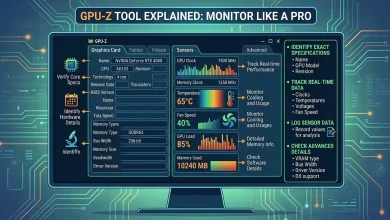
- Run GPU-Z: This is your first line of defense against fakes. It will identify the card’s true identity, often flagging counterfeits with a “[FAKE]” prefix or displaying incorrect core information (e.g., GPU die name) or memory details. Check the VBIOS version, as modded firmware (common in mining cards) might indicate non-stock settings, which are best avoided.
- Stress Test: Use tools like FurMark or 3DMark (Time Spy, Fire Strike) to put the GPU under heavy load for at least 15-30 minutes, or even a few hours if possible. Monitor temperatures using GPU-Z or MSI Afterburner. Normal core temperatures under load are typically below 85°C, with hotspot and memory junction temperatures potentially reaching 100°C. Look for crashes, freezes, visual artifacts (flickering, colored dots/lines), or significant thermal throttling (sudden drops in clock speed).
- Benchmark: Run a popular benchmark (e.g., 3DMark, Unigine Heaven, Unigine Superposition) and compare the results with online databases for the same GPU model. Significant discrepancies can indicate an underperforming card, a fake, or one that has been damaged.
- Game Test: Play a graphically demanding game for an extended period. This provides a real-world scenario test and can reveal issues that benchmarks might miss.
Common Scams and How to Spot Them
The used GPU market, particularly online, is unfortunately a hotbed for scams. Awareness is your best defense. Scammers are becoming increasingly sophisticated, sometimes even going so far as to polish older GPU cores and etch new markings to resemble newer models.
- Counterfeit/Reflashed GPUs: This is one of the most common and insidious scams. Older, less powerful GPUs (e.g., GTX 550 Ti) are reflashed with modified BIOS to appear as newer, more desirable cards (e.g., GTX 1050 Ti, or even an RTX 3080 Ti made to look like an RTX 4090).
- How to Spot: GPU-Z is critical here, as it often detects “[FAKE]” cards. Also, check for mismatched performance compared to expected benchmarks, outdated display ports (VGA/DVI on modern cards), inconsistent box/branding, or shoddy PCB workmanship.
- “Brick in a Box” / Wrong Item: The seller sends an empty box, a non-GPU item (like a bag of rice or old components), or a completely different, much cheaper GPU.
- How to Spot: This typically happens with online-only purchases. Always use platforms with strong buyer protection (like PayPal Goods and Services on eBay) and, if possible, film yourself opening the package upon arrival.
- Damaged/Non-Functional Cards: The GPU might be dead on arrival, have hidden defects, or fail under load due to prior heavy use (e.g., mining in poorly ventilated conditions) or faulty repairs.
- How to Spot: Thorough physical inspection and comprehensive stress testing are essential. Ask for videos of benchmarks and tests from the seller. Be wary of cards with broken warranty stickers or signs of previous disassembly if not disclosed.
- Shipping Scams: Scammers may provide fake tracking numbers, or exploit buyer protection policies by claiming to have sent the correct item while you received something else.
- How to Spot: Again, buyer protection is key. For high-value items, document everything: photos of the packaging, contents, and serial numbers.
- Payment Scams (Cash App, Venmo): These services offer no buyer protection. Once you send money, it’s virtually impossible to get it back if the seller disappears or sends a fake.
- How to Spot: Always use payment methods with buyer protection for online transactions, such as PayPal Goods and Services. For local cash transactions, inspect and test the item thoroughly *before* handing over money.
Negotiation, Payment, and Warranty Considerations
Once you’ve identified a promising GPU and vetted the seller, it’s time to finalize the deal. Don’t be afraid to negotiate, especially if you find comparable listings at lower prices or detect minor cosmetic flaws. Be firm but polite. Factor in the total cost, including potential shipping and any applicable platform fees.
Payment
As repeatedly emphasized, for online purchases, prioritize payment methods with robust buyer protection. PayPal Goods and Services is widely recommended as it allows you to file a dispute and potentially recover your money if the item is not as described or never arrives. Avoid direct bank transfers, Cash App, Venmo, or other methods without protection for transactions with unknown sellers. For local transactions, cash is king, but only exchange it after you have fully inspected and ideally tested the GPU.
Warranty
Warranty coverage on used GPUs can be a grey area and varies significantly by manufacturer and region. Some manufacturers, like MSI, ASUS, and Gigabyte, may honor the original 3-year warranty based on the serial number, even for a second owner, often requiring the original proof of purchase. Others may not transfer warranties or offer only limited coverage for refurbished products (e.g., 90 days to 1 year for some refurbished GPUs from retailers). Always check the manufacturer’s specific warranty policy or directly contact their customer support with the serial number if you’re concerned about remaining warranty. Assume no warranty unless explicitly confirmed.
Finalizing the Deal
- Documentation: Keep all communication with the seller, payment receipts, and listing details. This documentation is crucial if you need to dispute a transaction.
- Return Policy: Inquire about the seller’s return policy. Some reputable sellers or platforms offer a short return window (e.g., a few days), which gives you time for thorough testing.
- Shipping Insurance: If shipping a high-value item, consider purchasing shipping insurance, though this is usually more relevant for the seller.
Conclusion
Buying a used GPU can be an incredibly rewarding experience, offering significant performance gains at a fraction of the cost of new hardware. The current market, with its blend of new releases and a strong demand for value, makes the used segment particularly appealing. However, it’s not a transaction to be taken lightly. By diligently researching your desired card, thoroughly vetting potential sellers, and rigorously inspecting and testing the GPU both physically and through software, you can significantly mitigate the risks of scams and bad deals. Always prioritize platforms with buyer protection, remain skeptical of offers that seem too good to be true, and don’t hesitate to walk away if something feels off. With careful planning and adherence to these guidelines, you’ll be well on your way to securing a reliable and high-performing used GPU that brings excellent value to your gaming rig or workstation. For more detailed insights into GPU performance metrics and comparisons, a valuable resource is Wikipedia’s GPU comparison articles.