6 Powerful Ways GPU Processors Transform Graphics & AI Performance
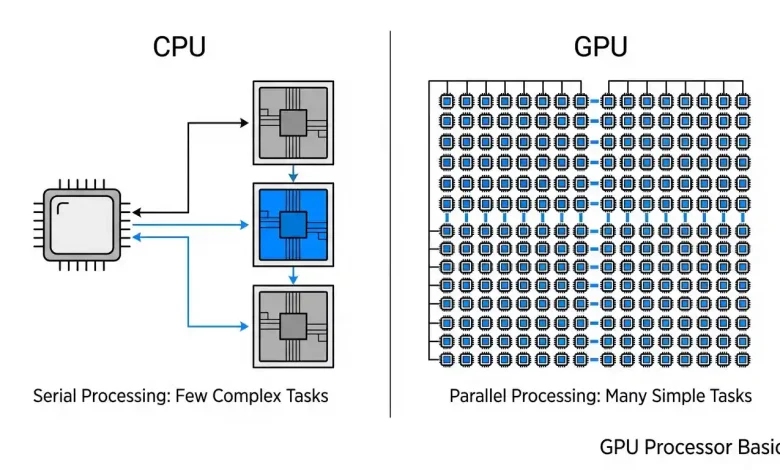
Table of Contents
GPU Processor Basics are fundamental to understanding modern computing, especially as graphics processing units have evolved far beyond their initial role of rendering images. Once considered specialized components primarily for gaming, GPUs have rapidly become indispensable powerhouses, accelerating a vast array of complex computational tasks across diverse fields, from artificial intelligence and machine learning to scientific simulations and professional content creation. Their unique architecture, designed for massive parallel processing, allows them to handle computational demands that central processing units (CPUs) simply cannot match efficiently. This article will delve into the core principles of how GPUs work, explore their intricate architecture, differentiate them from CPUs, examine their versatile applications, and glimpse into the exciting future of this transformative technology.
What Exactly is a GPU?
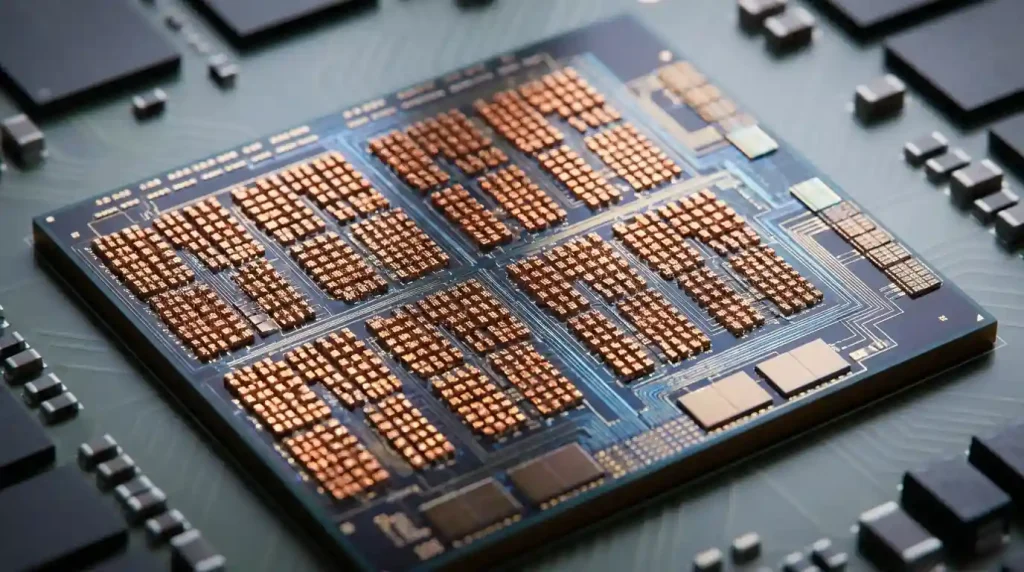
A Graphics Processing Unit (GPU) is a highly specialized electronic circuit engineered to perform rapid mathematical calculations, making it exceptionally adept at handling tasks that involve processing large blocks of data simultaneously. While the name suggests a sole focus on graphics, its capability to execute many computations in parallel is what truly defines its power. Originally, GPUs were conceived to expedite the rendering of 3D graphics, intricate video, and detailed animations, thereby offloading these intensive visual tasks from the CPU. This specialization allowed graphics programmers to craft more visually stunning effects, realistic scenes, and advanced lighting techniques in games and other applications.
The genesis of the modern GPU can be traced back to early graphics controllers in the 1980s, which were non-programmable devices coordinating display output. However, the late 1990s witnessed a pivotal shift. In 1999, NVIDIA introduced the GeForce 256, famously marketing it as the world’s first “graphics processing unit.” This chip integrated the previously separate vertex computations for transformation and lighting and the fragment computations onto a single, programmable chip, marking a significant milestone in graphics hardware evolution. This innovation not only streamlined the graphics pipeline but also laid the groundwork for the GPU’s eventual expansion into general-purpose computing, forever changing the landscape of digital technology.
CPU vs. GPU: Understanding the Core Difference
While both the Central Processing Unit (CPU) and the Graphics Processing Unit (GPU) are silicon-based microprocessors essential to a computer’s operation, their fundamental architectural designs and primary purposes diverge significantly. Understanding this distinction is key to appreciating why each processor excels at different types of workloads.
The CPU is often referred to as the “brain” of the computer. It is designed for versatility and sequential processing, excelling at managing system operations, executing program instructions, and handling tasks that require complex control logic and quick decision-making. CPUs typically feature a small number of powerful, sophisticated cores (ranging from a few to dozens in consumer-grade processors, and hundreds in server-grade CPUs). These cores are optimized for latency, meaning they are built to complete individual tasks as quickly as possible, one after another, and often include large cache memories to store frequently used data.
In contrast, the GPU is designed with a radically different philosophy: to maximize parallel processing throughput and computational density. Instead of a few powerful cores, a GPU boasts thousands of smaller, more specialized cores. These cores are engineered to perform the same operation on many different pieces of data simultaneously. This massive parallelism makes GPUs exceptionally efficient for tasks that can be broken down into numerous independent, concurrent sub-problems, such as rendering visuals in games, manipulating large datasets for scientific simulations, or training complex AI models. While CPUs prioritize fast completion of individual complex tasks, GPUs prioritize processing vast amounts of data at once, making them ideal for visual processing and data-intensive parallel computations.
The Architecture of a Graphics Processing Unit
The remarkable capabilities of a GPU stem from its unique internal architecture, which is meticulously designed for highly parallel operations. Unlike the CPU’s design for sequential efficiency, a GPU is a symphony of thousands of processing units working in concert. Several key components define this architecture:
- Shader Cores / Stream Processors: These are the very heart of a GPU’s parallel processing prowess. For NVIDIA GPUs, these are known as CUDA cores, while AMD GPUs utilize stream processors. These tiny, efficient computing units are responsible for executing thousands of threads concurrently. Their sheer number allows the GPU to tackle intensive workloads by distributing the computational burden across many units, accelerating everything from rendering complex graphics to performing AI inference.
- Video Memory (VRAM): GPUs feature their own dedicated, high-speed memory, known as Video RAM (VRAM). This memory is distinct from the system’s main RAM and is typically much faster and physically located closer to the GPU itself, often directly soldered onto the graphics card’s PCB. VRAM is crucial for storing large amounts of data required by the GPU, including textures, frame buffers (the images ready to be displayed), and, in the context of AI, massive datasets and model weights. Modern VRAM technologies like GDDR6 or High Bandwidth Memory (HBM) are engineered to provide extremely high throughput, facilitating rapid data movement between the compute units and memory.
- Memory Bus and Bandwidth: The memory bus acts as the vital channel connecting the GPU’s processing cores with its VRAM. The width of this bus (e.g., 256-bit, 384-bit, or even 512-bit for HBM) dictates how much data can travel per clock cycle. A wider memory bus, coupled with high-frequency VRAM, translates directly to higher memory bandwidth, which is critical for applications that demand real-time data processing, such as high-fidelity graphics rendering and machine learning.
- ROPs (Raster Operations Units) and TMUs (Texture Mapping Units): These components are vital for the final stages of rendering. ROPs are responsible for tasks like depth and stencil testing, anti-aliasing, and blending colors before the image is written to the frame buffer. TMUs, on the other hand, handle applying textures to 3D models, making surfaces appear realistic and detailed.
- Tensor Cores: Introduced by NVIDIA, Tensor Cores are specialized hardware units specifically designed to accelerate matrix operations, which are the mathematical bedrock of deep learning tasks. These cores can perform multiple operations per clock cycle, significantly boosting performance in machine learning workloads compared to general-purpose CUDA cores. For more details on optimizing computational tasks, you can explore advanced processing techniques. Visit our guide on advanced processing techniques.
Modern GPUs also incorporate a sophisticated cache hierarchy (L1, L2, and shared memory) to further enhance efficiency and reduce memory bottlenecks, ensuring that data is accessed as quickly as possible by the processing units. This intricate design allows GPUs to manage vast amounts of data and computations with incredible speed and efficiency.
How GPUs Process Graphics: The Rendering Pipeline
The journey from raw 3D data to a photorealistic image on your screen is a complex, multi-stage process orchestrated by the GPU through what is known as the graphics rendering pipeline. This pipeline operates as a sequence of stages, with each stage performing a specific set of operations in parallel, much like an assembly line.
The process typically begins on the CPU (Application Stage). Here, the CPU handles the overall application logic, physics simulations, and prepares the data for the GPU. It makes calls to graphics APIs (like DirectX, OpenGL, or Vulkan) to send rendering commands, mesh data, shaders, and textures into the GPU’s memory.
Once the data reaches the GPU, it enters the Geometry Processing stage, often called Vertex Transformation. In this initial GPU-side stage, the GPU receives a stream of vertices, which are the corner points of 3D objects. Each vertex carries attributes such as position, color, and normal vectors (indicating surface direction). The vertex shader, a programmable unit, then performs a series of mathematical operations. These include model transformation (converting local object coordinates to world coordinates), view transformation (placing objects relative to the camera), and projection transformation (converting 3D coordinates into 2D screen space). Lighting calculations are also performed at this stage to determine the color of each vertex based on light sources in the scene. The GPU essentially builds the 3D models from polygons and triangles at this point, positioning them accurately within the virtual world.
Next, the transformed geometry moves to the Rasterization stage. Here, the abstract geometric primitives (like triangles) are converted into discrete fragments. A fragment can be thought of as a “potential pixel”. The rasterizer determines which pixels on the screen are covered by the geometric shapes and interpolates various attributes—such as color, depth (distance from the camera), and texture coordinates—across these fragments. This process effectively translates the vector-based 3D models into a grid of pixel-sized elements.
The generated fragments then proceed to the Fragment Shading stage (also known as Pixel Shading). In this highly programmable stage, the fragment shader applies detailed textures, calculates intricate lighting effects (like shadows and reflections), and determines the final color for each fragment. This is where much of the visual fidelity and realism in modern graphics is generated. Each fragment is processed largely independently, showcasing the GPU’s parallel processing strength.
Finally, the pipeline concludes with the Raster Operations (ROP) stage. This backend stage performs various final tests and operations before a fragment can become a visible pixel. These include depth testing (to determine if a fragment is obscured by another object closer to the camera), stencil testing, and alpha blending (for transparency effects). Once all tests are passed, the fragment’s color and depth information are written into the frame buffer, which is a portion of VRAM storing the complete image. The completed frame is then dispatched from the frame buffer to the display, typically dozens of times per second to create smooth, fluid motion.
| Feature | CPU (Central Processing Unit) | GPU (Graphics Processing Unit) |
|---|---|---|
| Primary Design Philosophy | Sequential processing, versatility, complex tasks | Parallel processing, throughput, simple repeated tasks |
| Core Count & Type | Few (4-64), powerful, sophisticated cores | Many (hundreds-thousands), simpler, specialized cores |
| Workload Focus | Operating systems, general applications, serial tasks, decision-making | Graphics rendering, AI/ML, scientific simulations, video processing |
| Memory Access | Large cache (L1, L2, L3) | High-bandwidth VRAM, smaller caches |
| Instruction Execution | Serial execution (one after another) | Parallel execution (many simultaneously) |
| Energy Efficiency (for primary tasks) | Good for general tasks, lower power for specific single tasks | High power consumption under heavy parallel load |
Beyond Graphics: General-Purpose Computing on GPUs (GPGPU)
The evolution of GPUs took a significant turn with the advent of General-Purpose Computing on Graphics Processing Units (GPGPU). This paradigm shift involves utilizing the GPU’s inherently parallel architecture to perform computational tasks traditionally handled by the CPU, extending its utility far beyond mere graphics rendering. The catalyst for this transformation was the development of programmable shaders and robust floating-point support in GPUs, which allowed developers to express non-graphical algorithms in a way that GPUs could process efficiently. A key enabler for GPGPU was NVIDIA’s introduction of CUDA (Compute Unified Device Architecture) in 2007, a parallel computing platform and programming model that simplified the task of programming GPUs for general-purpose applications.
Today, GPGPU is a cornerstone of many data-intensive and computationally heavy applications:
- Artificial Intelligence & Machine Learning: GPUs are now considered indispensable for both training and deploying artificial intelligence and machine learning models. The process of training deep learning models involves billions of matrix multiplications, and the GPU’s ability to distribute this work across thousands of cores drastically reduces training times. This applies to various AI subfields such as image recognition, natural language processing, and autonomous systems.
- Scientific Research & Simulations: In fields ranging from physics and biology to environmental science, GPGPU accelerates complex simulations. Examples include detailed weather forecasting, molecular modeling, astrophysical simulations, computational fluid dynamics, and bioinformatics. The ability to process vast datasets quickly allows researchers to tackle problems of unprecedented scale and complexity.
- Video Processing & Content Creation: GPUs remain pivotal in accelerating professional applications like video editing, 3D rendering, and visual effects creation, significantly cutting down rendering times and enabling real-time previews.
- Financial Modeling: In the finance industry, GPGPU technologies are employed for tasks such as risk analysis, algorithmic trading, and real-time data processing, providing quicker insights into market trends.
- Cryptocurrency Mining: Historically, GPUs played a significant role in cryptocurrency mining due to their efficiency in performing the repetitive, parallel computations required for hashing algorithms.
- Image Processing and Signal Analysis: Beyond basic graphics, GPUs are used in advanced image processing, computer vision, and generalized signal analysis, including audio signals, due to their ability to execute algorithms on many data elements in parallel.
The continuous innovation in GPGPU programming models, alongside hardware advancements, has transformed GPUs into versatile accelerators that drive innovation across nearly every scientific and industrial sector. For a deeper dive into the specifics of this technology, a comprehensive resource can be found on Wikipedia’s General-purpose computing on GPUs page.
Types of GPUs: Integrated vs. Dedicated
GPUs primarily come in two forms: integrated and dedicated (or discrete), each offering distinct advantages and trade-offs depending on the user’s needs and computing environment. The choice between them significantly impacts performance, cost, power consumption, and portability.
Integrated GPUs (iGPUs): An integrated GPU is built directly into the computer’s Central Processing Unit (CPU) die or embedded onto the motherboard, often as part of a larger System on a Chip (SoC).
- Advantages: iGPUs are highly cost-effective as they eliminate the need for a separate graphics card, reducing overall system expenses. They are also exceptionally energy-efficient, consuming less power and generating less heat, which translates to longer battery life in laptops and smaller cooling requirements. Their compact nature makes them space-saving, ideal for thin and light laptops, tablets, and smartphones. For everyday tasks like web browsing, video playback (even 4K resolution), word processing, and general productivity, iGPUs are often more than adequate and provide a smooth user experience.
- Limitations: The primary drawback of iGPUs is their performance ceiling. They typically share system RAM with the CPU, which can create memory bandwidth bottlenecks and impact overall system performance, especially during heavy graphical or computational loads. Consequently, they are less powerful than dedicated GPUs and may struggle with demanding applications such as high-end gaming, professional 3D rendering, or intensive AI training. Furthermore, iGPUs offer virtually no upgrade potential, as they are fixed components of the CPU or motherboard.
Dedicated (Discrete) GPUs (dGPUs): A dedicated GPU is a standalone graphics card that has its own GPU chip, dedicated video RAM (VRAM), and power delivery systems, all mounted on an add-in board that slots into a computer’s motherboard (typically via a PCIe slot).
- Advantages: dGPUs offer significantly superior performance for graphics-intensive applications. Their dedicated VRAM ensures high-speed, exclusive access to memory, preventing bottlenecks with the CPU’s memory. This makes them the go-to choice for high-end gaming, complex 3D modeling and rendering, faster video editing/encoding/decoding, and demanding AI/machine learning workloads. Dedicated GPUs can also support multiple high-resolution displays without performance degradation. They are also generally upgradable, allowing users to swap out an old card for a newer, more powerful one. For users requiring peak computational power, delving into specialized GPU configurations can further enhance capabilities. Learn more about optimizing GPU configurations for performance.
- Limitations: The considerable power of dGPUs comes at a higher cost, making systems with them more expensive. They also have increased power consumption, leading to shorter battery life in laptops and higher electricity bills for desktops. This higher power usage also translates to more heat generation, necessitating robust and often elaborate cooling solutions (fans, heatsinks, liquid cooling), which can add to the system’s size and noise. Their physical size can also be a constraint, as they may not fit into ultra-thin laptops or compact desktop cases.
The choice ultimately hinges on the intended use: iGPUs are excellent for everyday computing and budget-conscious users, while dGPUs are essential for professionals, serious gamers, and anyone requiring high-performance computing.
Future Trends in GPU Technology
The landscape of GPU technology is in a constant state of evolution, driven by relentless innovation and the escalating demands of emerging technologies like AI, virtual reality, and high-performance computing. Several key trends are poised to shape the future of graphics processing units:
- Enhanced AI and Machine Learning Capabilities: GPUs will continue to deepen their integration with AI. We can expect further advancements in specialized AI hardware, such as more powerful and versatile Tensor Cores, designed to accelerate real-time inference and neural network training. Future GPUs are likely to be designed specifically for AI-centric tasks, potentially diverging from their primary graphical applications to become central processing hubs for AI systems.
- Heterogeneous Computing: The future will increasingly involve systems that integrate different types of processors to leverage their unique strengths. This means GPUs will work in even closer harmony with CPUs and other specialized accelerators like Tensor Processing Units (TPUs) or Field-Programmable Gate Arrays (FPGAs) to optimize processing efficiency for diverse workloads. Hybrid processing architectures are expected to rise, allowing for more efficient task distribution and improved workload management.
- Memory Innovations: Memory bandwidth and capacity are critical for handling the ever-growing datasets of AI and high-fidelity graphics. Emerging memory technologies such as High Bandwidth Memory (HBM) and Unified Memory Architectures (UMA) will continue to evolve, offering even larger capacities and significantly faster data transfer rates to prevent memory bottlenecks.
- Real-time Ray Tracing & Advanced Graphics: Real-time ray tracing, which simulates the physical behavior of light to create hyper-realistic graphics, will become more refined and accessible. Future GPUs will push