GPU Compare: The Ultimate Guide to Graphics Card Selection
Table of Contents
GPU compare, or Graphics Processing Unit comparison, is an increasingly crucial task for anyone building or upgrading a computer system in 2026. Once primarily the domain of hardcore gamers, GPUs have evolved into powerful, versatile processors essential for a vast array of applications, including content creation, artificial intelligence, and scientific computing. The market is dynamic, with NVIDIA, AMD, and Intel constantly pushing the boundaries of performance and efficiency. Understanding how to effectively compare these intricate pieces of hardware ensures you make an informed decision that aligns with your specific needs, budget, and future aspirations. This guide will delve into the essential aspects of GPU comparison, from core specifications and architectural nuances to real-world performance metrics and emerging trends.
Understanding the Core of GPU Compare: What Matters?
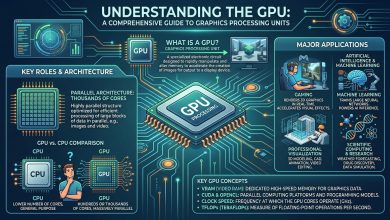
At its heart, a GPU is a specialized processor designed to handle highly parallel workloads, significantly accelerating graphics rendering for interactive 3D, supporting high-resolution multi-display output, and contributing to compute tasks that can be expressed as many similar operations running simultaneously. While a Central Processing Unit (CPU) remains central for general-purpose logic and scheduling, a GPU offers superior throughput for specific categories of work. When you GPU compare, it’s rarely about a single number; real-world results depend on how software utilizes the GPU, the amount of memory available on the card, the speed at which that memory can be accessed, and whether the rest of the system can sustain power under load.
- Compute Throughput and Architecture: This is described by a combination of processing units, clock behavior, and architectural efficiency. These factors dictate how quickly the GPU can process shading, geometry, and compute kernels.
- Memory Capacity and Bandwidth: High-resolution gaming and professional applications demand substantial video RAM (VRAM). The type of memory (e.g., GDDR6, GDDR6X, HBM), its capacity, and the width of its bus (memory interface) are critical for overall performance, as they determine how quickly the GPU can access and process large datasets.
- Clock Speed: Measured in megahertz (MHz) or gigahertz (GHz), clock speed indicates how many cycles the GPU’s cores complete per second. Higher clock speeds generally translate to more operations per second, though architectural efficiency often plays a larger role in real-world performance.
- CUDA Cores / Stream Processors: NVIDIA GPUs utilize CUDA Cores, while AMD GPUs employ Stream Processors. These are the fundamental processing units responsible for executing parallel computations. A higher count generally suggests greater raw processing power.
Key Specifications to Consider When You GPU Compare
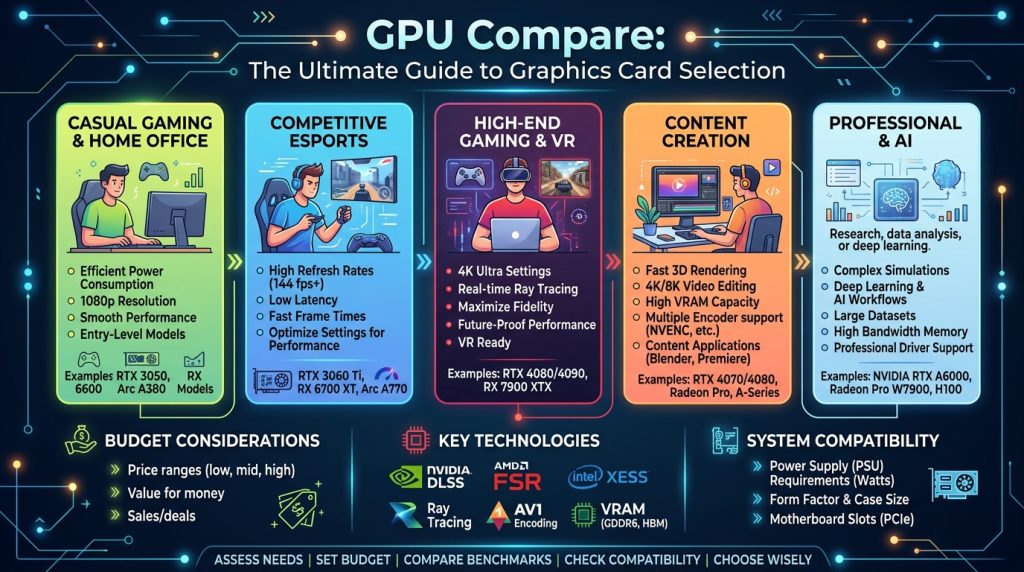
To effectively compare GPUs, one must look beyond marketing jargon and understand the underlying specifications that drive performance. These include not just the core count and clock speeds, but also aspects related to memory, power, and manufacturing.
- VRAM (Video RAM): This dedicated memory stores data that the GPU needs to access quickly, such as textures, frame buffers, and shader programs. More VRAM is crucial for higher resolutions (1440p, 4K, 8K), graphically intensive games, and professional applications like video editing, 3D rendering, and AI model training. For instance, a 16GB VRAM card like the AMD Radeon RX 9060 XT is generally considered excellent for mainstream 1080p gaming, while higher-tier options are better for 4K gaming or professional tasks.
- Memory Bus Width and Type: The memory bus width (e.g., 256-bit, 384-bit) determines how much data can be transferred to and from the VRAM in a single cycle. Combined with the memory type (e.g., GDDR6, GDDR6X, HBM), this dictates the total memory bandwidth, a crucial factor for demanding workloads. GDDR6X, for example, offers higher bandwidth than standard GDDR6.
- TDP (Thermal Design Power) and Power Connectors: TDP indicates the maximum amount of heat generated by the GPU that the cooling system is designed to dissipate. This figure directly correlates with power consumption and the type of power supply unit (PSU) and connectors (e.g., 8-pin, 12VHPWR) required. Higher TDP usually means more power draw and hotter operation, necessitating better cooling and a robust PSU.
- PCIe Interface: Modern GPUs connect via a PCIe (Peripheral Component Interconnect Express) slot, typically PCIe 4.0 or PCIe 5.0. While PCIe 5.0 offers double the bandwidth of PCIe 4.0, most current applications, even high-end gaming, rarely saturate a full PCIe 4.0 x16 interface. However, for future-proofing and extremely data-intensive workloads, PCIe 5.0 can be a beneficial feature.
- Manufacturing Process: The node size (e.g., 5nm, 4nm, 3nm) refers to the lithography process used to create the GPU chip. Smaller nodes generally allow for more transistors in a given area, leading to greater efficiency, higher performance, and reduced power consumption.
Architectural Differences: NVIDIA vs. AMD vs. Intel
The GPU market in 2026 is primarily dominated by three major players: NVIDIA, AMD, and the emerging Intel. Each company employs distinct architectural philosophies and offers unique ecosystems that influence performance, features, and overall user experience.
NVIDIA: The AI and Ray Tracing Leader
NVIDIA’s architecture, exemplified by their GeForce RTX and professional Quadro/Tesla lines, is characterized by specialized cores and a robust software ecosystem.
- CUDA Cores: NVIDIA’s proprietary Compute Unified Device Architecture (CUDA) is a parallel computing platform that enables GPUs to perform general-purpose computing tasks. Its widespread adoption in professional and scientific fields gives NVIDIA a significant advantage, especially in AI and machine learning.
- Tensor Cores: Introduced with the RTX series, Tensor Cores are specialized processing units designed to accelerate AI inference and machine learning workloads. They are fundamental to NVIDIA’s Deep Learning Super Sampling (DLSS) technology, which uses AI to upscale lower-resolution images to higher resolutions, boosting frame rates while maintaining visual quality.
- RT Cores: Dedicated Ray Tracing (RT) Cores accelerate the computationally intensive task of real-time ray tracing, which simulates the physical behavior of light for highly realistic reflections, shadows, and global illumination in games and professional rendering. NVIDIA often leads in ray tracing performance due to these dedicated cores and DLSS 3 with Frame Generation.
- DLSS and Frame Generation: NVIDIA’s DLSS technology, particularly DLSS 3 and its Frame Generation feature, remains a top industry standard for upscaling and improving frame rates, often delivering sharper visual quality than AMD’s upscalers in many titles.
AMD: Value, Efficiency, and Open Standards
AMD’s Radeon GPUs (for gaming) and Instinct accelerators (for data centers) emphasize cache optimization, efficiency, and more open software ecosystems.
- Stream Processors: AMD GPUs utilize Stream Processors for parallel computation, similar in function to NVIDIA’s CUDA Cores.
- RDNA Architecture: AMD’s RDNA (Radeon DNA) architecture powers its consumer graphics cards, focusing on gaming performance and efficiency. RDNA 3, and the anticipated RDNA 4, target the mainstream and mid-range segments, aiming for strong price-to-performance ratios at 1080p and 1440p resolutions.
- Infinity Cache: A high-bandwidth, low-latency cache integrated into AMD GPUs that significantly reduces VRAM access latency and improves effective bandwidth, particularly beneficial in gaming scenarios.
- FSR (FidelityFX Super Resolution): AMD’s open-source upscaling technology, FSR, is an alternative to DLSS. While it generally offers broader compatibility across GPUs, NVIDIA’s DLSS often provides superior visual fidelity and performance, particularly with ray tracing. FSR 4 improvements focus on temporal stability and cleaner edges.
- ROCm: AMD’s ROCm (Radeon Open Compute) platform is an open-source alternative to CUDA, gaining traction in high-performance computing and AI infrastructure, offering more flexibility for developers.
Intel: The Emerging Challenger
Intel, traditionally known for CPUs, is aggressively expanding into the dedicated GPU market with its Arc series for consumers and data center accelerators.
- Xe Architecture: Intel’s Xe architecture forms the foundation of its integrated and dedicated graphics solutions.
- XeSS (Xe Super Sampling): Intel’s AI-powered upscaling technology, XeSS, competes with DLSS and FSR. It leverages XMX (Xe Matrix Extensions) AI engines on Arc GPUs to reconstruct images, offering performance gains similar to its competitors.
- Ecosystem Development: Intel is investing heavily in its software ecosystem and driver stability, areas where it initially faced challenges. Their focus includes strong performance in the sub-$300 market, with models like the Arc B580 being a strong contender for budget 1080p gaming.
| Feature | NVIDIA (e.g., RTX 50 Series) | AMD (e.g., RX 9000 Series) | Intel (e.g., Arc B Series) |
|---|---|---|---|
| Core Architecture | CUDA Cores, Tensor Cores, RT Cores (e.g., Blackwell) | Stream Processors, Compute Units (e.g., RDNA 4) | Xe Cores, XMX Engines (e.g., Xe2) |
| Upscaling Technology | DLSS (Deep Learning Super Sampling) with Frame Generation | FSR (FidelityFX Super Resolution) | XeSS (Xe Super Sampling) |
| Ray Tracing Performance | Generally leading due to dedicated RT Cores and DLSS | Competitive, but often trails NVIDIA in pure RT scenarios | Improving, but still catching up to the market leaders |
| AI/ML Focus | Strongest ecosystem with CUDA, Tensor Cores, dominant in AI infrastructure | Growing with ROCm platform, competitive in HPC and some AI | Aggressive expansion with AI accelerators and Xe architecture |
| Typical Strengths | High-end performance, Ray Tracing, AI, professional applications | Price-to-performance, competitive mid-range, VRAM value | Budget-friendly, emerging ecosystem, strong integrated graphics |
Benchmarking and Real-World Performance
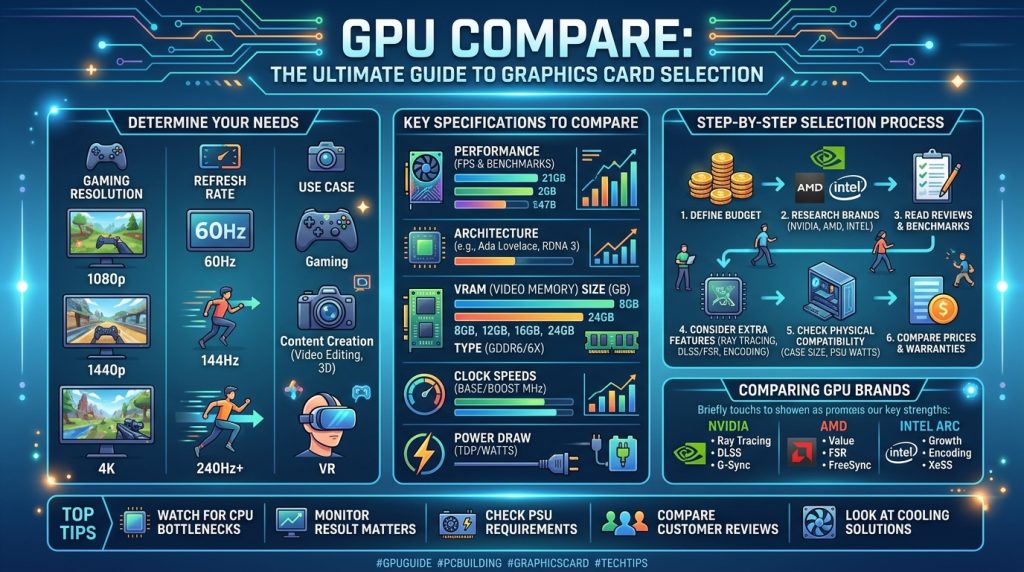
GPU benchmarks are vital for understanding how graphics cards perform in specific tasks, providing a standardized way to evaluate different GPUs without speculation. They offer insights into speed, efficiency, power consumption, and compatibility with various software and hardware. Benchmarking helps identify the best GPU for your workload, whether it’s gaming at 1440p or 4K, video editing, or AI training.
- Synthetic Benchmarks: Tools like 3DMark, Blender, and UNIGINE Superposition run artificial tests to gauge a GPU’s raw performance in a standardized environment. While they provide objective scores for comparison, they might not fully reflect real-world usage.
- Real-World Benchmarks: These involve testing GPUs in actual games and productivity applications. In-game benchmarks measure frame rates (FPS) at various resolutions and quality settings, often with and without ray tracing or upscaling technologies enabled. Productivity benchmarks assess performance in tasks like video rendering, 3D modeling, and scientific simulations. Real-world benchmarks are generally more relevant as they closely mimic how you’ll use the GPU.
- Frame Rates (FPS): The most common metric for gaming performance. Higher FPS translates to smoother gameplay. Benchmarks often provide average FPS, 1% low FPS, and 0.1% low FPS to indicate consistency and avoid stuttering.
- Resolution and Settings: Performance varies significantly with display resolution (1080p, 1440p, 4K) and in-game graphical settings (low, medium, high, ultra). A GPU that excels at 1080p might struggle at 4K, making it crucial to compare benchmarks relevant to your target resolution and visual fidelity.
- Ray Tracing Performance: With the increasing adoption of ray tracing in games, benchmarks often include dedicated ray tracing tests to compare how well GPUs handle this visually demanding technology. NVIDIA has historically held an advantage here due to its dedicated RT cores.
- Upscaling Performance: The effectiveness of technologies like DLSS, FSR, and XeSS in boosting frame rates while maintaining image quality is also a key benchmark. These AI-driven features can significantly alter playable performance expectations.
Regularly checking updated GPU hierarchy charts and benchmarks from reputable tech sites (like Tom’s Hardware, which provides updated charts as of June 2026) can give a comprehensive overview of how different GPUs stack up.
GPU Compare by Use Case: Gaming, Professional Work, and AI
The “best” GPU is entirely dependent on its intended application. A high-end gaming card might be suboptimal for professional rendering, and vice-versa.
- Gaming:
- Resolution and Refresh Rate: For 1080p competitive gaming at high refresh rates, a mid-range card like NVIDIA’s RTX 5060 or AMD’s RX 9060 XT might be sufficient. For 1440p AAA gaming, options like the RTX 5070 Ti or RX 9060 XT are more suitable. For immersive 4K gaming, flagship cards are typically required.
- Ray Tracing and Upscaling: Gamers who prioritize realistic lighting and shadows with ray tracing will often lean towards NVIDIA GPUs due to their strong ray tracing performance and DLSS implementation. Those seeking raw rasterization performance and value might find AMD offerings more appealing.
- VRAM: Modern games, especially at higher resolutions with demanding textures, benefit greatly from more VRAM. 12GB to 16GB is increasingly becoming the sweet spot for 1440p and higher.
- Professional Work (Content Creation, CAD, Video Editing):
- VRAM: Professional applications like 3D rendering, video editing (especially 4K+), and CAD simulations are highly VRAM-intensive. Cards with 16GB, 24GB, or even more VRAM are often preferred.
- Software Optimization: Specific software suites (e.g., Adobe Premiere Pro, DaVinci Resolve, Blender, AutoCAD) may be optimized to leverage particular GPU architectures or APIs. NVIDIA’s CUDA platform, for instance, has a long-standing advantage in many professional applications due to extensive developer support and optimization.
- Precision: For scientific computing and complex simulations, double-precision floating-point performance (FP64) can be critical, an area where some professional-grade GPUs (like NVIDIA’s A100/H100 or AMD’s Instinct series) excel.
- AI and Machine Learning:
- Tensor Cores / AI Accelerators: GPUs with dedicated AI hardware, such as NVIDIA’s Tensor Cores or Intel’s XMX engines, are highly advantageous for accelerating AI inference and training workloads.
- CUDA Ecosystem: NVIDIA’s CUDA remains the dominant platform for AI development, with a mature ecosystem of libraries, frameworks (TensorFlow, PyTorch), and developer tools. This is a significant reason why NVIDIA currently dominates AI infrastructure.
- HBM (High Bandwidth Memory): For large-scale AI models and datasets, GPUs utilizing HBM can offer substantially higher memory bandwidth compared to GDDR-based cards, crucial for speeding up training times.
- Scalability: For advanced AI research and enterprise solutions, the ability to scale multiple GPUs in a cluster (e.g., via NVIDIA NVLink) is paramount.
Factors Beyond Raw Power: Cooling, Power Consumption, and Price
While raw performance metrics are important, several practical considerations can significantly impact your GPU choice.
- Cooling Solution: Effective cooling is essential for sustained performance and longevity. GPUs come with various cooling designs, including open-air coolers (with multiple fans), blower-style coolers (expelling heat out the back of the case), and liquid cooling solutions (AIO or custom loops). Larger cards with more robust cooling often perform better under sustained load but require more case space.
- Power Consumption and PSU Requirements: High-performance GPUs can draw significant power, necessitating a compatible power supply unit (PSU) with sufficient wattage and the correct power connectors. Under-provisioning your PSU can lead to system instability or damage. Efficient GPUs offer better performance per watt, which can save on electricity costs over time.
- Price and Value: The cost-effectiveness of a GPU is a crucial factor. AMD, for instance, often emphasizes a better price-to-performance ratio, particularly in the mid-range. NVIDIA tends to position itself as the premium choice, especially for high-end gaming and AI, but is feeling pressure to adjust pricing in 2026. The “value” of a GPU also involves its longevity and ability to handle future software demands.
- Size and Form Factor: GPUs vary greatly in physical size. Ensure your chosen card fits within your PC case’s dimensions and doesn’t interfere with other components. Compact ITX-style cards are available for small form factor builds, while triple-slot or longer cards demand more spacious cases.
- Driver Support and Software Ecosystem: A stable and feature-rich driver suite is critical for optimal performance and compatibility. NVIDIA’s CUDA ecosystem and mature developer tools are a significant advantage for AI and professional workloads. AMD and Intel are actively improving their driver support and software offerings.
Future Trends in GPU Technology
The GPU landscape is in constant evolution, driven by advancements in manufacturing, AI integration, and new computing paradigms. Several key trends are shaping the future of graphics cards.
- AI Integration and Dedicated Hardware: The synergy between GPUs and AI is deepening. Future GPUs will feature more AI-specific hardware, such as enhanced Tensor Cores or similar architectures for AI workloads, and dedicated inference accelerators. NVIDIA, for example, is doubling down on AI, with AI-accelerated features becoming a battleground for all GPU giants. AI is now crucial for real-time ray tracing, generative AI, and even optimizing power efficiency.
- Advanced Upscaling and Frame Generation: Technologies like DLSS, FSR, and XeSS will continue to evolve, offering even better image quality and performance boosts. These AI-powered upscaling methods are fundamentally changing performance expectations in games.
- Modular Designs and Chiplets: The trend towards modular GPU designs, potentially utilizing chiplet architectures, could facilitate easier upgrades and extend hardware lifecycles. This approach could allow for more flexible manufacturing and scaling.
- Energy Efficiency: As computational demands increase, so does power consumption. Next-generation GPUs will likely incorporate AI-based energy controllers to optimize power efficiency, dynamically adjusting power usage based on workload to maintain high performance while reducing energy consumption.
- Heterogeneous Architectures and Hybrid Computing: The future will see greater integration between CPUs and GPUs, possibly with tighter memory coherence and unified memory spaces, enabling more seamless collaboration between the two processors.
- Cloud and Edge Computing: The demand for high-performance GPUs in cloud computing providers for AI training, large-scale data analytics, and scientific simulations is growing rapidly. Additionally, more power-efficient GPUs are emerging for edge computing, essential for real-time AI processing in fields like medical, automotive, and manufacturing.
- Generative AI in Graphics: Beyond upscaling, AI is poised to revolutionize content creation itself. The future of game graphics might shift from brute-force rendering to AI imagining entire worlds into existence, generating complex 3D environments from simple text prompts. This could redefine how digital content is created and experienced. For more insights into how GPUs are driving innovation across various sectors, consult the Wikipedia page on Graphics Processing Units.
Conclusion
Navigating the complex world of GPU comparison requires a thorough understanding of technical specifications, architectural differences, and real-world performance metrics. From NVIDIA’s dominance in AI and ray tracing with its CUDA ecosystem to AMD’s strong value proposition and competitive mid-range performance, and Intel’s assertive entry into the market, consumers have more choices than ever before.
Ultimately, the optimal GPU for you depends on your primary use case – be it high-fidelity gaming, demanding professional content creation, or cutting-edge AI/ML development. Beyond raw power, factors like cooling, power efficiency, price, and the broader software ecosystem play a pivotal role in the decision-making process. By evaluating these elements carefully and staying abreast of the rapid advancements in GPU technology, you can select a graphics card that not only meets your current needs but also provides a strong foundation for future computing endeavors.