5 Best Low Profile GPUs for Compact & Mini PCs in 2026
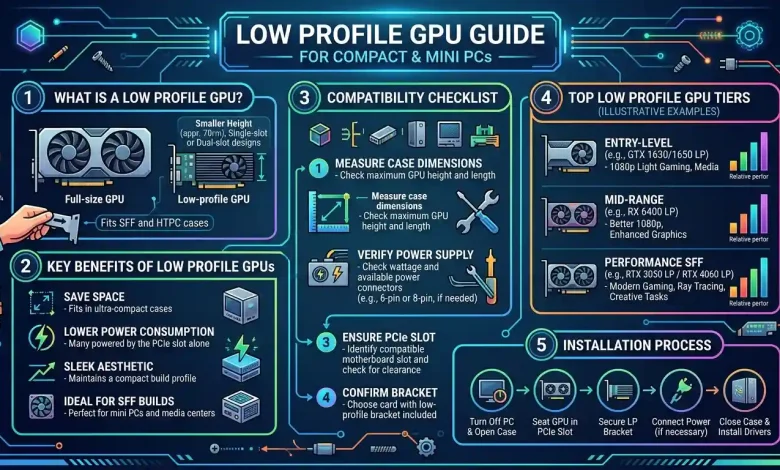
Table of Contents
Low Profile GPU solutions are becoming increasingly vital in the evolving landscape of personal computing, especially with the surging popularity of compact and mini PCs. These diminutive powerhouses, often no larger than a shoebox, demand components that fit their constrained internal spaces without compromising on essential functionality or graphical prowess. A traditional, full-sized graphics card, with its towering heatsinks and dual-slot design, simply won’t fit into the sleek enclosures of many Small Form Factor (SFF) builds, Home Theater PCs (HTPCs), or business-oriented mini-desktops. This comprehensive guide aims to demystify low profile GPUs, providing an in-depth look at what they are, why they are indispensable for compact systems, how to choose the right one, and the best options currently available on the market.
What Exactly is a Low Profile GPU?
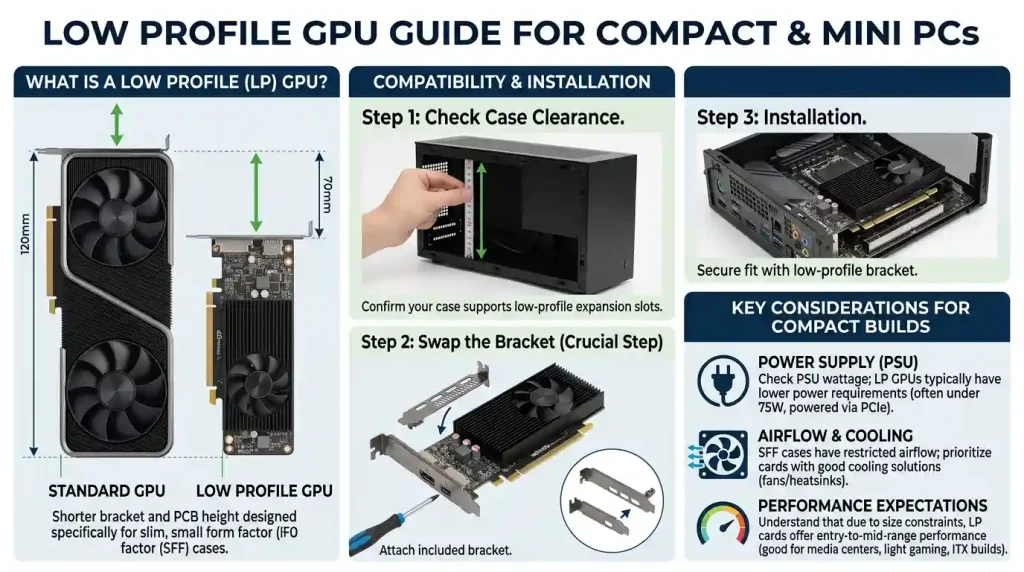
A low profile GPU, often abbreviated as LP GPU, is a graphics card specifically designed to occupy less vertical space than a standard GPU. While a typical full-sized graphics card extends significantly upwards from the PCIe slot, a low profile card is much shorter, usually matching the height of the PCIe bracket itself. This compact design is achieved by using a smaller PCB (Printed Circuit Board) and a more condensed cooling solution, which often involves a single, smaller fan or a passive heatsink. The critical distinguishing feature is the included “low profile bracket” – a half-height metal bracket that replaces the standard full-height bracket, allowing the card to be securely mounted in slim PC cases that only offer half-height expansion slots. Without this specialized bracket and the compact PCB, many small form factor cases would be unable to accommodate a dedicated graphics solution, relegating users to integrated graphics, which often lack the performance needed for gaming, video editing, or even multi-monitor setups.
These cards are engineered with space efficiency in mind, making them a cornerstone for builders aiming for minimalist designs without sacrificing graphical capabilities. Their existence is a testament to the ingenuity in PC component design, addressing the niche but growing market for compact and mini PCs that demand both aesthetic appeal and functional performance. The reduced height is the primary characteristic, but often, low profile GPUs also feature a single-slot design, meaning they only occupy one expansion slot on the motherboard, further enhancing their compatibility with tight build environments. This combination of reduced height and often reduced thickness makes them the go-to choice for any system where space is at an absolute premium.
Why Choose a Low Profile GPU for Your Compact PC?
The decision to opt for a low profile GPU is almost always dictated by the physical constraints of a compact or mini PC case. While integrated graphics have certainly improved over the years, they often fall short for tasks requiring more significant graphical horsepower. Here are the primary reasons why a low profile GPU becomes a necessity or a highly desirable upgrade:
- Space Efficiency: This is the most obvious and compelling reason. Compact PC cases, such as those adhering to Mini-ITX or even smaller form factors, simply do not have the internal volume to house standard-sized components. Low profile GPUs are custom-built to fit into these confined spaces, allowing for dedicated graphics where it would otherwise be impossible.
- Enhanced Performance Over Integrated Graphics: Even entry-level low profile GPUs typically offer a substantial performance boost over the integrated graphics found in most CPUs. For casual gaming, smoother media playback, or more demanding productivity tasks like photo editing, a discrete low profile card can make a significant difference in user experience.
- Powering Multiple Displays: Many integrated graphics solutions have limited display outputs or struggle to efficiently drive multiple high-resolution monitors. Low profile GPUs often come with a variety of output ports (HDMI, DisplayPort, DVI) and the horsepower to comfortably run two, three, or even four displays simultaneously, which is crucial for professional workstations or multi-tasking setups.
- Dedicated Memory (VRAM): Unlike integrated graphics which share system RAM, a discrete low profile GPU comes with its own dedicated video memory (VRAM). This reduces strain on system memory and ensures graphics-intensive applications have ample memory bandwidth, leading to smoother performance, particularly in games and design software.
- Lower Power Consumption for Specific Models: While not all low profile GPUs are ultra-low power, many are designed to be energy-efficient, drawing power directly from the PCIe slot without requiring additional power connectors. This makes them ideal for systems with smaller, less powerful PSUs (Power Supply Units), a common characteristic of compact PCs.
- Upgradability for Older Systems: Low profile GPUs can breathe new life into older compact systems that might be struggling with integrated graphics performance, offering an affordable and compatible upgrade path for improved multimedia or light gaming capabilities.
Key Considerations When Selecting a Low Profile GPU
Choosing the right low profile GPU involves a careful balance of performance, power, and physical compatibility. Rushing this decision can lead to compatibility issues or an unsatisfactory experience. Here are the crucial factors to consider:
Form Factor and Slot Compatibility
The absolute first consideration is whether the GPU will physically fit into your PC case. Low profile refers to the height of the card. Ensure your case supports half-height expansion slots. Most low profile GPUs also come with both full-height and half-height brackets, allowing for flexibility, but it’s the PCB size that truly dictates compatibility with compact cases. Beyond height, consider the card’s length and thickness. Some compact cases have strict length limitations, especially those with front-mounted power supplies or internal drive cages. While many low profile cards are single-slot (occupying only one PCIe slot), some higher-performance models might be dual-slot, meaning they take up the space of two expansion slots, which can be an issue in ultra-slim cases. Always measure the available space within your case and compare it to the GPU’s dimensions before making a purchase. Remember to account for any internal cables or motherboard components that might obstruct the card’s installation.
Power Requirements and PSU Limitations
Compact and mini PCs often come with smaller power supply units (PSUs), sometimes as low as 150W or 200W, and frequently lack additional PCIe power connectors (6-pin or 8-pin). This makes the GPU’s power draw a critical factor. Many entry-level low profile GPUs are designed to draw all their power directly from the PCIe slot, typically up to 75W, making them compatible with almost any system. Cards like the NVIDIA GeForce GT 1030 or AMD Radeon RX 6400 are excellent examples of this efficiency. However, more powerful low profile options, such as some versions of the GTX 1650, might require an external 6-pin power connector. Always check your PSU’s wattage, available connectors, and the GPU’s TDP (Thermal Design Power) and power input requirements. Overlooking this can lead to system instability, crashes, or the GPU simply not powering on.
Performance Expectations vs. Use Case
Before selecting a low profile GPU, clearly define your primary use case. Are you building an HTPC for 4K media playback and light emulation? Do you need a productivity machine capable of driving three monitors? Or are you aiming for casual gaming at 1080p?
For basic display output, 4K video decoding, and light tasks, even a very modest low profile GPU like the NVIDIA GT 1030 GDDR5 version can suffice. For more demanding tasks, such as light gaming in titles like Valorant or Minecraft, or smooth photo editing, stepping up to a low profile NVIDIA GTX 1650 or AMD RX 6400 would provide a significantly better experience. It’s crucial to manage expectations; low profile GPUs, by their nature, prioritize form factor over raw power. While they offer a substantial upgrade over integrated graphics, they generally cannot compete with their full-sized counterparts in terms of high-end gaming or professional rendering performance. Consulting reputable benchmarks for the specific low profile models you’re considering, relative to your intended use, is highly recommended to ensure you get the performance you expect. For a deeper understanding of how graphics cards work and their general performance tiers, you might find this Wikipedia article on graphics cards insightful.
Cooling Solutions and Thermal Management
Given the confined spaces of compact PCs, effective cooling for a low profile GPU is paramount. These cards typically feature smaller heatsinks and fans (or passive cooling) compared to their full-sized brethren. While this helps them fit, it can also lead to higher operating temperatures, especially under sustained load. Consider the airflow within your compact case. Does it have any case fans? Are there vents near the GPU slot? A card with a small, active fan (even if it’s a single fan) will generally offer better thermal performance than a passively cooled card, which relies entirely on case airflow to dissipate heat. If your case has poor airflow, a passively cooled card might throttle significantly, leading to reduced performance and potentially shortening the card’s lifespan. Some manufacturers offer low profile cards with slightly more robust cooling solutions, which might be a worthwhile investment for more demanding use cases, even if it adds a millimeter or two to the card’s thickness.
Top Low Profile GPU Picks for Various Budgets and Needs
The market for low profile GPUs, while niche, offers several compelling options across different performance and price points. Here’s a look at some of the best choices available today, keeping in mind that specific models and availability can vary by region and manufacturer (e.g., ASUS, Gigabyte, MSI, Zotac).
| GPU Model | Approximate Price Range (USD) | Key Features & Performance | Power Requirement | Typical Use Case |
|---|---|---|---|---|
| NVIDIA GeForce GT 1030 (GDDR5) | $80 – $120 | Entry-level performance, excellent for HTPC, 4K video decoding, basic desktop use. GDDR5 version is significantly better than DDR4. | ~30W, PCIe slot powered | HTPC, office PC, light multimedia, older eSports titles at low settings. |
| AMD Radeon RX 6400 (Low Profile) | $120 – $180 | Good entry-level gaming, supports modern APIs. More capable than GT 1030 for gaming. Only available in PCIe 4.0, but still performs well in PCIe 3.0. | ~53W, PCIe slot powered | Light 1080p gaming (eSports), general productivity, content consumption. |
| NVIDIA GeForce GTX 1650 (Low Profile) | $180 – $250 | Best overall performance for low profile segment, capable 1080p gaming for many titles. Some models require a 6-pin power connector. | ~75W, PCIe slot powered (some models 75W+ with 6-pin) | 1080p casual to moderate gaming, content creation, more demanding productivity. |
| NVIDIA GeForce RTX 3050 (Low Profile, specific OEM versions) | $250 – $350+ | Rare, but some OEM low profile versions exist. Offers ray tracing and DLSS. Significant performance leap. Requires external power. | ~115W+, requires 6-pin/8-pin power | More serious 1080p gaming, professional applications leveraging AI/RTX features in SFF. |
The NVIDIA GeForce GT 1030 (GDDR5 variant) remains a staple for budget-conscious builders needing a dedicated display output or a boost for media consumption. Its ultra-low power draw and single-slot design make it universally compatible with almost any compact system. It’s not a gaming beast, but for HTPCs or basic office use, it’s highly effective.
For those looking to venture into light 1080p gaming or need better performance for demanding applications, the AMD Radeon RX 6400 (Low Profile) stands out. It offers a significant step up from the GT 1030 in gaming benchmarks, particularly in modern titles, thanks to its more current architecture. It also retains the crucial advantage of being powered entirely by the PCIe slot, making it incredibly versatile for systems with limited PSU capabilities.
The pinnacle of low profile gaming performance for most readily available retail options is arguably the NVIDIA GeForce GTX 1650 (Low Profile). This card can handle many popular titles at 1080p with respectable frame rates, often without requiring an external power connector (though some models do, so check carefully). It represents the sweet spot for compact gaming PCs that want the best possible performance without stepping into the realm of custom, high-power solutions. Its ability to offer a solid gaming experience in a compact form factor has made it a favorite among SFF enthusiasts.
While rarer and often found only in pre-built OEM systems, certain low profile versions of the NVIDIA GeForce RTX 3050 occasionally surface. These cards offer significantly higher performance, including ray tracing capabilities and DLSS support, making them suitable for more demanding 1080p gaming and even some content creation tasks. However, they typically come with a higher price tag and often require an additional power connector, which can complicate builds in very small systems with low-wattage PSUs. Always verify the specific power requirements for any RTX 3050 low profile model you consider.
Installation Tips and Best Practices
Installing a low profile GPU into a compact or mini PC requires a bit more care and finesse than a standard build. Here are some tips to ensure a smooth installation and optimal performance:
- Prepare Your Workspace: Ensure you have a clean, well-lit area. Static electricity can damage components, so use an anti-static wrist strap or regularly touch a grounded metal object.
- Measure Twice, Install Once: Before even opening the GPU package, double-check your case’s dimensions against the GPU’s specifications for length, height, and thickness. Pay attention to any internal obstructions.
- Bracket Swap: Most low profile GPUs come with both full-height and half-height brackets. You will need to remove the full-height bracket (usually secured with small screws) and install the half-height bracket. Be gentle to avoid bending the PCB or damaging components.
- Clear the Path: In compact cases, cables and other components can get in the way. Temporarily disconnect or reroute SATA cables, front panel headers, or even CPU cooler fans if they obstruct the GPU slot or installation path.
- Gentle Insertion: Align the GPU carefully with the PCIe slot and press down firmly and evenly until it seats correctly. You should hear a click from the retention clip.
- Secure the Bracket: Use the screw provided by your case to secure the low profile bracket to the chassis. This prevents the card from shifting and provides stability.
- Power Connections: If your GPU requires a 6-pin or 8-pin power connector, ensure it’s securely plugged in. Route the cable neatly to avoid obstructing airflow. If your PSU lacks these connectors, ensure you’ve chosen a PCIe slot-powered GPU.
- Cable Management: In a compact case, every millimeter counts for airflow. Use zip ties or Velcro straps to bundle and route cables away from fans and heatsinks. Poor cable management can lead to higher temperatures and reduced performance.
- Driver Installation: Once installed and powered on, boot into your operating system and install the latest drivers for your new GPU from the manufacturer’s official website (NVIDIA or AMD). This is crucial for unlocking its full performance and features.
- Test Thermals: After installation, monitor your GPU’s temperatures under load using software like HWMonitor or GPU-Z. Ensure temperatures remain within safe operating limits, especially during gaming or other demanding tasks. If temperatures are consistently high, consider improving case airflow if possible.
Conclusion
Low profile GPUs are indispensable components for anyone building or upgrading a compact or mini PC. They bridge the gap between limited integrated graphics and the spatial constraints of small form factor cases, allowing users to enjoy dedicated graphics performance for a wide range of applications, from immersive 4K media consumption to casual 1080p gaming and professional multi-monitor setups. While the selection process requires careful consideration of form factor, power delivery, and performance expectations, the market offers robust solutions like the NVIDIA GT 1030, AMD RX 6400, and NVIDIA GTX 1650 to meet diverse needs and budgets. By understanding the unique requirements of compact systems and adhering to best installation practices, you can successfully integrate a low profile GPU, transforming your mini PC into a surprisingly powerful and versatile machine. The future of computing continues to lean towards smaller, more efficient designs, and low profile GPUs will undoubtedly remain a cornerstone of this evolution, proving that big performance can indeed come in a small package.