7 Must-Know Facts About GPU 0 Usage in Multi-GPU Setups
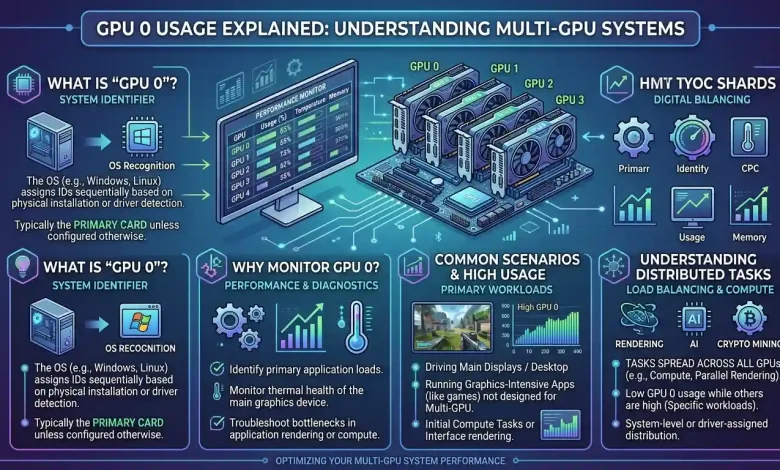
Table of Contents
GPU 0 Usage Explained: Understanding Multi-GPU Systems often begins with a fundamental question: what exactly does “GPU 0” signify, particularly in a computer equipped with multiple graphics processing units? In the realm of computing, the designation “GPU 0” typically refers to the primary or first graphics processing unit recognized by the operating system and applications. This can be an integrated graphics processor (iGPU) found on the CPU, or the first discrete graphics card installed in a system. While the concept of using multiple GPUs has evolved significantly over the years, from traditional gaming setups like NVIDIA’s SLI and AMD’s CrossFire to advanced professional applications, understanding how these systems manage and distribute workloads is crucial for optimizing performance.
Multi-GPU computing involves configuring two or more GPUs to operate in parallel, distributing computational tasks to achieve faster processing times and handle larger datasets than a single card could manage. This parallel processing approach is highly beneficial in various demanding applications such as AI model training, high-end content creation, scientific simulations, and even some specialized gaming scenarios. However, the efficiency and performance gains of such setups are heavily dependent on how effectively workloads are balanced and how well the software is designed to utilize multiple graphics adapters. This article will delve into the intricacies of multi-GPU systems, explaining the role of GPU 0, exploring the technological advancements, and providing insights into their practical applications and considerations.
The Evolution of Multi-GPU Technologies: From SLI/CrossFire to Modern Implementations
The journey of multi-GPU technology for consumers largely began with NVIDIA’s SLI (Scalable Link Interface) and AMD’s CrossFire, which aimed to boost gaming performance by linking two or more graphics cards. These technologies allowed multiple GPUs, typically from the same manufacturer and often the same model, to work in tandem on a single workload. Initially, SLI and CrossFire offered significant performance increases, sometimes reaching 60-90% in frame rates with two-way setups, especially in early iterations. Techniques like Alternate Frame Rendering (AFR), where each GPU rendered alternating frames, were common to achieve these gains.
However, the widespread adoption and consistent performance benefits of SLI and CrossFire in gaming were often inconsistent. Many games either did not support multi-GPU setups effectively, leading to little to no performance improvement or, in some cases, even introduced issues like micro-stuttering or graphical glitches. The reliance on game developers to implement specific support for these technologies proved to be a major hurdle, as the diminishing percentage of multi-GPU users reduced their incentive to do so. Furthermore, VRAM (Video Random Access Memory) typically did not stack in SLI or CrossFire configurations; instead, the effective VRAM was limited to that of a single card, as the same data often needed to be replicated across all GPUs.
By the mid-2010s and especially with the advent of the NVIDIA RTX 20 series, NVIDIA began to phase out SLI in favor of NVLink, a higher-bandwidth interconnect, which itself became limited to only the highest-end GPUs like the RTX 3090, and is not present on the RTX 40 series. AMD also quietly discontinued active development and driver support for CrossFire on newer GPUs, with the RX Vega series being the last to officially support it. Consequently, for consumer gaming, traditional multi-GPU setups like SLI and CrossFire are largely considered defunct in 2024 and beyond.
How Multi-GPU Systems Work Under the Hood: Explicit Multi-Adapter and Device Groups
Despite the decline of traditional gaming-focused multi-GPU solutions, the underlying principle of using multiple graphics processors for accelerated computing has continued to evolve, particularly with advancements in APIs like DirectX 12 and Vulkan. These modern APIs offer more explicit control to developers over how GPUs are utilized, moving away from driver-level abstractions that characterized SLI and CrossFire.
DirectX 12 Explicit Multi-Adapter
DirectX 12 introduced the “Explicit Multi-Adapter” feature, allowing developers to manage multiple GPUs with fine-grained control, irrespective of their manufacturer or type (e.g., integrated and discrete GPUs can work together). This approach contrasts sharply with the “Linked Display Adapters (LDA)” mode, which was similar to SLI/CrossFire where linked GPUs appeared as a single device. Explicit Multi-Adapter supports two main types of setups:
- Linked Display Adapters (LDA): For GPUs that are connected, like in older SLI/CrossFire setups (though modern consumer cards largely lack this). These are exposed as a single
ID3D12Devicewith multiple “nodes,” and developers can specify which nodes (GPUs) should be used for specific tasks. - Multiple Display Adapters (MDA): This allows for the use of completely different GPUs on the same system, such as an integrated GPU (iGPU) and a discrete GPU (dGPU), or even discrete GPUs from different vendors (e.g., AMD and NVIDIA). Each adapter is treated as a separate
ID3D12Device, giving developers direct control over resource allocation and task distribution.
Key features enabling this explicit control include cross-adapter memory, allowing one GPU to access the memory of another with minimal cost, and cross-adapter fences for synchronizing execution between different GPUs. This paradigm shift means that applications must be specifically coded to take advantage of these multi-adapter features, rather than relying on automatic driver-level scaling.
Vulkan Device Groups
Similarly, the Vulkan API provides multi-GPU support through “device groups,” which can allow multiple GPUs from the same vendor (often connected via an interconnect for direct data transfer) to be exposed as a single logical device. Vulkan 1.1 standardized several extensions, including device groups, allowing for explicit multi-GPU support and better compatibility with DirectX 12. While initially, Vulkan’s multi-GPU support for consumer hardware was often limited to two identical GPUs for NVIDIA or similar-generation GPUs for AMD, it also supports “non-SLI” setups where individual devices register to a Vulkan instance, allowing applications to query and interact with multiple physical GPUs, including integrated graphics. This also offers explicit memory allocation and synchronization mechanisms, allowing for more efficient multi-GPU operation when properly implemented by developers.
GPU 0 Usage in Action: Load Balancing and Asymmetric Workloads
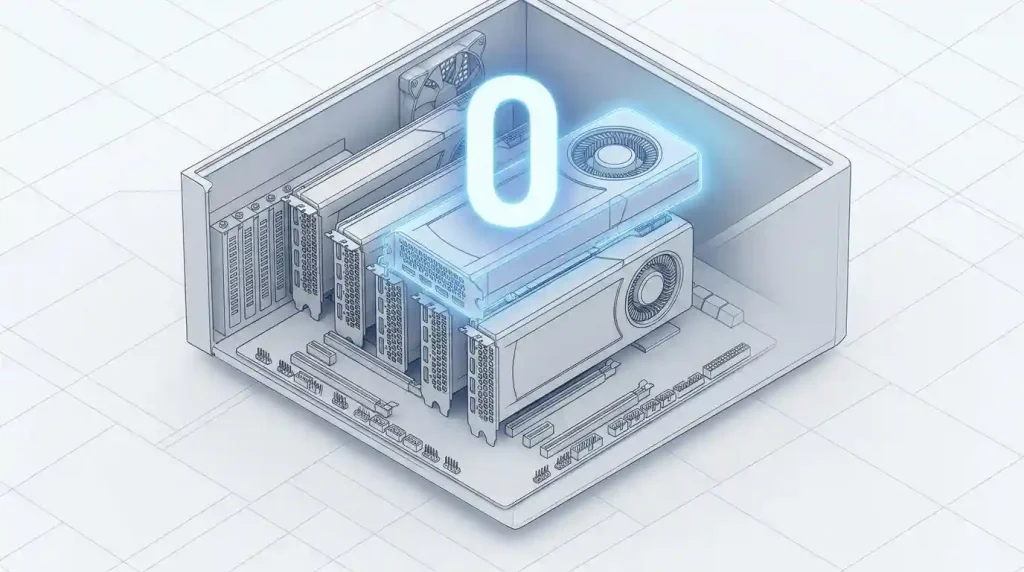
In a multi-GPU system, understanding “GPU 0 usage” is critical because it represents the activity of the primary graphics processor. Depending on the system configuration and application, GPU 0 can be either an integrated GPU (iGPU) or a discrete GPU (dGPU). Modern multi-GPU implementations, particularly those leveraging DirectX 12’s Explicit Multi-Adapter or Vulkan’s device groups, enable more sophisticated load balancing strategies than older technologies. Instead of simply splitting frames, these APIs allow for dynamic distribution of tasks, even across GPUs with different capabilities, leading to what is known as asymmetric workloads.
| Feature/Aspect | Traditional Multi-GPU (SLI/CrossFire) | Modern Multi-GPU (DX12/Vulkan Explicit) |
|---|---|---|
| Workload Distribution | Typically Alternate Frame Rendering (AFR) or Split Frame Rendering (SFR); driver-managed. | Explicit, fine-grained control by applications; supports task parallelism, heterogeneous GPUs, and asymmetric workloads. |
| GPU Compatibility | Generally required identical GPUs from the same vendor. | Can combine different GPUs, including iGPU + dGPU, and potentially different vendors (DX12 MDA). |
| VRAM Pooling | VRAM does not stack; limited to the lowest VRAM of a single card. | Potential for more efficient memory management and sharing, though not true VRAM stacking in a simple sense, but improved data transfer. |
| Application Support | Relied on driver profiles and specific game engine support; often inconsistent in gaming. | Requires explicit application development; more common in professional/compute applications. |
| Primary Use Case (Historical) | High-end gaming. | AI/machine learning, offline rendering, simulations, scientific computing, professional visualization. |
| Current Status (Consumer Gaming) | Largely defunct and unsupported on modern consumer GPUs. | Limited and developer-dependent; not a mainstream gaming solution. |
In a scenario with an iGPU and a discrete GPU, GPU 0 might handle basic display tasks and less intensive workloads, while GPU 1 (the discrete card) takes on demanding applications like gaming or 3D rendering. However, with explicit multi-adapter, a developer could assign specific rendering passes or computational tasks to the iGPU, even if it’s less powerful, to offload work from the discrete GPU and improve overall efficiency. For instance, a discrete GPU could render the main scene, while the integrated GPU handles post-processing effects or UI rendering.
Effective load balancing is crucial to maximize the benefits of multiple GPUs. Without proper distribution, one GPU might be heavily utilized (e.g., GPU 0 at 100% usage) while others remain idle or underutilized, leading to bottlenecks and wasted resources. This is particularly challenging for irregular and unbalanced workloads, where dynamic load balancing solutions are needed to ensure optimal utilization and near-linear speedup. For applications like AI training, strategies such as data parallelism (replicating the model across GPUs, each processing a subset of data) and model parallelism (splitting the model’s layers or operations across GPUs) are employed to distribute the computational load efficiently. Tools and frameworks must be configured correctly to leverage multiple GPUs and manage memory effectively, preventing issues like resource exhaustion or hanging.
Performance Considerations and Limitations of Multi-GPU
While the allure of combining multiple GPUs for amplified performance is strong, several critical factors govern their actual effectiveness. For consumer gaming, as previously noted, the era of widespread multi-GPU support with SLI and CrossFire is over. Modern games rarely offer optimizations for these older technologies, and driver support has largely ceased. Even when they did work, issues such as micro-stuttering, inconsistent frame pacing, and the failure of VRAM to stack often limited the real-world benefits. This means that for the average gamer, investing in a single, more powerful GPU is almost always the superior and more straightforward choice.
However, for professional applications and high-performance computing (HPC), multi-GPU setups continue to be highly relevant and offer substantial advantages. Workloads in areas like AI model training, scientific simulations, 3D rendering, and video processing can often scale impressively with multiple GPUs. In these scenarios, the tasks are typically designed to be highly parallelizable, meaning they can be broken down into smaller, independent chunks that each GPU can process concurrently. This leads to significant reductions in processing time and the ability to handle larger, more complex datasets.
Nonetheless, even in professional contexts, limitations exist. The efficiency of multi-GPU scaling is highly dependent on the application’s design and how well it handles inter-GPU communication and data transfer. Excessive data movement between GPUs can introduce overhead, negating some of the performance gains. Moreover, hardware limitations beyond the GPUs themselves, such as CPU bottlenecks, insufficient I/O bandwidth, or inefficient memory access patterns, can still hinder overall performance and lead to underutilization of the GPUs. System cooling and power delivery also become more critical with multiple GPUs, as they generate considerable heat and require stable power.
For a detailed perspective on the challenges and potential of multi-GPU setups in compute-intensive environments, one can refer to resources like Wikipedia’s article on Multi-GPU, which provides a comprehensive overview of the technology and its evolution.
Troubleshooting and Optimizing Multi-GPU Usage
When working with multi-GPU systems, encountering situations where one GPU (often GPU 0) is heavily utilized while others are idle or underutilized is common. Effective troubleshooting and optimization are essential to harness the full potential of such configurations.
Identifying Bottlenecks
The first step in troubleshooting is to identify the bottleneck. Tools like Task Manager (in Windows), nvidia-smi (for NVIDIA GPUs), or similar utilities for AMD and Intel can provide real-time monitoring of GPU utilization, memory usage, and temperature. Low GPU usage across all cards, or disproportionate usage, often points to issues beyond the GPUs themselves. Common culprits include:
- CPU Bottlenecks: If the CPU cannot feed data to the GPUs fast enough, they will sit idle waiting for work, even if they appear underutilized. This can be due to single-threaded data processing, inadequate CPU-to-GPU ratios, or limitations in programming environments (e.g., Python GIL).
- Slow Data Loading/I/O: Data transfer from storage or across the network can be a bottleneck, causing GPUs to wait for input. Optimizing data transfer patterns and preloading/caching data can help.
- Inefficient Memory Access: Even if the GPU is busy, poor memory access patterns (e.g., non-coalesced reads, excessive host-to-device transfers) can degrade performance.
- Software/Driver Issues: Outdated or incompatible GPU drivers, misconfigured TensorFlow settings, or software not designed to utilize multiple GPUs effectively can lead to problems.
Optimization Strategies
To optimize multi-GPU usage and ensure efficient load balancing:
- Choose Compatible Hardware: Select GPUs that are compatible and match workload requirements. Mixing different GPU models can lead to compatibility issues and reduced performance. While DX12 and Vulkan allow heterogeneous setups, optimal performance often comes from more uniform configurations for certain workloads.
- Software Configuration: Ensure that the software or framework being used is correctly configured for multi-GPU operation. For AI training, this means implementing appropriate data or model parallelism strategies and optimizing communication patterns between GPUs.
- Load Balancing: Implement dynamic load balancing solutions, especially for irregular workloads, to distribute tasks effectively and maximize GPU utilization. Some applications offer automatic load balancing features, which can be particularly useful for high-resolution rendering or mixed GPU models.
- Optimize Data Transfer: Minimize data movement between GPUs by keeping related tasks on the same GPU when possible to reduce communication overhead.
- Monitor and Scale Gradually: Continuously monitor performance metrics and GPU utilization. Start with a smaller GPU configuration and expand based on actual performance data to avoid overprovisioning.
- Driver Updates: Keep GPU drivers up-to-date, as they often include performance improvements and bug fixes for multi-GPU setups.
- Power and Cooling: Ensure adequate power supply and robust cooling solutions, as multiple GPUs generate significant heat and demand stable power.
- Main Display Priority: In some Windows configurations with mixed GPUs, the GPU connected to the “Main Display” may bear the brunt of the processing load. Adjusting display settings or cable arrangements can sometimes influence GPU prioritization.
The Future of Multi-GPU: Beyond Gaming
While the golden age of multi-GPU gaming has largely passed, the concept of leveraging multiple graphics processors is far from dead. In fact, it is experiencing a significant resurgence and evolution in non-gaming sectors, driven by the increasing demands of artificial intelligence, machine learning, scientific research, and professional content creation.
AI and Machine Learning
The training and inference of large AI models, particularly large language models (LLMs), require immense computational power and vast amounts of VRAM. A single high-end GPU, even with substantial VRAM (e.g., 24GB or 32GB), can be insufficient for cutting-edge models. This has led to a renewed interest in multi-GPU configurations, not for traditional gaming, but for “pooling” GPU power and VRAM. Technologies like NVIDIA’s NVLink, which provides high-bandwidth inter-GPU communication, are crucial in these professional contexts, allowing GPUs to share memory pools more efficiently. Data parallelism and model parallelism are standard techniques used to distribute AI workloads across multiple GPUs, making it possible to train larger models faster.
Professional Workloads and Cloud Computing
Beyond AI, multi-GPU systems are indispensable in other professional fields:
- Offline 3D Rendering: For animation studios and architectural visualization, rendering complex scenes can take hours or days on a single GPU. Multiple GPUs significantly accelerate this process by dividing the rendering workload.
- Scientific Simulations: Physics simulations, molecular dynamics, and other scientific computations are inherently parallelizable and benefit greatly from the massive parallel processing capabilities of multiple GPUs.
- Video Processing and Content Creation: Tasks like high-resolution video editing, encoding, and special effects rendering can be dramatically sped up with multi-GPU setups. Some workflows can even dedicate different GPUs to different tasks, such as one for decoding/encoding and another for effects.
- Cloud Computing and Data Centers: In cloud environments, GPU clusters are widely used to provide scalable compute resources for various demanding applications. These setups rely on efficient multi-GPU management and orchestration tools to maximize utilization.
Emerging Trends
The explicit control offered by modern APIs like DirectX 12 and Vulkan continues to open doors for innovative multi-GPU uses, including heterogeneous computing where integrated and discrete GPUs, or even GPUs from different vendors, can collaborate on tasks. While “AI SLI” concepts might be floated, emphasizing task-specific distribution rather than simple frame-splitting, the core idea is to allocate discrete tasks to separate GPU pools, such as one GPU for rendering and another for AI upscaling or frame generation. This suggests a future where multi-GPU isn’t about raw gaming frame rate increases from traditional methods, but about optimizing specific pipelines and leveraging specialized accelerators for different parts of a complex workload. The ability to run multiple independent GPU compute tasks concurrently, or split large tasks across GPUs, ensures that multi-GPU solutions will remain a vital component of high-performance computing for years to come.
Conclusion
The concept of “GPU 0 usage” is more than just a numerical identifier; it’s the starting point for understanding how a computer’s graphics resources are managed, especially in multi-GPU environments. While traditional multi-GPU gaming technologies like SLI and CrossFire have faded into obsolescence due to inconsistent support and diminishing returns, the underlying principle of parallel GPU computing has not. Instead, it has transformed and thrived in specialized fields demanding immense computational power.
Modern APIs such as DirectX 12 and Vulkan provide developers with explicit control over multiple graphics adapters, enabling sophisticated load balancing and the intelligent distribution of tasks across heterogeneous GPUs. This has paved the way for multi-GPU systems to become indispensable tools in AI and machine learning, professional rendering, scientific simulations, and cloud computing. In these sectors, multi-GPU setups are not merely about boosting frame rates but about tackling memory-intensive workloads, accelerating complex calculations, and achieving unprecedented levels of productivity and efficiency.
As technology continues to advance, the focus will remain on optimizing inter-GPU communication, developing smarter load-balancing algorithms, and creating software that can seamlessly orchestrate the power of multiple graphics processors. Therefore, while GPU 0 might often refer to the primary display output or integrated graphics, its interaction within a multi-GPU system highlights a dynamic and evolving landscape where parallel processing continues to drive innovation in high-performance computing.