Best GPU for Gaming: 10 Amazing Top Picks for Every Budget in 2026
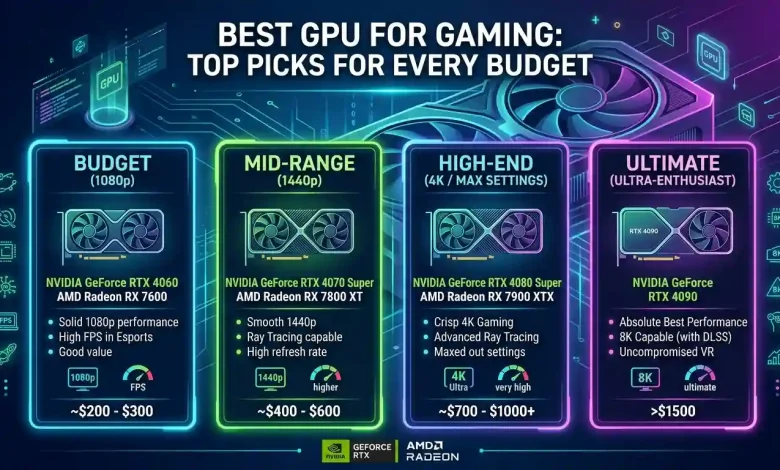
Table of Contents
The Best GPU for Gaming is not a one-size-fits-all answer. For any avid gamer, the Graphics Processing Unit (GPU) is arguably the most critical component of a gaming PC, acting as the heart that brings virtual worlds to life. It dictates everything from frame rates and visual fidelity to the smooth rendering of complex scenes and the support for advanced graphical features like ray tracing and AI upscaling. Choosing the right GPU can significantly enhance your gaming experience, but with a constantly evolving market filled with options from NVIDIA, AMD, and increasingly, Intel, the decision can be overwhelming. This comprehensive guide aims to demystify the process, offering top picks for every budget and detailing the key factors to consider, ensuring you make an informed choice that aligns with your gaming aspirations and financial plan.
Best GPU for Gaming Your Gaming Needs and Budget
Before diving into specific GPU models, it’s crucial to understand your personal gaming requirements and set a realistic budget. These two factors will largely determine which graphics card category is best suited for you.
Resolution and Refresh Rate:
- 1080p Gaming: This is still the most popular resolution for PC gamers, especially those on a budget. GPUs for 1080p gaming are generally more affordable, and many can achieve high refresh rates (60Hz to 144Hz+) for smooth gameplay in competitive titles.
- 1440p Gaming: Often considered the “sweet spot” for many serious gamers, 1440p offers a significant visual upgrade over 1080p without the extreme hardware demands of 4K. A good 1440p GPU can deliver sharp textures and wider fields of view at high refresh rates (often 120Hz or 144Hz).
- 4K Gaming: For the ultimate visual experience, 4K resolution provides unparalleled detail and immersion. However, it demands the most powerful (and expensive) GPUs to maintain playable frame rates, especially with demanding titles and high settings.
Game Types and Future-Proofing:
Consider the types of games you primarily play. Are you into graphically intensive AAA titles like Cyberpunk 2077, competitive esports games like Valorant, or a mix of both? If you aim to play the latest and upcoming titles with high settings for several years, investing in a more powerful GPU with ample VRAM will offer better “future-proofing.”
Budget:
Your budget is perhaps the most significant constraint. GPU prices can range from under $200 to well over $1,500. It’s important to balance performance desires with what you can comfortably afford, remembering that the GPU is often the most costly component in a gaming PC.
Entry-Level Gaming: Affordable Powerhouses for 1080p
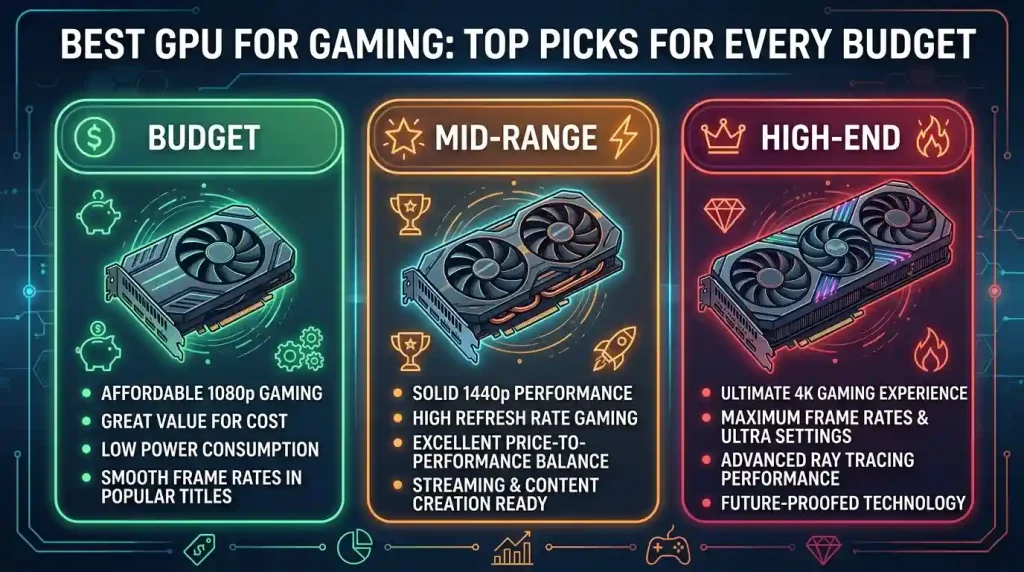
For gamers looking to enjoy modern titles at 1080p resolution without breaking the bank, several excellent GPUs offer a compelling balance of performance and value. These cards are typically designed to provide smooth gameplay at 60 frames per second (FPS) or higher, even on medium to high settings.
The AMD Radeon RX 7600 is frequently highlighted as a strong contender for the best budget graphics card, offering spectacular value. Built on the AMD RDNA 3 architecture, it provides improved performance over its predecessors. It can handle demanding games like Cyberpunk 2077 at 1080p with Ultra settings and even enable ray tracing with the help of AMD FSR. Furthermore, the RX 7600 can tackle some games at 1440p, including Assassin’s Creed Valhalla and Doom Eternal. Another solid option for 1080p gaming is the NVIDIA GeForce RTX 4060. It offers excellent 1080p gaming performance, especially at 144Hz displays, and includes modern features like hardware ray tracing and DLSS 3 frame generation, all while maintaining low power consumption. Its compact size also allows it to fit into most cases.
For those on an even stricter budget, the AMD Radeon RX 6600, despite being a few years old, still offers excellent price-to-performance for 1080p gaming at around 60fps with decent visual fidelity. It comes with 8GB of GDDR6 memory, which is generally sufficient for 1080p gaming. Intel’s Arc A750 is also a viable budget option, offering performance that can rival or exceed the RX 6600 in some titles, although driver stability has historically been a point of concern for Intel’s newer GPU venture.
- NVIDIA GeForce RTX 4060: Excellent 1080p/144Hz performance with DLSS 3 and ray tracing.
- AMD Radeon RX 7600: Strong 1080p performance, good value, and RDNA 3 features.
- AMD Radeon RX 6600: Best budget option for 1080p/60fps gaming with 8GB VRAM.
Mid-Range Marvels: The Sweet Spot for 1440p Gaming
The 1440p resolution is widely regarded as the sweet spot for PC gaming, delivering significantly crisper visuals than 1080p without demanding the ultra-high-end hardware necessary for 4K. GPUs in this category aim to provide a smooth, high-refresh-rate experience at 1440p in most modern AAA titles.
The AMD Radeon RX 7800 XT is a standout performer in this segment. It delivers smashing 1440p performance and is often considered to trounce its NVIDIA rival, the RTX 4070, despite often being more affordable. With an ample 16GB of GDDR6 memory, it’s well-suited for 1440p and offers good future-proofing. Its strong rasterization performance and FSR 3 support make it an excellent choice for gamers seeking value.
On the NVIDIA side, the GeForce RTX 4070 Super is currently seen as offering the best value in NVIDIA’s portfolio for 1440p gaming. It delivers fantastic performance at 2560×1440 and is remarkably power-efficient. Its ray tracing frame rates are superb, and support for DLSS 3 provides a significant edge in highly demanding games, allowing titles like Cyberpunk 2077 to run at over 100fps with incredible settings. Another strong contender is the RTX 4070, a powerhouse for 1440p gaming with premium features, including 12GB GDDR6X VRAM, strong ray tracing, and DLSS 3 with Frame Generation.
For those looking for slightly older but still capable options, the AMD Radeon RX 6700 XT with 12GB of VRAM is often recommended as a budget-friendly 1440p option, offering smooth performance in demanding titles at high to ultra settings. The RX 6800 and RX 6750 XT also provide excellent value in this range.
- AMD Radeon RX 7800 XT: Outstanding value and performance at 1440p, 16GB VRAM for future-proofing.
- NVIDIA GeForce RTX 4070 Super: High FPS in competitive and AAA titles, DLSS 3 makes ray tracing playable, lower power consumption.
- NVIDIA GeForce RTX 4070: Fantastic 1440p performance, superb ray tracing, and DLSS 3 support.
High-End Dominance: Uncompromising 4K Performance
When budget is less of a concern and the goal is to achieve the pinnacle of visual fidelity and performance at 4K resolution, the high-end GPU market offers unparalleled power. These cards are designed to handle the most graphically intensive games at ultra settings, often with ray tracing enabled, and still maintain high frame rates.
The NVIDIA GeForce RTX 4090 stands as the undisputed champion of 4K gaming, offering unparalleled performance. With its massive VRAM (24GB GDDR6X) and advanced ray tracing capabilities, it can easily handle the most demanding games. It’s the first graphics card capable of maxing out a 120Hz 4K monitor in many modern games, achieving monumental frame rates even with ray tracing enabled and DLSS 3 activated. For those who demand peak performance regardless of price, the RTX 4090 is an absolutely sublime GPU.
AMD’s flagship, the Radeon RX 7900 XTX, is a strong contender in the 4K gaming arena, delivering exceptional performance that rivals NVIDIA’s top offerings, often at a slightly lower price point. It comes with 24GB of GDDR6 VRAM, providing plenty of memory for 4K gaming and future titles. While it might lag slightly behind the RTX 4090 in raw ray tracing performance, it still offers an excellent 4K gaming experience. The RX 7900 XTX is a compelling choice for those seeking top-tier performance without completely breaking the bank.
If the RTX 4090 is out of reach but you still want an exceptional 4K experience, the NVIDIA GeForce RTX 4080 Super is a fantastic alternative. It offers excellent performance with ray tracing and DLSS 3.5 support, making it a future-proof option. The RTX 4080 also offers impeccable 4K performance, excelling in both competitive e-sports and narrative-driven games.
| GPU Model (Approx. Current Tier) | Target Resolution | Key Features & Benefits | VRAM | Typical Price Range |
|---|---|---|---|---|
| AMD Radeon RX 6600 (Entry-Level) | 1080p @ 60+ FPS | Cost-effective, good 1080p performance, 8GB VRAM. | 8GB GDDR6 | $200 – $250 |
| NVIDIA GeForce RTX 4060 (Entry-Level) | 1080p @ 100+ FPS | DLSS 3, ray tracing, power efficient, compact. | 8GB GDDR6 | $290 – $350 |
| AMD Radeon RX 7600 (Entry-Level) | 1080p @ 100+ FPS, some 1440p | Excellent value, RDNA 3 architecture, FSR support. | 8GB GDDR6 | $250 – $300 |
| AMD Radeon RX 7800 XT (Mid-Range) | 1440p @ 60-100+ FPS | Strong rasterization, 16GB VRAM, great value. | 16GB GDDR6 | $450 – $550 |
| NVIDIA GeForce RTX 4070 Super (Mid-Range) | 1440p @ 60-100+ FPS | DLSS 3, superior ray tracing, power efficient. | 12GB GDDR6X | $550 – $650 |
| AMD Radeon RX 7900 XTX (High-End) | 4K @ 60+ FPS | Exceptional 4K performance, 24GB VRAM, competitive price. | 24GB GDDR6 | $900 – $1000 |
| NVIDIA GeForce RTX 4090 (Top-Tier) | 4K @ 100+ FPS | Unrivaled performance, DLSS 3, best ray tracing, 24GB VRAM. | 24GB GDDR6X | $1600+ |
Factors Beyond Raw Performance: VRAM, Cooling, and Power
While raw performance benchmarks are crucial, a graphics card’s overall effectiveness and longevity are also heavily influenced by several other key factors. Understanding these can help you fine-tune your selection.
VRAM (Video Random Access Memory):
VRAM is dedicated memory on the GPU that stores graphical data, textures, and frame buffers, essential for rendering complex scenes. The amount of VRAM needed largely depends on your target resolution and game settings.
- 8GB VRAM: Generally sufficient for 1080p gaming, even at high settings. However, some very texture-heavy or future titles at 1080p might push this limit.
- 12GB VRAM: A comfortable amount for 1440p gaming and some lighter 4K workloads. Cards like the RTX 4070 often come with 12GB.
- 16GB+ VRAM: Ideal for 1440p ultra settings, 4K gaming, and content creation tasks. Higher VRAM capacity provides better future-proofing and smoother performance in demanding scenarios. For high-end 4K gaming, 24GB (found in cards like the RTX 4090 and RX 7900 XTX) is considered top-tier.
While VRAM capacity is important, it’s also crucial to consider if the GPU itself is powerful enough to utilize that memory effectively. A card with a large amount of VRAM but a weaker GPU might not translate to significantly better performance.
Cooling Solutions:
Modern GPUs generate a significant amount of heat, and effective cooling is vital to maintain optimal performance and prevent thermal throttling. There are primarily three types of cooling systems for graphics cards:
- Open-Air Coolers (Axial Fans): The most common type, featuring multiple fans (usually two or three) that blow air directly over a large heatsink. These coolers disperse warm air into the PC case, requiring good overall case airflow for optimal performance. They generally offer excellent cooling and can be quieter than blower-style cards.
- Blower-Style Coolers: These use a single fan to draw air from inside the case and exhaust it directly out of the back of the PC. They are particularly useful in smaller cases or multi-GPU setups where internal airflow is limited, as they prevent hot air from recirculating within the chassis. However, they can be noisier and sometimes run hotter than open-air designs due to the smaller fan needing to spin faster.
- All-in-One (AIO) Liquid Coolers: These self-contained liquid cooling solutions typically feature a water block on the GPU connected by tubes to a radiator with fans. AIOs offer superior cooling performance and quieter operation, especially under heavy loads, and are excellent for overclocking. They exhaust heat outside the case, similar to blower cards, but with much greater efficiency.
Hybrid coolers combine elements of both air and liquid cooling, often using a liquid loop for the GPU die and air cooling for other components.
Power Consumption and PSU Requirements:
High-performance GPUs can draw substantial power, necessitating a robust Power Supply Unit (PSU) with sufficient wattage and the correct connectors. Always check the manufacturer’s recommended PSU wattage for your chosen GPU to ensure system stability and prevent potential issues. Overlooking PSU requirements can lead to system crashes or even damage to components.
The Ecosystem: Drivers, Features, and Software
Beyond the hardware specifications, the software ecosystem surrounding your GPU plays a significant role in your gaming experience. Both NVIDIA and AMD offer unique features and software suites that enhance performance and visual quality.
NVIDIA’s DLSS and Reflex:
- DLSS (Deep Learning Super Sampling): NVIDIA’s AI-powered upscaling technology uses dedicated Tensor Cores on RTX GPUs to render games at a lower internal resolution and then intelligently upscale them to a higher resolution, significantly boosting frame rates while maintaining (and sometimes even improving) image quality. DLSS is generally regarded as having superior image quality compared to FSR, particularly in motion and for ray-traced scenes, and is supported in a vast majority of games that offer upscaling.
- NVIDIA Reflex: This technology reduces system latency (input lag) in competitive games, providing a more responsive gaming experience.
AMD’s FSR and Anti-Lag:
- FSR (FidelityFX Super Resolution): AMD’s open-source upscaling technology works on a broader range of GPUs, including older AMD and NVIDIA cards, and even some integrated graphics. While FSR also boosts frame rates, its software-based approach often results in slightly less sharp image reconstruction and can exhibit more artifacts compared to DLSS, especially at lower quality presets. However, FSR 3 has introduced frame generation, aiming to close the performance gap.
- AMD Anti-Lag: Similar to NVIDIA Reflex, Anti-Lag aims to reduce input latency in games.
Driver Stability and Software Suites:
Both manufacturers provide extensive software suites (NVIDIA Control Panel/GeForce Experience and AMD Adrenalin Edition) for driver management, game optimization, and feature control. Stable and frequently updated drivers are essential for optimal performance and compatibility with new game releases. Historically, NVIDIA has had a strong reputation for driver stability, though AMD has made significant strides in recent years. Intel, being a newer player in the discrete GPU market, is continuously working on refining its drivers.
For a deeper understanding of the differences and performance comparisons between NVIDIA’s DLSS and AMD’s FSR, a detailed analysis can be found on Wikipedia’s page on Deep Learning Super Sampling, which also covers FidelityFX Super Resolution.
When to Upgrade Your GPU?
Deciding when to upgrade your GPU can be a tricky decision, as it involves balancing current performance, upcoming technologies, and your budget. Here are some indicators that it might be time for an upgrade:
- Struggling Frame Rates: If your current GPU consistently fails to deliver playable frame rates (e.g., below 60 FPS for 1080p, or below your monitor’s refresh rate for higher resolutions) in your favorite games, even with settings adjusted, it’s a clear sign.
- New Game Releases: When newly released AAA titles demand significantly more power than your current card can offer, or if you have to heavily compromise on visual settings to play them, an upgrade might be warranted.
- Bottlenecking: If your CPU is powerful but your GPU is constantly at 100% utilization while your CPU idles, your GPU is likely bottlenecking your system, preventing you from getting the most out of your other components.
- New Display: Upgrading to a higher-resolution monitor (e.g., from 1080p to 1440p or 4K) or a high-refresh-rate display will almost certainly necessitate a more powerful GPU to drive the increased pixel count or frame output.
- New Technologies: If you want to experience cutting-edge features like advanced ray tracing, or benefit from the latest generations of AI upscaling (DLSS 3/FSR 3), an upgrade to a newer GPU that supports these technologies is necessary.
It’s also worth keeping an eye on the GPU release cycles. While NVIDIA and AMD typically release new generations every 1-2 years, waiting for a new series might yield better performance-per-dollar, though prices tend to be higher at launch.
Conclusion: Making the Right Choice
Choosing the best GPU for gaming in 2026 is a highly personal decision, deeply rooted in your specific gaming habits, desired resolution, and most importantly, your budget. From the budget-friendly cards that unlock enjoyable 1080p experiences to the high-end behemoths that render stunning 4K worlds, there’s a graphics card tailored for every gamer.
For those seeking value, AMD continues to offer strong propositions, particularly in the entry-level and mid-range segments, providing ample VRAM and solid rasterization performance. NVIDIA, while often commanding a premium, consistently leads in raw ray tracing capabilities and the maturity of its DLSS upscaling technology. Intel is an emerging contender, bringing competitive options to the budget market and continuously improving its driver support.
Before making your final purchase, consider the entire ecosystem: the games you play, the resolution of your monitor, the capabilities of your existing PC components, and the long-term value of features like VRAM, cooling, and software optimizations. By carefully weighing these factors against the top picks detailed in this guide, you’ll be well-equipped to select a GPU that not only fits your budget but also elevates your gaming experience to new heights, ensuring countless hours of immersive and fluid gameplay.