Best Budget GPU for Smooth 1080p and 1440p Gaming
Table of Contents
The pursuit of smooth gaming experiences at Best Budget GPU for Smooth 1080p and 1440p Gaming 1080p and 1440p resolutions doesn’t always have to break the bank. In 2026, navigating the graphics card market for budget-friendly options that still deliver robust performance is more achievable than ever, thanks to advancements from NVIDIA, AMD, and Intel, alongside a vibrant used market. While high-end GPUs continue to push boundaries with astronomical price tags, a sweet spot exists for gamers who prioritize value without sacrificing visual fidelity or frame rates. This comprehensive guide will delve into the best budget GPUs available today, both new and used, to help you achieve a truly satisfying gaming experience at your desired resolution. We’ll explore critical factors like VRAM, architecture, and upscaling technologies, providing actionable advice to ensure your investment delivers smooth, immersive gameplay for years to come.
Budget GPUs: Key Factors to Consider
When shopping for a budget GPU, it’s crucial to look beyond raw processing power and understand how various specifications contribute to real-world gaming performance. Several key factors determine a graphics card’s suitability for smooth 1080p and 1440p gaming, especially when aiming for a high frame rate without spending a fortune.
VRAM (Video Random Access Memory)
VRAM is arguably one of the most critical specifications, especially with modern games becoming increasingly demanding. For 1080p gaming in 2026, 8GB of VRAM is considered the minimum, though 12GB is highly recommended for more breathing room and future-proofing. As for 1440p, 12GB is the practical minimum, with 16GB being the recommended standard to ensure consistent performance, particularly in demanding AAA titles with high texture settings and ray tracing. Running out of VRAM can lead to severe stuttering, texture pop-in, and significant FPS drops, making the gaming experience frustrating. Therefore, prioritizing a GPU with ample VRAM is a smart long-term strategy, even if it means a slight compromise on raw processing power.
GPU Architecture and Core Specifications
The underlying architecture of a GPU (e.g., NVIDIA’s Blackwell, AMD’s RDNA 4, Intel’s Xe) dictates its efficiency, processing capabilities, and feature set. Newer architectures often bring significant generational improvements in rasterization, ray tracing, and AI performance. Core specifications like CUDA Cores (NVIDIA), Stream Processors (AMD), or Xe Cores (Intel) indicate the raw computational power. Clock speeds (base and boost) also play a role, influencing how fast the GPU can process data. A higher clock speed generally translates to better performance, but it’s important to consider it in conjunction with the architecture and core count.
Upscaling Technologies: DLSS, FSR, and XeSS
In 2026, upscaling technologies have become indispensable for budget and mid-range GPUs. NVIDIA’s DLSS (Deep Learning Super Sampling), AMD’s FSR (FidelityFX Super Resolution), and Intel’s XeSS (Xe Super Sampling) use AI or advanced algorithms to render games at a lower resolution and then upscale them to a higher target resolution. This effectively boosts frame rates significantly with minimal perceived loss in image quality. DLSS 4 with Multi Frame Generation (NVIDIA) and FSR 4 (AMD) have made considerable strides, with DLSS generally offering superior image quality and performance uplift in supported titles. These technologies allow budget GPUs to punch above their weight, enabling smooth 1080p and even 1440p gaming experiences that would otherwise be out of reach.
Power Efficiency and Cooling
Power consumption (TDP – Thermal Design Power) directly impacts your electricity bill and the cooling requirements of your PC. More efficient GPUs generate less heat, requiring less robust (and often quieter) cooling solutions. This can be a significant factor for those building smaller form-factor PCs or using modest power supplies. Many modern budget GPUs are remarkably power-efficient, making them suitable for a wide range of systems.
The Current Market Landscape: Navigating Value in Mid-2026
The GPU market in mid-2026 presents a complex picture, marked by both fierce competition and persistent challenges. NVIDIA continues its dominance, especially in high-end gaming and AI, but AMD and Intel are aggressively increasing their market share with competitive pricing and innovative solutions in the mainstream segment.
New vs. Used Market Dynamics
One of the most significant trends impacting budget buyers is the general price hike across the GPU market, largely driven by strong demand from AI data centers and ongoing DRAM shortages. This makes finding genuinely budget-friendly new cards challenging, pushing many consumers to consider older generations. The used market, particularly for NVIDIA’s RTX 30-series and AMD’s RX 6000-series, offers excellent value. These cards, though a generation or two old, are still incredibly capable for 1080p and 1440p gaming and have seen significant price drops, making them a “sweet spot” for budget-conscious buyers. However, buying used requires caution, including verifying the card’s condition and ensuring proper testing.
Generational Leaps and Feature Sets
The latest generations, such as NVIDIA’s RTX 50-series (Blackwell architecture) and AMD’s Radeon RX 9000-series (RDNA 4 architecture), deliver substantial performance improvements over their predecessors. NVIDIA maintains its lead in ray tracing and AI upscaling with DLSS 4, while AMD has significantly closed the gap with FSR 4, often offering compelling price-to-performance ratios in traditional rasterization workloads. Intel’s Arc B-series GPUs, building on the foundation of their A-series, have also become genuine contenders, especially in the budget and mid-range segments, with vastly improved driver support and competitive pricing. These advancements mean that even “budget” cards today offer features and performance that were once exclusive to higher-tier models.
The Best Budget GPUs for Smooth 1080p Gaming
For many gamers, 1080p remains the sweet spot, offering sharp visuals and high frame rates without requiring an exorbitant investment. In 2026, several budget-friendly GPUs deliver excellent 1080p performance, making smooth gameplay a reality for a wider audience.
NVIDIA GeForce RTX 5060
The NVIDIA GeForce RTX 5060 stands out as a top contender for 1080p gaming. Built on the Blackwell architecture, it offers significant improvements over the previous generation, the RTX 4060, delivering smooth performance in virtually every modern game. Its 8GB of GDDR7 VRAM, coupled with DLSS 4 Multi Frame Generation, can effectively double frame rates in supported titles, making 1080p gaming feel effortless. The RTX 5060 is also highly power-efficient, with a TDP of around 115-145W, making it suitable for a wide range of systems. While its 8GB VRAM might be a concern for some ultra-settings scenarios in future AAA games, its overall package of performance, efficiency, and DLSS 4 support makes it an outstanding budget pick.
AMD Radeon RX 7600 XT
AMD’s Radeon RX 7600 XT offers exceptional value, particularly due to its generous 16GB VRAM buffer, which is double that of many NVIDIA competitors at this price point. This ample VRAM is a significant advantage for gamers who enjoy heavily modded games, simulation titles, or plan to stream their gameplay, providing crucial headroom for future titles. While it may slightly trail the RTX 4060 (and thus the newer RTX 5060) in ray tracing performance, it holds its own, and often excels, in rasterization workloads. With excellent FSR 4 support, the RX 7600 XT delivers competitive performance for 1080p gaming at high settings. It often comes in at a competitive price, making it one of the best value propositions in the GPU market today for 1080p.
Intel Arc B580
The Intel Arc B580 has emerged as a genuine budget disruptor. With 12GB of GDDR6 VRAM and robust 1080p rasterization performance, it often matches or even beats the RTX 4060 in many titles. Intel’s driver situation has dramatically improved since its initial A-series launch, and with XeSS 3 and multi-frame generation, the B580 can deliver impressive frame rates, especially if you’re willing to tweak settings. Its price point, often around $250-$300, makes it an incredibly compelling option for budget-conscious builders who want more than 8GB of VRAM without spending a fortune. Ray tracing performance might lag behind NVIDIA, but for pure rasterization and overall value, the Arc B580 is a strong choice for 1080p and can even stretch into light 1440p gaming.
Used Market Options for 1080p
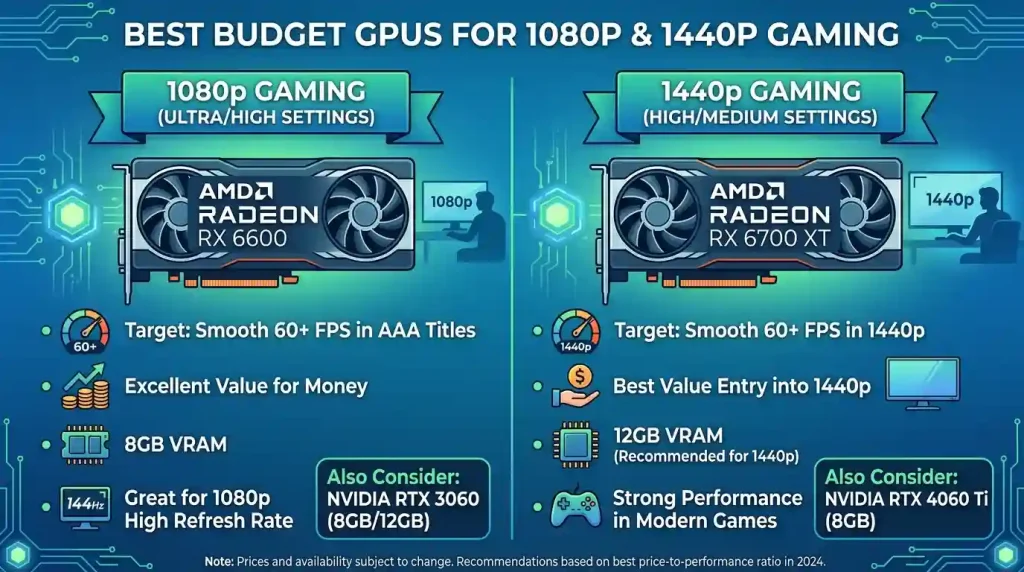
For those on a very tight budget, the used market offers incredible value. The AMD Radeon RX 6700 XT with 12GB of VRAM is widely considered the best raw performance-per-dollar option in the used segment, capable of smooth 1080p and even respectable 1440p gaming. Similarly, the NVIDIA GeForce RTX 3060 12GB remains a strong contender, offering solid 1080p performance with the benefit of DLSS support. These last-generation cards, if found at a fair price (typically $120-$200), can provide years of solid 1080p gaming.
Stepping Up: Top Budget GPUs for 1440p Performance
1440p resolution has become the “sweet spot” for many serious PC gamers, offering a noticeable jump in visual clarity over 1080p without the extreme hardware demands of 4K. While it requires a more capable GPU, several budget-oriented options in 2026 can deliver smooth 1440p gaming experiences.
AMD Radeon RX 9060 XT
The AMD Radeon RX 9060 XT is widely acclaimed as the best budget option for entering the 1440p gaming arena without spending excessively. Marketed directly at native 1440p Ultra play, it makes sense for value-focused buyers. With a generous 16GB of VRAM, the RX 9060 XT ensures ample memory headroom for demanding titles and high texture settings at 1440p, which is crucial for longevity. In tests, it averages around 70 FPS at native 1440p in many games, with FSR 4 capable of pushing frame rates even higher in supported titles. Its strong raw performance and large VRAM buffer make it an excellent choice for a budget graphics card with better long-term flexibility.
NVIDIA GeForce RTX 5060 Ti
If you prefer NVIDIA’s ecosystem, particularly for superior ray tracing and DLSS 4 capabilities, the NVIDIA GeForce RTX 5060 Ti is a suitable target for 1440p. While some variants might come with 8GB of VRAM, the 16GB GDDR7 version of the RTX 5060 Ti is the sweet spot for reliable 1440p performance. This card offers a significant performance increase over the non-Ti 4060, making it a highly capable 1440p card. Its ray tracing performance, combined with DLSS 4, allows you to enable advanced visual effects without a major performance penalty. The RTX 5060 Ti handles most AAA titles at high settings above 100 FPS, making it a fantastic value for budget-conscious builders looking for solid 1440p.
AMD Radeon RX 9070
The AMD Radeon RX 9070 emerges as a very strong contender for 1440p gaming, especially if found at a good price. This card offers high performance for the money, delivering decent 1440p frame rates and significantly improved ray tracing over previous AMD generations. Crucially, it comes with 16GB of VRAM, making it well-equipped for high graphics settings at 1440p now and into the future. Gamers can expect over 100 FPS on average in high-demanding games at 1440p with the RX 9070. It offers performance close to the RX 9070 XT and NVIDIA’s RTX 5070 Ti, positioning it as an excellent value option for enthusiasts who want to max out 1440p settings without stretching to the very high-end.
Used Market Options for 1440p
For those willing to explore the used market, the AMD Radeon RX 6800 with 16GB of VRAM is an excellent all-rounder for strong 1440p gaming. Its generous VRAM is a big deal for modern textures and open-world titles, providing breathing room for future games. The NVIDIA GeForce RTX 3070, if found for a good price, can also deliver solid 1440p performance, especially for high-refresh 1080p. However, its 8GB of VRAM can become a limiting factor in some newer, more demanding titles at 1440p, requiring careful settings management. Always exercise caution and thoroughly test any used GPU before committing to the purchase.
| GPU Model | Architecture | VRAM | Target Resolution & Performance | Key Features | Est. New Price (USD) |
|---|---|---|---|---|---|
| NVIDIA GeForce RTX 5060 | Blackwell | 8GB GDDR7 | Smooth 1080p (High-Ultra), Entry 1440p (Medium) | DLSS 4, Multi Frame Generation, Power Efficient | $380 |
| AMD Radeon RX 7600 XT | RDNA 3 | 16GB GDDR6 | Strong 1080p (High-Ultra), Capable 1440p (Medium) | FSR 4, Excellent Rasterization, High VRAM | $380 |
| Intel Arc B580 | Xe BMG | 12GB GDDR6 | Strong 1080p (High-Ultra), Value 1440p (Medium-High) | XeSS 3, Frame Generation, Good Value | $250-$300 |
| AMD Radeon RX 9060 XT | RDNA 4 | 16GB GDDR6 | Excellent 1440p (High-Ultra), High-refresh 1080p | FSR 4, High VRAM, Strong 1440p Rasterization | $440 |
| NVIDIA GeForce RTX 5060 Ti (16GB) | Blackwell | 16GB GDDR7 | Premium 1440p (High-Ultra), Ray Tracing Capable | DLSS 4, Multi Frame Generation, Ray Tracing Performance | ~$500+ (depending on variant) |
| AMD Radeon RX 9070 | RDNA 4 | 16GB GDDR6 | High-end 1440p (Ultra), Entry 4K (Medium) | FSR 4, Strong Rasterization, Improved Ray Tracing | $600-$700 |
| AMD Radeon RX 6700 XT (Used) | RDNA 2 | 12GB GDDR6 | Excellent 1080p (Ultra), Solid 1440p (High) | FSR 3, Strong Rasterization for Price | $150-$200 |
| NVIDIA GeForce RTX 3060 12GB (Used) | Ampere | 12GB GDDR6 | Smooth 1080p (High-Ultra), Entry 1440p (Medium) | DLSS 2/3, Decent Ray Tracing for Price | $120-$140 |
Optimizing Your System: CPU, RAM, and PSU Synergy
A powerful budget GPU alone won’t guarantee a smooth gaming experience. The graphics card works in conjunction with other components in your PC, and a balanced system is key to unlocking its full potential. Overspending on a GPU while neglecting the CPU, RAM, or power supply can lead to bottlenecks, where one component limits the performance of another.
CPU Pairing
Your Central Processing Unit (CPU) plays a vital role in gaming, especially in titles that are CPU-intensive or when aiming for very high frame rates. A weaker CPU can “bottleneck” even a capable GPU, meaning the GPU is waiting for the CPU to process game logic, resulting in lower-than-expected frame rates. For budget 1080p and 1440p gaming, a modern mid-range CPU like an Intel Core i5 (12th gen or newer) or an AMD Ryzen 5 (5000 series or newer) is generally sufficient. Pairing an entry-level budget GPU with a very old or low-power CPU is a common mistake that can negate the GPU’s potential.
RAM Requirements
Random Access Memory (RAM) directly impacts multitasking and how quickly your system can access game assets. For a smooth gaming experience in 2026, 16GB of RAM is the recommended baseline. While 8GB might still be adequate for some older or less demanding titles, modern AAA games, especially at 1440p, can easily exceed this, leading to stuttering as the system struggles to load textures and data. Investing in 16GB (2x8GB) of dual-channel RAM, ideally running at 3200MHz or faster, provides a noticeable improvement in responsiveness and frame rate stability.
Power Supply Unit (PSU)
The Power Supply Unit (PSU) is the heart of your system, providing electricity to all components. When choosing a budget GPU, it’s crucial to ensure your PSU has enough wattage and the necessary connectors (e.g., 6-pin or 8-pin PCIe power connectors) to safely power the graphics card. Each GPU has a recommended PSU wattage, and it’s always wise to have a little headroom. An underpowered or unreliable PSU can lead to system instability, crashes, or even damage to components. Aim for a reputable brand with an 80 Plus Bronze or Gold certification for efficiency and reliability.
Driver Support and Ecosystem: A Crucial Consideration
Beyond the raw hardware, the software ecosystem supporting your GPU is incredibly important for performance, stability, and access to new features. Driver support, in particular, can significantly impact your gaming experience, especially with newer titles.
Driver Updates and Stability
NVIDIA, AMD, and Intel regularly release driver updates that optimize performance for new game releases, fix bugs, and introduce new features. Staying up-to-date with the latest drivers is essential for maximizing your GPU’s potential. Historically, Intel’s Arc GPUs faced initial challenges with driver maturity, particularly for older DirectX 9 and DX11 titles, but these issues have been largely resolved through consistent updates, making them much more viable today. NVIDIA and AMD generally have a long-standing reputation for robust and frequent driver updates.
Upscaling Technologies and Software Suites
The effectiveness of upscaling technologies like DLSS, FSR, and XeSS is heavily reliant on driver integration and game support. NVIDIA’s DLSS, benefiting from dedicated Tensor Cores, generally offers superior image quality and performance gains, especially with Multi Frame Generation. AMD’s FSR is celebrated for its open-source nature and broader compatibility across various GPUs, including older generations and even NVIDIA cards. Intel’s XeSS has rapidly improved, now offering competitive performance and features like multi-frame generation. These technologies are often managed through the respective GPU control panel software (e.g., NVIDIA Control Panel, AMD Adrenalin Software, Intel Arc Control), which also provides other optimization tools, monitoring features, and game profiles. The choice of ecosystem can influence not just in-game performance but also the ease of optimizing your settings and accessing advanced features.
Ecosystem Benefits
Choosing a GPU from a particular manufacturer often means tying into their broader ecosystem of technologies. For NVIDIA, this includes features like Reflex (for reduced system latency), Broadcast (for streaming enhancements), and CUDA (for GPU-accelerated creative applications). AMD offers features like Anti-Lag and Radeon Boost, alongside a strong focus on open standards and good synergy with AMD CPUs and chipsets (Smart Access Memory). These additional software benefits can add significant value to your gaming and overall PC experience, making the choice of GPU more than just about raw frames per second. For more detailed information on GPU technologies and their evolution, consulting resources like Wikipedia’s entry on Graphics Processing Units can provide valuable historical and technical context.
Conclusion: Striking the Perfect Balance
Finding the best budget GPU for smooth 1080p and 1440p gaming in 2026 requires a keen understanding of the market