Laptop with GPU: 8 Incredible Laptops for Gaming, Editing & Rendering
Table of Contents
Laptop with GPU capabilities have revolutionized portable computing, transforming once bulky machines into sleek powerhouses capable of tackling the most demanding tasks, from immersive gaming to intricate content creation. No longer confined to desktop setups, a laptop with a dedicated Graphics Processing Unit (GPU) offers unparalleled performance, versatility, and portability, making it an indispensable tool for a wide array of users. This comprehensive guide will delve into the world of GPU-equipped laptops, exploring the best options for both avid gamers and professional creators, highlighting the critical features that set them apart, and helping you make an informed decision for your next portable powerhouse.
Introduction: The Power of a Dedicated GPU in Laptops
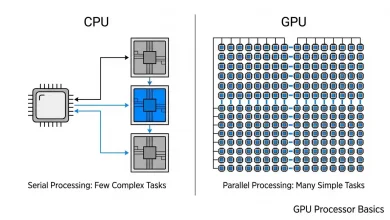
The Graphics Processing Unit (GPU) is a specialized electronic circuit designed to rapidly manipulate and alter memory to accelerate the creation of images, videos, and animations. While CPUs (Central Processing Units) are excellent for general-purpose computing, GPUs excel at parallel processing, handling many pieces of data simultaneously, which is crucial for graphics rendering, machine learning, and video editing applications. For years, dedicated GPUs were primarily associated with high-performance desktop computers. However, advancements in mobile technology have led to the integration of powerful discrete GPUs into laptops, effectively bridging the performance gap and making true mobile gaming and professional content creation a reality.
The impact of a dedicated GPU extends beyond just gaming. For creators, it means faster rendering times, smoother video editing, accelerated 3D modeling, and enhanced performance in various design and AI-assisted creative tools. For gamers, it translates to higher frame rates, more realistic graphics with features like real-time ray tracing, and the ability to play the latest titles at higher resolutions and detail settings.
Understanding Laptop GPUs: Integrated vs. Dedicated
Before diving into specific laptop recommendations, it’s crucial to understand the two main types of GPUs found in laptops:
- Integrated Graphics: These GPUs are built directly into the laptop’s CPU and share the system’s main memory (RAM). They are energy-efficient and suitable for basic tasks like web browsing, video playback, and office work. However, their performance is limited, making them unsuitable for demanding games or intensive creative applications.
- Dedicated (Discrete) Graphics: A dedicated GPU is a separate chip with its own dedicated memory (VRAM). This allows it to handle complex graphical computations independently of the CPU, providing significantly better performance for gaming, video editing, 3D modeling, and graphic design. Dedicated GPUs require more power and generate more heat, necessitating robust cooling systems in the laptops they are housed in.
For both serious gaming and professional content creation, a dedicated GPU is essential. Even an entry-level discrete GPU like an NVIDIA RTX 4050 will significantly outperform integrated graphics.
Gaming Laptops: Key Features and Considerations
Gaming laptops are engineered to deliver peak frame rates and fast response times, providing an immersive and fluid gaming experience. When choosing a gaming laptop, several factors beyond just the GPU come into play:
Powerful GPU is Paramount
The GPU is arguably the most critical component for gaming performance. Look for high-end discrete graphics cards from NVIDIA (GeForce RTX series) or AMD (Radeon RX series). Newer NVIDIA RTX 40-series and AMD Radeon RX 7000 series GPUs offer features like real-time ray tracing and AI-based enhancements (like NVIDIA DLSS and AMD FSR) for improved visuals and performance. In 2024 and 2025, you’ll find models with RTX 4060, RTX 4070, and even up to RTX 4090 laptop GPUs. The latest NVIDIA RTX 50-series GPUs (e.g., RTX 5050, RTX 5070, RTX 5080, RTX 5090) are also emerging, offering even more advanced performance, particularly with DLSS 4 and Blackwell-based AI-enhanced graphics.
High Refresh Rate Display
A high refresh rate display is crucial for smooth gameplay, especially in fast-paced titles. Look for displays with at least 120Hz or 144Hz refresh rates, with 165Hz, 240Hz, or even 360Hz becoming increasingly common in 2024. Resolution options typically range from 1080p (Full HD) to 1440p (QHD) and even 4K. While 1080p with a high refresh rate is excellent for competitive gaming, higher resolutions can offer a more visually stunning experience. OLED displays are gaining popularity, offering superior contrast and response times, though they may impact battery life.
Robust Processor (CPU)
While the GPU handles graphics, a powerful CPU is vital for overall system performance, handling game logic, AI, and multitasking. Look for modern Intel Core i7 or i9 (13th Gen, 14th Gen, or even newer Ultra series) or AMD Ryzen 7 or 9 (Ryzen 7000 series or newer) processors with multiple cores and high clock speeds.
Sufficient RAM and Fast Storage
For gaming, 16GB of DDR4 or, ideally, DDR5 RAM is recommended for smooth performance and multitasking. Many high-end laptops allow for RAM upgrades, so consider models with extra slots. Fast storage, typically an NVMe SSD, is essential for quick game load times and overall system responsiveness. Aim for at least 512GB, with 1TB or more being ideal for a substantial game library.
Effective Cooling System
Powerful components generate significant heat, especially during extended gaming sessions. An efficient cooling system with aggressive fan curves is critical to prevent thermal throttling and maintain consistent performance.
Examples of Noteworthy Gaming Laptops (2024-2026):
Based on recent market trends and reviews, some of the best gaming laptops include:
- Razer Blade series (e.g., Blade 16, Blade 18): Known for sleek designs, premium build quality, and powerful NVIDIA RTX GPUs, often featuring high-refresh-rate displays.
- ASUS ROG Zephyrus series (e.g., G14, G16): Offers a balance of portability and performance, with models featuring AMD Ryzen or Intel Core Ultra CPUs and NVIDIA RTX GPUs, including OLED display options.
- Lenovo Legion series (e.g., Legion Pro 7i, Legion Slim 5): Highly regarded for strong performance, good cooling, and competitive pricing, often equipped with powerful RTX GPUs.
- Gigabyte Aorus series (e.g., Aorus 16X): Often provides a good balance of features and value, with modern CPUs and RTX GPUs, and quality displays.
- MSI Katana / Stealth series: Offers various options from budget-friendly to high-end, with strong GPU performance.
Creator Laptops: Essential Specifications for Creative Workflows
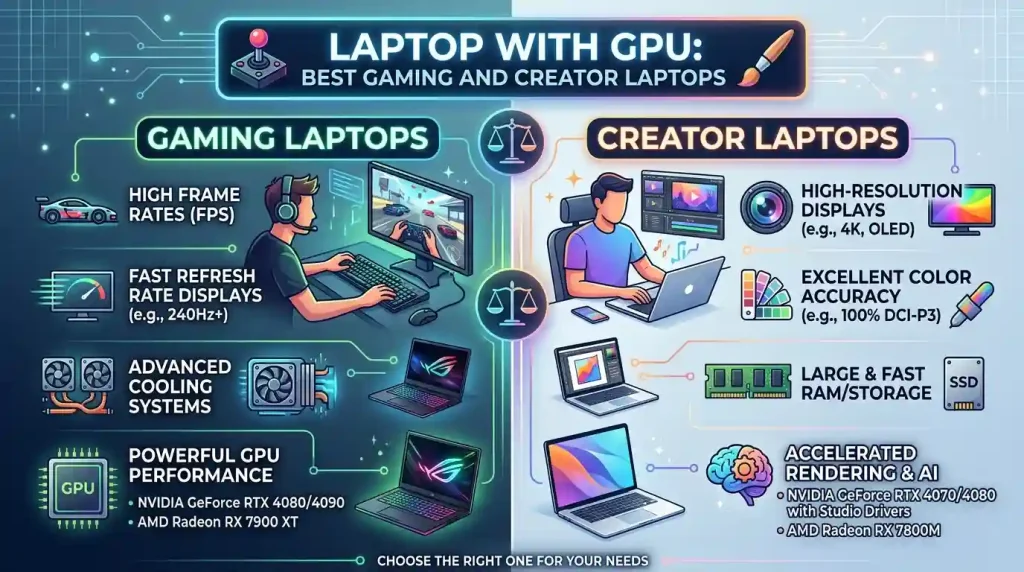
Creator laptops prioritize sustained performance, color accuracy, and optimized thermals for long-duration tasks like video encoding, 3D modeling, animation, and graphic design. While sharing some similarities with gaming laptops in terms of raw power, their design objectives differ in crucial ways.
Powerful and Reliable GPU
A dedicated GPU is equally vital for creators, accelerating various tasks within creative software. NVIDIA’s GeForce RTX series and Quadro RTX GPUs (for professional workstations) are popular choices, offering features like NVIDIA Studio Drivers for enhanced performance and reliability in creative applications, as well as AI acceleration for tools like Omniverse and Stable Diffusion. AMD Radeon RX series GPUs also offer strong performance for creative work.
Color-Accurate and High-Resolution Display
This is a major differentiator. Creator laptops emphasize display quality, typically featuring wider color gamuts (e.g., 100% sRGB or DCI-P3 coverage), factory calibration to Delta-E targets, and uniform brightness for visual precision. High-resolution displays (QHD+, 4K, or 4K+) are common, providing ample screen real estate and sharp details essential for intricate design and video editing. OLED and Mini LED panels are highly sought after for their exceptional contrast and color reproduction.
Sustained CPU Performance
For rendering and complex calculations, a powerful multi-core CPU that can maintain stable clock speeds over hours is crucial. Intel Core i9 or AMD Ryzen 9 processors are excellent choices, with higher core counts being beneficial for tasks like video encoding and 3D rendering.
Ample RAM and Fast, Large Storage
Creators often work with large files and multiple demanding applications simultaneously, necessitating significant RAM. 32GB of DDR5 RAM is highly recommended, and 64GB or even 128GB can be beneficial for future-proofing and extremely heavy workloads. Fast NVMe SSDs with capacities of 1TB or more are essential for storing large project files and ensuring quick access.
Optimized Thermals for Sustained Load
Unlike gaming laptops that handle “bursty” performance, creator laptops need thermal solutions optimized for continuous, long-duration loads to prevent throttling during rendering or encoding tasks.
Examples of Noteworthy Creator Laptops (2024-2026):
Some prominent creator laptops include:
- Apple MacBook Pro (M-series chips): Known for exceptional performance, unified memory architecture, and stunning Mini LED displays, particularly strong in video editing and 3D rendering due to their efficiency and optimized software ecosystem.
- Dell XPS series (e.g., XPS 15, XPS 16 Creator Edition): Offers a blend of powerful performance, beautiful displays, and sleek design, often featuring NVIDIA RTX GPUs.
- ASUS ProArt series (e.g., ProArt P16, ZenBook Pro Duo): Specifically designed for creators, often featuring high-resolution OLED displays, powerful CPUs, and NVIDIA RTX GPUs, with some models offering unique dual-screen setups for enhanced productivity.
- MSI Creator series (e.g., Creator Z16, Z17): Provides high-performance hardware, including Intel Core i9 processors and NVIDIA RTX graphics, coupled with professional-grade displays.
- Lenovo ThinkPad P series (e.g., P1 Gen 7): Workstation-grade laptops offering powerful Intel Core processors and professional NVIDIA Quadro RTX GPUs for specialized creative workloads.
Popular GPU Options: NVIDIA vs. AMD
The laptop GPU market is primarily dominated by NVIDIA’s GeForce RTX series and AMD’s Radeon RX series. Both offer a range of GPUs catering to different performance tiers and budgets.
| Feature | NVIDIA GeForce RTX (Laptop) | AMD Radeon RX (Laptop) |
|---|---|---|
| Market Share/Availability | Dominant, widely available across many laptop brands. | Less common, primarily found in budget systems or specific AMD-partnered designs. |
| Ray Tracing Performance | Generally superior, especially with dedicated RT Cores. | Improved, but often lags behind NVIDIA in performance when ray tracing is enabled. |
| Upscaling Technology | DLSS (Deep Learning Super Sampling) – AI-based, widely adopted and effective for boosting frame rates. | FSR (FidelityFX Super Resolution) – Open-source, works on a broader range of GPUs, but sometimes offers slightly less refined visual quality compared to DLSS. |
| AI Acceleration | Strong focus on AI with Tensor Cores, utilized in DLSS, generative AI tools, and creative applications (NVIDIA Studio). | Also features AI capabilities, though often less prominent in marketing for creative applications compared to NVIDIA’s Studio platform. |
| Power Efficiency (Max-Q/SmartShift) | NVIDIA’s Max-Q technologies optimize voltage and power at a microscopic level for efficiency. | AMD SmartShift dynamically allocates power between CPU and GPU. |
| Driver Support | Dedicated Game Ready Drivers and Studio Drivers optimized for gaming and professional creative applications, respectively. | Gaming drivers, with ongoing improvements in stability and performance. |
| Price/Performance | Often positioned for best performance at higher price points. | Known for providing good raw performance per cost, especially in budget-friendly options. |
| Top-tier Laptop GPUs (2024-2026) | RTX 4090, RTX 5080, RTX 5090 (Laptop) | Radeon RX 7800M XT, RX 9060 XT (expected) |
While NVIDIA generally holds an advantage in ray tracing performance and widespread adoption in high-end laptops, AMD offers competitive raw performance, especially in the mid-range and budget segments. For creators, NVIDIA’s Studio platform and optimized drivers provide a compelling ecosystem. For gamers, both offer excellent experiences, with the choice often coming down to specific laptop models, pricing, and personal preference for features like DLSS or FSR. For more in-depth comparisons, resources like Notebookcheck Tech offer extensive benchmark lists. Notebookcheck’s Mobile Graphics Cards Benchmark List provides detailed performance data for a wide range of laptop GPUs.
The Rise of Hybrid Laptops: Blurring the Lines
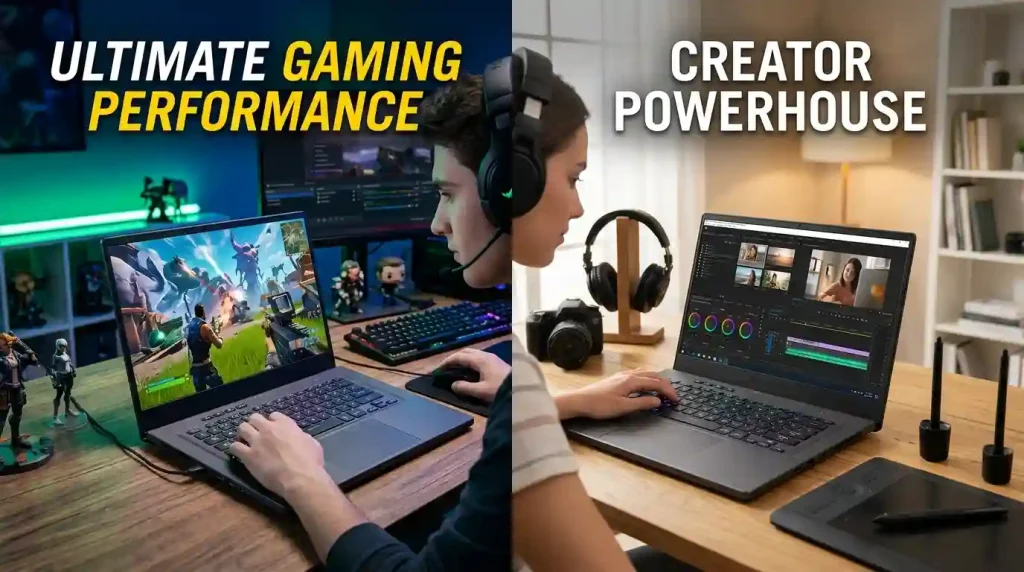
The distinction between gaming and creator laptops has become increasingly nuanced. Many modern high-performance laptops are designed to excel in both domains, offering a versatile solution for users who game and create. These “hybrid” machines often feature:
- Powerful GPUs (e.g., NVIDIA RTX 4070 or higher) capable of handling both demanding games and accelerated creative workflows.
- High-resolution, color-accurate displays with decent refresh rates (e.g., QHD+ or 4K with 120Hz/240Hz).
- Robust cooling systems designed for sustained performance under varied loads.
- Ample RAM (32GB+) and fast SSD storage.
Laptops like the ASUS ROG Zephyrus G16 (2024), Gigabyte Aorus 16X, and some Dell XPS models are examples of machines that effectively bridge this gap, catering to users who need a single device for both work and play.
Future-Proofing Your Investment
When investing in a laptop with a dedicated GPU, considering its longevity is important. Here are a few tips for future-proofing:
- Opt for the Latest Generation: While previous generation GPUs can offer good value, the latest generations (e.g., NVIDIA RTX 40-series/50-series, AMD Radeon RX 7000-series/9000-series) often come with architectural improvements, better power efficiency, and support for newer technologies like DLSS 3/4 or FSR, which can significantly extend their relevance.
- Prioritize VRAM: More VRAM (Video RAM) is always better, especially for higher resolutions, complex textures in games, and large creative projects. Aim for at least 8GB, with 12GB or 16GB being ideal for high-end use.
- Upgradeable RAM and Storage: If possible, choose a laptop that allows for user upgrades of RAM and SSD storage. This can significantly extend the usable life of your laptop as demands increase over time.
- Consider AI Capabilities: With the growing importance of AI in both creative software and gaming (e.g., AI upscaling), GPUs with strong AI acceleration features will be increasingly valuable.
Conclusion
Choosing the best laptop with a dedicated GPU for gaming or content creation requires a careful consideration of your specific needs, budget, and desired performance. While gaming laptops prioritize raw speed and high refresh rates, creator laptops focus on sustained performance and color accuracy. However, the convergence of technology has led to a new generation of hybrid machines that adeptly handle both demanding tasks. Whether you’re a professional editor bringing cinematic visions to life or a competitive gamer seeking the ultimate advantage, the market offers a diverse range of powerful laptops equipped with advanced GPUs. By understanding the key features and making informed choices regarding GPU, CPU, display, RAM, and storage, you can select a portable powerhouse that not only meets your current demands but also stands ready for the innovations of tomorrow. The era of truly powerful and portable computing is here, driven by the ever-evolving capabilities of the laptop GPU.