Integrated GPU vs Dedicated GPU: 10 Powerful Differences to Find the Best Choice
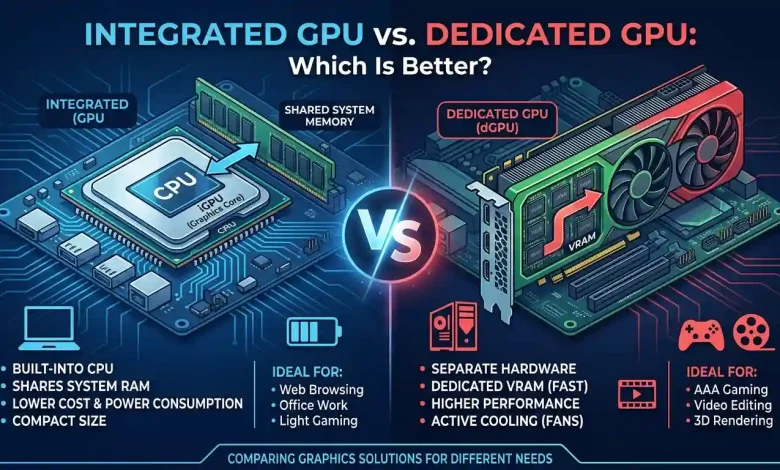
Table of Contents
Integrated GPU vs Dedicated GPU: The decision between these two types of graphics processing units (GPUs) is a critical one for anyone purchasing a new computer, whether it’s for gaming, professional design work, or general daily use. A GPU, or graphics processing unit, is a specialized electronic circuit designed to rapidly manipulate and alter memory to accelerate the building of images in a frame buffer intended for output to a display. Essentially, it’s the component responsible for rendering everything you see on your screen, from simple text and images to complex 3D graphics and animations. Understanding the fundamental distinctions between integrated and dedicated GPUs is crucial for making an informed choice that aligns with your specific needs and budget.
Understanding the Core Differences: Integrated vs. Dedicated
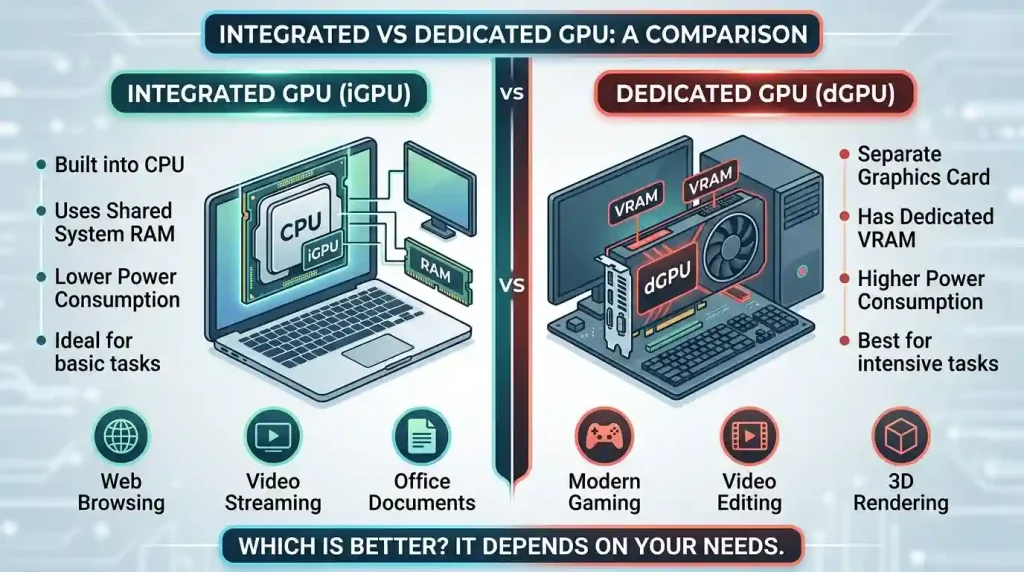
At its heart, the primary difference between an integrated GPU (iGPU) and a dedicated GPU (dGPU), also often referred to as a discrete GPU, lies in their physical location and how they utilize system resources. An iGPU is built directly into the computer’s central processing unit (CPU) or motherboard, sharing system memory (RAM) with the CPU. In contrast, a dGPU is a separate, standalone component with its own dedicated memory, known as Video RAM (VRAM), and its own processing unit. This fundamental architectural difference leads to significant variations in performance, cost, power consumption, and suitability for various tasks.
The evolution of GPUs has seen them move beyond just rendering graphics. Modern GPUs are increasingly employed for general-purpose computing (GPGPU), accelerating tasks like artificial intelligence (AI) processing, machine learning, scientific simulations, and even cryptocurrency mining, thanks to their parallel processing capabilities. This broader application spectrum means the choice of GPU impacts more than just visual fidelity; it influences a system’s overall computational prowess.
Integrated GPUs: The Everyday Workhorse
What is an Integrated GPU?
An integrated GPU is, as its name suggests, integrated directly into the computer’s main processor (CPU) or occasionally onto the motherboard chipset. This design makes the system more compact and efficient. Instead of having its own dedicated memory, an iGPU relies on the system’s main RAM for its operations. This shared memory architecture means that a portion of your system’s RAM is allocated for graphics processing, which can sometimes impact overall system performance, especially during graphics-intensive tasks. Intel’s UHD Graphics, Iris, and Iris Xe series, and AMD’s Radeon Vega Graphics found in their APUs (Accelerated Processing Units) are prime examples of modern integrated GPUs.
Advantages of Integrated GPUs
Integrated GPUs offer several compelling advantages, making them the preferred choice for a large segment of computer users:
- Cost-Effectiveness: Systems with iGPUs are generally more affordable because they eliminate the need for a separate, expensive graphics card. This significantly reduces the overall cost of the computer.
- Energy Efficiency: Integrated graphics consume less power compared to dedicated GPUs. This is particularly beneficial for laptops, where it extends battery life, and for small form factor desktops where lower power consumption translates to less heat generation and quieter operation.
- Space-Saving and Compact Design: By being integrated into the CPU, iGPUs allow for thinner, lighter, and more compact device designs. This is ideal for ultrabooks, mini-PCs, and mobile devices where physical space is at a premium.
- Adequate for Everyday Tasks: For most common computing activities, iGPUs provide perfectly adequate performance. This includes web browsing, streaming video content, office productivity tasks (word processing, spreadsheets), light photo editing, and casual gaming with less demanding titles. Modern integrated graphics have advanced considerably and can even handle some AAA games at lower settings.
Disadvantages of Integrated GPUs
Despite their benefits, integrated GPUs come with inherent limitations that can be significant depending on your computing needs:
- Shared Memory: The most notable drawback is their reliance on system RAM. This shared memory can lead to bottlenecks, as the CPU and GPU compete for the same resources, potentially impacting overall system performance, especially during graphics-intensive applications.
- Lower Performance for Demanding Tasks: Integrated GPUs generally offer lower processing power and memory bandwidth compared to dedicated cards. This means they can struggle with high-end gaming, complex video editing, 3D modeling, and other professional applications that demand significant graphical horsepower. Users may experience slower rendering, lower frame rates, and reduced graphics quality.
- Limited Upgradeability: Integrated GPUs cannot be easily upgraded or replaced. Since they are part of the CPU or soldered to the motherboard, upgrading typically means replacing the entire CPU or, in laptops, buying a new machine altogether.
- Fewer Advanced Features: iGPUs often lack advanced features found in dedicated cards, such as real-time ray tracing or AI-enhanced graphics technologies.
Dedicated GPUs: The Performance Powerhouse
What is a Dedicated GPU?
A dedicated GPU, also known as a discrete GPU, is a standalone component that operates independently of the CPU. It typically comes as an expansion card that plugs into a PCIe slot on the motherboard. Crucially, a dedicated GPU has its own high-speed memory, called Video RAM (VRAM), which is optimized for graphics processing tasks. This dedicated memory and processing unit allow dGPUs to handle complex visual computations with much greater efficiency and speed than integrated solutions. Leading manufacturers of dedicated GPUs include NVIDIA (GeForce, Quadro, TITAN series) and AMD (Radeon RX, Radeon Pro series).
Advantages of Dedicated GPUs
For users who demand top-tier graphical performance, dedicated GPUs offer unparalleled advantages:
- Superior Performance: Dedicated graphics cards provide significantly more processing power and memory than integrated GPUs. They excel in handling demanding applications such as high-end gaming, 3D rendering, video editing, and professional design software with ease. This translates to smoother gameplay, faster frame rates, and better graphics quality at higher resolutions and settings.
- Dedicated Memory (VRAM): Having its own high-speed VRAM ensures that the GPU doesn’t compete with the CPU for system RAM. This reduces strain on system resources and provides immediate, high-bandwidth access to graphics data, leading to a substantial performance boost.
- Advanced Features and Technologies: Dedicated GPUs support cutting-edge technologies like real-time ray tracing, DLSS (Deep Learning Super Sampling), and AI-enhanced graphics, which significantly enhance visual fidelity and performance in compatible applications. They are also crucial for general-purpose GPU (GPGPU) tasks, including AI/machine learning and complex simulations.
- Upgradeability: In desktop systems, dedicated graphics cards are typically replaceable and upgradeable, offering a clear path to future performance enhancements without needing to replace the entire computer.
- Offloads CPU: By handling graphical computations, a dGPU frees up the CPU to focus on other tasks, leading to better overall system responsiveness and potentially boosting CPU performance in systems where the CPU might otherwise be burdened by integrated graphics.
Disadvantages of Dedicated GPUs
The power and performance of dedicated GPUs come with certain trade-offs:
- Higher Cost: Dedicated graphics cards are often the most expensive component in a PC, significantly increasing the overall system price. High-end models, especially the latest generations, can be very costly.
- Increased Power Consumption: dGPUs consume considerably more power than integrated graphics. This leads to higher electricity bills and, in laptops, a shorter battery life, especially during intensive use.
- Greater Heat Generation and Cooling Needs: With higher power consumption comes increased heat output. Dedicated GPUs require robust cooling solutions, often involving large heatsinks and multiple fans, which can make systems larger and potentially noisier.
- Larger Size and Weight: The physical size of a dedicated graphics card, along with its cooling system, means that devices equipped with dGPUs (especially laptops) tend to be thicker, heavier, and less portable.
Performance Comparison: Raw Power vs. Efficiency
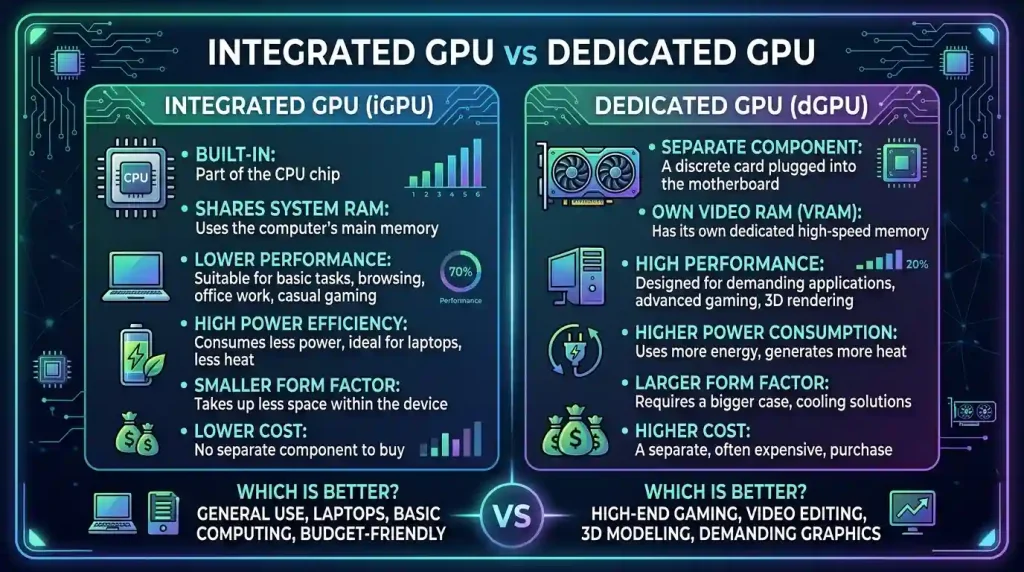
The performance gap between integrated and dedicated GPUs has historically been vast, though modern iGPUs have made significant strides. While integrated solutions like Intel Iris Xe or AMD Radeon Graphics in APUs can now comfortably handle 1080p video playback, light photo editing, and even some older or less demanding games at acceptable frame rates and settings, they still fall short when compared to even entry-level dedicated GPUs for graphically intensive tasks.
For high-performance gaming, content creation, 3D modeling, and scientific computing, a dedicated GPU is indispensable. The sheer number of processing cores, the dedicated high-speed VRAM, and advanced architectural features enable dGPUs to process vast amounts of graphical data in parallel, leading to vastly superior frame rates, rendering speeds, and overall visual quality. Benchmarks consistently show dedicated cards outperforming integrated ones by significant margins in such scenarios. Technologies like NVIDIA’s DLSS and AMD’s FSR can further enhance performance on dedicated GPUs by using AI to upscale lower-resolution images, providing a smoother experience at higher resolutions.
To illustrate the key differences, here’s a comparative overview:
| Feature | Integrated GPU (iGPU) | Dedicated GPU (dGPU) |
|---|---|---|
| Location | Built into CPU or motherboard | Separate expansion card |
| Memory | Shared with system RAM | Dedicated VRAM (Video RAM) |
| Performance | Suitable for light tasks, casual gaming, media consumption | Ideal for high-end gaming, 3D rendering, video editing, AI workloads |
| Cost | Budget-friendly, lower overall system cost | More expensive, significant contributor to system price |
| Power Consumption | Low, energy-efficient, longer battery life in laptops | High, consumes more power, shorter battery life |
| Heat Generation | Minimal cooling needed, lower heat output | Requires advanced cooling solutions, generates more heat |
| Upgradeability | Limited, often requires CPU replacement or new system | Easily replaceable (in desktops), offers clear upgrade path |
| Physical Size | Enables thinner, lighter, and more compact devices | Larger, contributes to bulkier designs |
| Multitasking | Can struggle with graphics-heavy multitasking due to shared memory | Handles multiple graphics-intensive applications and displays without slowdown |
Key Considerations for Your Purchase
Choosing between an integrated and dedicated GPU isn’t a one-size-fits-all decision. It hinges on several critical factors that reflect your individual computing habits, budget, and expectations.
Budget and Cost-Effectiveness
For many users, budget is the primary driver. Systems with integrated GPUs are significantly more affordable, making them excellent choices for students, office workers, and casual users who need a functional computer without breaking the bank. The lower initial cost, coupled with reduced power consumption over the lifespan of the device, contributes to a more cost-effective computing experience. Dedicated GPUs, conversely, represent a substantial investment, often being the single most expensive component in a high-performance PC. This higher price tag is justified by their superior capabilities, but it’s a factor that demands careful consideration.
Intended Use: Gaming, Professional Work, or Casual Use?
Your primary use case is perhaps the most crucial determinant:
- Casual Users: For everyday tasks like web browsing, email, streaming videos, and office applications, an integrated GPU is more than sufficient. Modern iGPUs provide reliable visual performance for these activities without any noticeable lag or performance issues.
- Casual to Light Gamers: If you enjoy older titles, indie games, or less graphically demanding modern games, an integrated GPU can still provide a playable experience, often requiring adjustments to lower resolution or graphic settings.
- Serious Gamers and Esports Enthusiasts: For playing the latest AAA titles at high resolutions, maximum settings, and high frame rates, a dedicated GPU is absolutely essential. The immersive experience of modern gaming relies heavily on the raw power and advanced features of dGPUs.
- Content Creators & Professionals: For tasks such as video editing, 3D modeling and rendering, graphic design, CAD, scientific simulations, and machine learning, a dedicated GPU is highly recommended. These applications are designed to leverage the parallel processing power and dedicated memory of dGPUs, significantly speeding up workflows and enabling more complex projects.
Power Consumption and Cooling Requirements
Dedicated GPUs consume substantially more power and, consequently, generate much more heat. This necessitates robust cooling systems, often with multiple fans and larger heatsinks, which can add to the system’s size, weight, and noise levels. In laptops, this also means shorter battery life during intensive tasks. Integrated GPUs, by contrast, are far more power-efficient, generate less heat, and are ideal for portable devices or quiet, compact desktop builds. The ability of many laptops with dGPUs to switch dynamically to the iGPU for lighter tasks (like NVIDIA Optimus) helps mitigate battery drain.
Upgradeability and Future-Proofing
For desktop users, dedicated GPUs offer the advantage of upgradeability. As newer, more powerful graphics cards are released, you can swap out an older dGPU for a new one, extending the lifespan and capabilities of your system. This is a significant factor for those who want to keep their systems competitive for many years. Integrated GPUs, being embedded, do not offer this flexibility. For laptops, regardless of the GPU type, upgrading is generally not an option, meaning you’re largely stuck with the performance you buy.
The Verdict: Which GPU is Right for You?
Ultimately, the choice between an integrated and dedicated GPU boils down to a clear understanding of your computing priorities. There is no single “better” option; rather, there is the “better for your needs” option.
Choose an Integrated GPU if:
- You are on a tight budget.
- Your primary tasks involve web browsing, office work, streaming media, or light photo editing.
- You play casual games or older titles that are not graphically demanding.
- You prioritize portability, long battery life (for laptops), and a quiet, compact system.
- Energy efficiency and lower heat generation are important to you.
Choose a Dedicated GPU if:
- You are a serious gamer who wants to play the latest AAA titles at high resolutions and frame rates.
- You are a professional content creator (video editor, 3D artist, graphic designer) or work with CAD/engineering applications.
- You engage in tasks like machine learning, AI development, or scientific simulations.
- You require support for advanced graphical features like ray tracing.
- You need the flexibility to upgrade your graphics performance in the future (for desktops).
- You are willing to invest more financially and tolerate higher power consumption, heat output, and potentially a larger system size.
It’s also worth noting that some laptops come equipped with both an integrated and a dedicated GPU, leveraging technologies like NVIDIA Optimus to switch between them. This allows the system to use the power-efficient iGPU for everyday tasks and automatically activate the more powerful dGPU when demanding applications are launched, offering a balance of battery life and performance. For further reading on the intricacies of GPU functionality, you can explore detailed resources such as the Wikipedia article on Graphics Processing Units.
Conclusion
In conclusion, both integrated and dedicated GPUs serve vital roles in modern computing, each optimized for different user requirements and budgets. While integrated graphics have seen impressive advancements, offering robust performance for daily tasks and even some light gaming, dedicated graphics cards remain the undisputed champions for high-performance computing, immersive gaming, and demanding professional workflows. By carefully assessing your specific needs—considering your budget, the types of applications you’ll use most frequently, and your preferences regarding power consumption, heat, and upgradeability—you can confidently select the graphics solution that will best empower your computing experience for years to come.