7 Best AMD GPUs for Gaming, Streaming & Editing – Power & Performance
Table of Contents
Choosing the best AMD GPU for gaming, streaming, and editing involves navigating a landscape of powerful hardware designed to deliver exceptional performance across diverse workloads. AMD has consistently pushed the boundaries with its Radeon graphics cards, offering compelling alternatives for PC builders and enthusiasts seeking strong value and innovative features. Whether you’re aiming for ultra-high frame rates in the latest AAA titles, smooth and high-quality live streams, or efficient video rendering and content creation, AMD’s current lineup, particularly those based on the RDNA 3 and the newer RDNA 4 architectures, provides a range of options to suit various needs and budgets.
Introduction: The Versatility of AMD GPUs
AMD’s presence in the graphics processing unit (GPU) market has grown significantly, especially with the introduction of its RDNA microarchitecture, which replaced the Graphics Core Next (GCN) architecture in 2019. RDNA was optimized for gaming and high-performance graphics, focusing on improved instructions per clock (IPC), reduced latency, higher bandwidth, and better power efficiency. This evolution has led to a series of powerful GPUs that cater to a broad spectrum of users, from casual gamers to professional content creators. The latest generations, RDNA 3 and the more recent RDNA 4 (as seen in cards like the RX 9070 XT), have brought substantial improvements in performance per watt, enhanced compute capabilities, and advanced features that benefit gaming, streaming, and editing applications.
Understanding Your Needs: Gaming, Streaming, and Editing Demands
Before diving into specific GPU recommendations, it’s crucial to understand the distinct demands each primary use case places on a graphics card. A GPU that excels in one area might be merely adequate in another, making a balanced choice paramount for a multi-faceted user.
Gaming Performance
For gamers, the primary metrics are resolution (1080p, 1440p, 4K), frame rates, and the ability to handle demanding graphical settings, including ray tracing. The AMD Radeon RX 9070 XT, for example, is highlighted as a stellar card for 1440p and even 4K gaming, offering impressive bang for your buck and nearly matching the performance of more costly competitors. The RX 9060 XT is considered a strong performer for 1080p and capable of stepping into 1440p gaming. Higher-end cards like the Radeon RX 7900 XTX are designed to dominate 4K gaming, even with ultra settings and ray tracing enabled. Modern AMD GPUs also leverage technologies like FidelityFX Super Resolution (FSR) to boost frame rates without significantly compromising visual quality.
Streaming Capabilities
Streaming places a significant burden on the GPU’s encoding capabilities. AMD’s RDNA 3 architecture, featured in the Radeon RX 7000 series, includes a new media engine with AV1 hardware encoding, which enables up to 7x faster video encoding at 8K compared to software-only solutions. AV1 encoding provides better visual quality at lower bitrates, resulting in crisp live streams. While Nvidia’s NVENC encoder has historically been considered the industry standard for streaming quality, AMD has made significant strides with its newer GPUs, particularly the RX 9000 series, which now rival Nvidia in some areas thanks to their improved media engine and AV1 encoding.
Editing and Content Creation
For video editing and content creation, factors like VRAM capacity, rendering speed, and software acceleration are critical. High-resolution footage (4K, 8K) and complex effects devour memory, making ample VRAM essential. The Radeon RX 7900 XTX, with its 24GB of GDDR6 memory, is highly capable for video editing, ensuring smooth playback of high-resolution videos and fast rendering times, especially in applications like DaVinci Resolve and Premiere Pro. AMD has also collaborated with major Independent Software Vendors (ISVs) like Adobe and Blackmagic Design to optimize AI features in their applications for AMD Radeon graphics, leading to performance boosts in tasks like text-based editing, auto reframe, color matching in Premiere Pro, and AI workloads in DaVinci Resolve.
Key AMD Technologies to Consider
AMD GPUs are not just about raw power; they come equipped with a suite of technologies designed to enhance performance and user experience across various applications.
RDNA Architecture (RDNA 3 and RDNA 4)
The foundation of modern AMD GPUs, RDNA architecture, has seen significant advancements. RDNA 3, launched with the Radeon RX 7000 series, introduced a chiplet-based design, combining 5nm and 6nm process nodes for optimized performance and power efficiency. It delivered up to 54% more performance per watt than RDNA 2. Key features include new unified compute units, second-generation AMD Infinity Cache technology, and dedicated AI accelerators. The newer RDNA 4 architecture, powering cards like the RX 9070 XT, further refines these aspects, focusing on high efficiency and competitive performance, with notable improvements in ray tracing and AI performance.
FSR (FidelityFX Super Resolution)
AMD’s FidelityFX Super Resolution (FSR) is an open-source upscaling technology designed to boost frame rates in games. FSR 3, the latest iteration, combines temporal upscaling with frame generation to significantly increase FPS. Unlike some competing technologies, FSR is hardware-independent and compatible with a wide range of GPUs, including those from Nvidia and Intel, though AMD Radeon GPUs typically see optimal results. FSR 3 also introduces a “Native AA” mode for pure anti-aliasing without upscaling, and can be combined with frame generation for improved visual fidelity.
Smart Access Memory (SAM)
Smart Access Memory (SAM) is an AMD technology that allows a Ryzen CPU to access the entire VRAM of an AMD graphics card, rather than being limited to small chunks. This improves how data moves between the CPU and GPU, which can lead to small but consistent performance gains (up to 5-11% in some games) in supported titles, especially in modern, asset-heavy games and those that leverage the CPU in their 3D rendering stages. SAM requires a compatible AMD Ryzen 5000 series (or newer) processor and a 500-series (or newer) AMD motherboard with UEFI firmware support.
AMD Software: Adrenalin Edition
The AMD Software: Adrenalin Edition is a comprehensive software suite that provides users with a modern interface to access gaming features, performance reports, driver updates, and creative tools. It offers features like Anti-Lag and Radeon Boost for gaming, and accelerates AI-enhanced features in various content creation applications. Recent updates have also added new AI features for RDNA 4 owners, including an offline GPU-powered AI chatbot called AMD Chat.
Top Contenders: AMD GPUs for the Modern Creator
Based on current market offerings and performance data, several AMD GPUs stand out for their versatility across gaming, streaming, and editing.
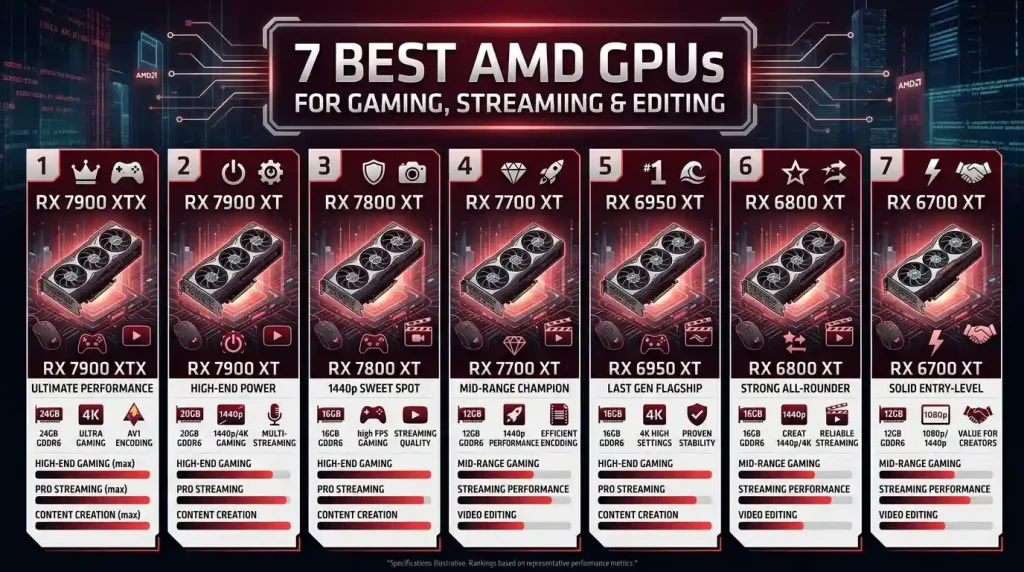
AMD Radeon RX 7900 XTX
The AMD Radeon RX 7900 XTX is AMD’s flagship offering, asserting dominance in the 4K gaming realm. It features a massive 24GB of GDDR6 memory, which is highly beneficial for 4K and 8K video editing projects, allowing for smooth playback and fast rendering even with multiple effects and color grading. For streaming, its dual media engines and full AV1 encoding support provide excellent quality streams at lower bitrates. While it excels in rasterization performance and DaVinci Resolve, it generally lags behind Nvidia in GPU rendering for some professional workloads like Blender and in Adobe Premiere Pro due to NVIDIA’s CUDA advantage. However, for pure gaming and Resolve-centric editing, it offers phenomenal performance.
AMD Radeon RX 7900 XT
A step down from the XTX, the Radeon RX 7900 XT still delivers excellent performance for high-refresh 1440p and solid 4K gaming. It typically comes with 20GB of GDDR6 VRAM, providing a strong buffer for demanding creative tasks. It shares the RDNA 3 architecture’s advancements in media encoding, making it a capable streaming card. It offers a strong balance of price and performance for users who need a powerful GPU but don’t require the absolute top-tier performance of the XTX.
AMD Radeon RX 9070 XT (RDNA 4)
The AMD Radeon RX 9070 XT, based on the newer RDNA 4 architecture, is currently considered one of the best overall AMD graphics cards, especially for its blend of performance and competitive pricing. It offers strong gaming performance at 1440p and can handle 4K resolution with confidence. With 16GB of GDDR6 VRAM, it’s well-suited for video editing and content creation, offering good value for professional capabilities without a premium cost, particularly for DaVinci Resolve users. Its improved ray tracing and AI performance further narrow the gap with competitors.
AMD Radeon RX 7800 XT
The Radeon RX 7800 XT stands out as a mid-range champion, offering exceptional value for 1440p gaming. It typically comes with 16GB of GDDR6 VRAM, which is a sweet spot for 1440p gaming and beneficial for many editing tasks. It provides a strong balance between gaming performance, VRAM capacity, and price, making it a highly recommended choice for gamers who also dabble in streaming and editing without breaking the bank.
AMD Radeon RX 7700 XT
The AMD Radeon RX 7700 XT is another strong contender for 1440p gaming, packing 12GB GDDR6 memory. It offers a significant performance boost over its predecessor and excels in rasterization, making it a solid mid-range choice for high frame rates at 1440p. While its FSR technology is good, it may not quite match the ray tracing performance of some competitors. However, for its price point, it delivers robust performance for both gaming and general content creation.
AMD Radeon RX 9060 XT (RDNA 4)
For users primarily focused on 1080p gaming with the flexibility to move into entry-level 1440p, the AMD Radeon RX 9060 XT (especially the 16GB version) is an excellent budget-friendly option. Built on the RDNA 3 architecture, it’s engineered for 1080p dominance and offers surprising future-proofing due to its generous VRAM. It sips power, stays cool, and still runs modern games smoothly. It also benefits from the RDNA 4 architecture’s improved ray-tracing and AI performance, and access to FSR 4 upscaling technology.
Performance Overview and Comparisons
To provide a clearer picture, here’s a comparative overview of some of the best AMD GPUs, focusing on their strengths in gaming, streaming, and editing. It’s important to note that specific performance can vary based on game optimization, software used, and system configuration.
| GPU Model | Architecture | VRAM (GDDR6) | Target Gaming Resolution | Streaming & Encoding | Video Editing & Content Creation |
|---|---|---|---|---|---|
| AMD Radeon RX 7900 XTX | RDNA 3 | 24GB | 4K Ultra, High Refresh Rate 1440p | Excellent (Dual Media Engines, AV1 hardware encoding) | Excellent (DaVinci Resolve optimized, high VRAM for 8K, AI features) |
| AMD Radeon RX 7900 XT | RDNA 3 | 20GB | High Refresh Rate 1440p, Entry 4K | Very Good (AV1 hardware encoding) | Very Good (Ample VRAM for 4K projects, AI features) |
| AMD Radeon RX 9070 XT | RDNA 4 | 16GB | High Refresh Rate 1440p, Capable 4K | Excellent (Improved media engine, AV1 encoding) | Excellent (Great value for professional use, DaVinci Resolve focused, AI) |
| AMD Radeon RX 7800 XT | RDNA 3 | 16GB | 1440p Ultra | Good (AV1 hardware encoding) | Good (Solid VRAM for 1440p projects, general editing) |
| AMD Radeon RX 7700 XT | RDNA 3 | 12GB | 1440p High | Good (AV1 hardware encoding) | Capable (Decent VRAM for 1440p projects, entry-level editing) |
| AMD Radeon RX 9060 XT | RDNA 4 | 16GB | 1080p Ultra, Entry 1440p | Good (Improved media engine, AV1 encoding) | Capable (Generous VRAM for budget option, casual editing) |
Factors Beyond the GPU
While the GPU is the heart of your system for these demanding tasks, other components play a crucial role in overall performance.
CPU Pairing and Smart Access Memory (SAM)
An AMD Ryzen CPU, especially a 5000 series or newer, paired with an AMD Radeon GPU unlocks Smart Access Memory (SAM). This synergy allows the CPU full access to the GPU’s VRAM, improving data transfer efficiency and delivering performance gains in many games. Choosing an all-AMD system can provide an “All-AMD Advantage” due to this optimized communication.
RAM Capacity and Speed
Sufficient RAM (typically 16GB or 32GB) and its speed are vital for multitasking, especially when gaming, streaming, and editing simultaneously. Video editing, in particular, benefits significantly from higher RAM capacity.
Storage Solutions
Fast NVMe SSDs are essential for quick game loading, seamless asset streaming in editing software, and reducing render times. A dedicated drive for project files and scratch disks can further enhance editing workflows.
Power Supply Unit (PSU)
A stable and adequately powerful PSU is critical to ensure your GPU and other components receive consistent power, preventing performance bottlenecks or system instability. Modern high-end GPUs like the RX 7900 XTX can have substantial power draws.
Cooling
Effective cooling for both your CPU and GPU is paramount, especially during prolonged gaming sessions or intensive rendering tasks. Good cooling prevents thermal throttling, ensuring your components maintain their peak performance. Desktop cooling solutions allow GPUs like the RX 7900 XTX to sustain maximum boost clocks during hour-long video renders, keeping export times consistently low.
Making Your Decision: Balancing Price and Performance
The “best” AMD GPU ultimately depends on your specific priorities and budget. If you are a professional content creator whose primary workflow revolves around Adobe Premiere Pro or After Effects, some sources suggest that Nvidia’s CUDA acceleration and NVENC encoder might still offer an edge in specific scenarios, despite AMD’s significant improvements. However, for users primarily working in DaVinci Resolve, AMD cards often provide exceptional value and strong performance, especially with their optimized OpenCL acceleration. For pure gaming, especially at 1440p and 4K, AMD offers highly competitive rasterization performance.
When considering your budget, the AMD Radeon RX 9070 XT is frequently cited as offering excellent value for its performance, often rivaling more expensive Nvidia counterparts. For more budget-conscious builds that still demand solid 1080p or entry-level 1440p gaming and casual content creation, the RX 9060 XT is a compelling choice. Remember that while some subjective opinions on encoder quality might favor one brand over another, the objective differences in AV1 and HEVC encoding quality between AMD and Nvidia have become less pronounced, with AMD’s RDNA 3 media engine being very capable. For further independent analysis on GPU performance, you might consult detailed technical reviews on reputable sites such as Wikipedia’s Graphics Processing Unit page.
Conclusion
AMD has solidified its position as a fierce competitor in the GPU market, offering a compelling range of graphics cards that excel in gaming, streaming, and editing. The advancements in RDNA 3 and RDNA 4 architectures, coupled with technologies like FSR 3 and Smart Access Memory, make AMD GPUs a powerful choice for a versatile PC build. Whether you prioritize uncompromised 4K gaming, high-quality live streaming, or efficient video production, there’s an AMD Radeon GPU tailored to your needs. The Radeon RX 7900 XTX and RX 9070 XT stand out for high-end users seeking top-tier performance across all three domains, while the RX 7800 XT and RX 9060 XT offer excellent value and performance for mid-range and budget-conscious creators respectively. By carefully considering your specific requirements and leveraging AMD’s innovative ecosystem, you can build a powerful system that delivers an exceptional experience for all your digital endeavors.