GPU Comparison: A Comprehensive Guide to Choosing the Right Graphics Card
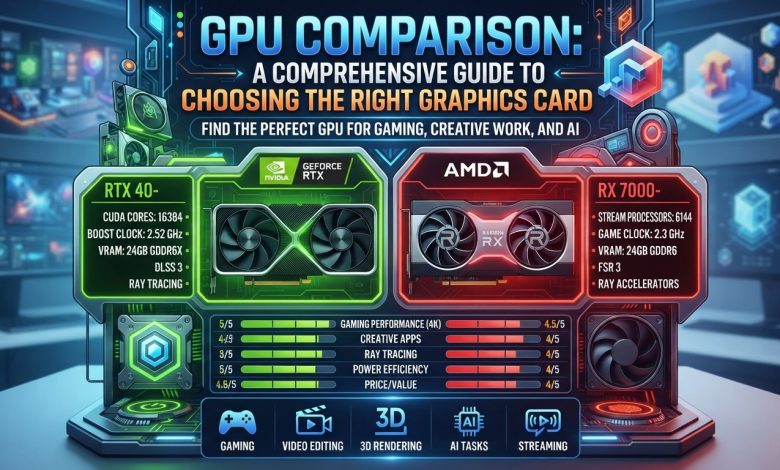
Table of Contents
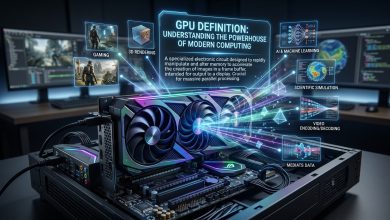
GPU comparison is an essential exercise for anyone looking to build, upgrade, or even simply understand the performance capabilities of a modern computer. A Graphics Processing Unit (GPU), often referred to as a graphics card, is a specialized electronic circuit designed to rapidly manipulate and alter memory to accelerate the building of images for display. While traditionally associated with gaming, GPUs have evolved significantly to become indispensable components for a wide range of applications, including professional content creation, scientific computing, and artificial intelligence (AI) workloads. Choosing the right GPU can drastically impact a system’s performance, efficiency, and overall user experience, making a thorough understanding of their features and capabilities paramount.
Understanding the Core: What is a GPU and Why it Matters
At its heart, a GPU is a parallel processor, meaning it can handle many calculations simultaneously, a design perfectly suited for the repetitive, intensive tasks involved in rendering graphics. Unlike a Central Processing Unit (CPU), which excels at sequential processing and general-purpose logic, a GPU is built with thousands of smaller, more specialized cores that can execute millions of instructions concurrently. This architectural difference is why GPUs are so effective at accelerating tasks like rendering complex 3D scenes, processing high-resolution video, and performing the vast matrix multiplications required for AI and machine learning.
The importance of a GPU extends beyond just visual output. Modern GPUs often include dedicated hardware blocks for advanced features like ray tracing, video encoding, and AI acceleration, further expanding their utility. While integrated GPUs (iGPUs) built into the CPU or motherboard are common for everyday tasks and provide energy-efficient computing, dedicated or discrete graphics cards offer superior performance for demanding applications by utilizing their own dedicated memory (VRAM) and not sharing resources with the CPU. This distinction is crucial when considering performance-intensive workloads, as a more powerful graphics card will be able to render more frames per second and handle more complex computations, directly impacting the fluidity and responsiveness of applications.
Decoding Key GPU Specifications for Informed Comparison
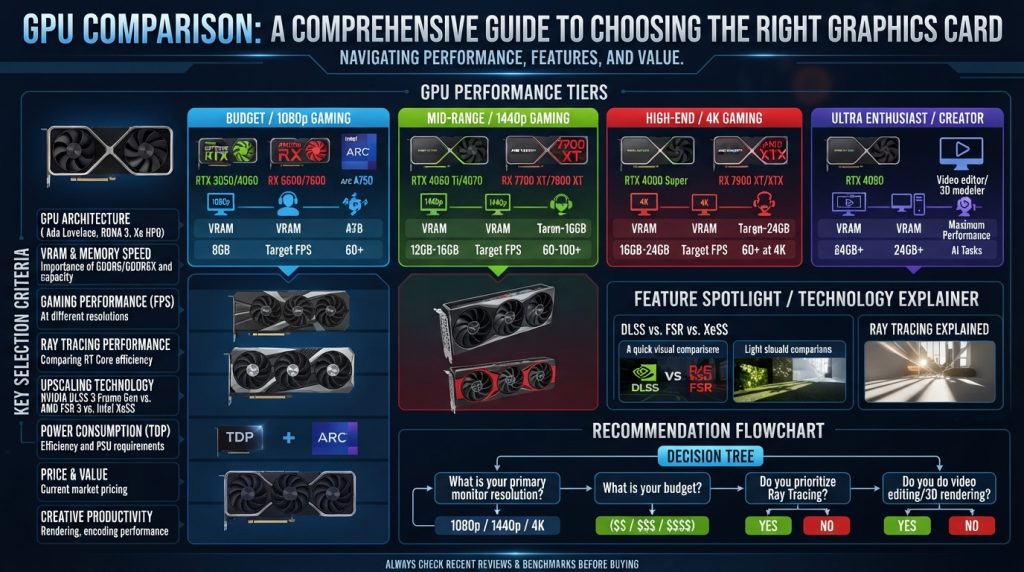
When delving into GPU comparison, several key specifications dictate a card’s capabilities and overall performance. Understanding these metrics is vital for making an informed decision tailored to your specific needs.
- GPU Architecture: This refers to the underlying design and instruction set of the GPU chip. NVIDIA’s current gaming lineup, for instance, is based on the Blackwell architecture (RTX 50-series), while AMD utilizes its RDNA 4 architecture (RX 9000 series). Different architectures bring advancements in processing power, efficiency, and new feature sets.
- CUDA Cores / Stream Processors: These are the fundamental processing units within the GPU. NVIDIA uses CUDA Cores, while AMD uses Stream Processors. More cores generally translate to greater parallel processing capability and higher performance, though direct comparison between NVIDIA and AMD based solely on core counts can be misleading due to architectural differences.
- VRAM (Video RAM): This is the dedicated memory on the graphics card itself. VRAM capacity and speed (often GDDR6, GDDR6X, or the newer GDDR7) are critical, especially for high-resolution gaming, texture-heavy applications, and professional workloads like 3D rendering and video editing. For 1080p gaming in 2026, 8GB of VRAM is considered the baseline, with 12GB offering more headroom. For 4K workflows, 12GB is a minimum, and 20GB+ is recommended for 6K/8K editing.
- Clock Speed (Boost Clock): This indicates how fast the GPU’s cores operate. Higher clock speeds generally mean faster processing, but they are not the sole determinant of performance. Actual performance depends on a combination of architecture, core count, and efficiency.
- Memory Bandwidth: This measures how quickly data can be accessed from the VRAM. Higher memory bandwidth is crucial for feeding the GPU’s processing units with data efficiently, especially in demanding scenarios. For AI workloads, memory bandwidth is a critical factor determining how quickly model weights can be processed.
- TDP (Thermal Design Power) and Power Consumption: This specifies the maximum amount of heat generated by the GPU, which directly correlates to its power draw. Higher TDP cards require more robust cooling solutions and a more powerful power supply unit (PSU).
NVIDIA vs. AMD: The Perennial Battle for Graphics Dominance
The GPU market is largely dominated by two major players: NVIDIA and AMD. Each company offers distinct advantages and caters to different user preferences, making a direct GPU comparison between their offerings a complex but necessary task.
NVIDIA has historically held a significant market share in discrete GPUs, which translates into broader game optimization and driver investment. Their RTX series, based on architectures like Ada Lovelace and the newer Blackwell, is renowned for its strong performance in ray tracing and advanced AI upscaling technologies such as DLSS. NVIDIA’s ecosystem also includes robust creator tools (NVIDIA Studio) and strong performance in workstation workloads, making them a preferred choice for many professionals. In mid-2026, GPUs like the GeForce RTX 5090 and RTX 5080 are at the forefront for high-end gaming and professional tasks, with the RTX 5070 and RTX 5060 Ti offering compelling options for mid-range users. The RTX 50-series leverages a fifth-generation Tensor Core design that powers DLSS 4.
AMD, on the other hand, has become increasingly competitive, particularly in raw rasterization performance and value for money. Their Radeon RX 9000 series (RDNA 4 architecture) has been praised for delivering a strong lineup, with cards like the RX 9070 XT often matching or even surpassing NVIDIA counterparts in traditional rasterization benchmarks at a lower MSRP. AMD’s FidelityFX Super Resolution (FSR) technology provides an open-source upscaling solution that works across a wider range of GPUs, including older models and even integrated graphics, offering broader accessibility to performance gains. For those prioritizing raw gaming performance per dollar and generous VRAM capacity, AMD’s offerings like the Radeon RX 9070 XT and RX 9060 XT 16GB present attractive options in 2026. While AMD’s ray tracing performance has improved with RDNA 4, it still generally trails NVIDIA in this specific area.
Intel has also entered the discrete GPU market with its Arc series, offering competitive options in the budget and mid-range segments, aiming to provide more choices to consumers.
GPU Comparison:Understanding GPU Performance Benchmarks and Real-World Scenarios
Benchmarks are standardized tests designed to measure and compare the performance of different GPUs. These tools provide quantifiable data that helps consumers understand how various graphics cards stack up against each other. Popular benchmarking suites include 3DMark and PassMark, which offer a range of tests for gaming, AI, and professional workloads.
When interpreting benchmark results for GPU comparison, it’s crucial to consider the specific workloads being tested. A GPU that excels in raw rasterization performance for traditional gaming might not perform as well in games heavily reliant on ray tracing, where NVIDIA’s architecture often has an advantage. Similarly, performance in professional applications like video editing or 3D rendering can depend heavily on software optimization, specific API support (like CUDA for NVIDIA or OpenCL for both), and VRAM capacity.
Real-world gaming performance is often expressed in Frames Per Second (FPS) at various resolutions (1080p, 1440p, 4K) and graphics settings. Reviews often include charts comparing average FPS across a suite of demanding titles. For instance, in mid-2026, the NVIDIA GeForce RTX 5090 consistently leads in 4K gaming, while cards like the AMD Radeon RX 9070 XT offer excellent value for 1440p gaming.
For professional users, benchmarks focusing on rendering times, encoding speeds, and AI inference performance are more relevant. Tools like Blender, OctaneRender, and specific AI model benchmarks provide insights into how GPUs handle these compute-intensive tasks. It’s also worth noting that many creative applications are optimized to leverage specific GPU architectures, meaning an NVIDIA GPU might outperform an AMD counterpart in certain software, even with similar theoretical raw power.
Ray Tracing and Upscaling Technologies: DLSS vs. FSR
Modern GPU comparison increasingly involves evaluating advanced rendering GPU Comparison:and upscaling technologies that significantly enhance visual fidelity and performance. Ray tracing and AI-powered upscaling are two such innovations that have become central to the premium gaming experience.
Ray Tracing is a rendering technique that simulates the physical behavior of light to produce incredibly realistic lighting, reflections, and shadows in real-time. Unlike traditional rasterization, which renders triangles and then applies shading, ray tracing traces the path of light rays, interacting with objects in a scene. This results in highly immersive and visually stunning graphics. Both NVIDIA’s RTX series and AMD’s Radeon RX series now feature hardware-accelerated ray tracing cores, though NVIDIA has historically held a performance lead in this area. The RTX 50-series, for example, shows significant improvements in ray tracing performance.
Upscaling Technologies are designed to boost frame rates by rendering games at a lower internal resolution and then intelligently rebuilding the image to the display’s native resolution. This reduces the workload on the GPU, allowing for higher FPS without a drastic loss in image quality.
- NVIDIA DLSS (Deep Learning Super Sampling): DLSS is NVIDIA’s proprietary AI-powered upscaling technology. It uses dedicated Tensor Cores on RTX GPUs and a trained neural network to reconstruct frames, often delivering superior image quality compared to traditional upscaling methods. DLSS 4.5, for instance, includes features like Ray Reconstruction and Multi-Frame Generation, which can significantly boost frame rates and improve image quality in supported titles. However, DLSS is exclusive to NVIDIA’s RTX graphics cards.
- AMD FSR (FidelityFX Super Resolution): FSR is AMD’s open-source spatial upscaling technology. Unlike DLSS, FSR does not require dedicated AI hardware and is compatible with a much wider range of GPUs, including older AMD cards, NVIDIA cards, and even integrated graphics. While FSR can sometimes produce a slightly softer image than DLSS, especially at lower resolutions, it offers broad accessibility and significant performance gains in many titles. AMD’s FSR 4 “Redstone” is its latest iteration, incorporating AI-based enhancements.
The choice between DLSS and FSR often depends on your GPU and the games you play. DLSS typically offers cleaner image quality on supported NVIDIA hardware, while FSR provides wider compatibility and can still deliver excellent results, particularly at 1440p and 4K.
Navigating GPU Tiers: Entry-Level, Mid-Range, and High-End
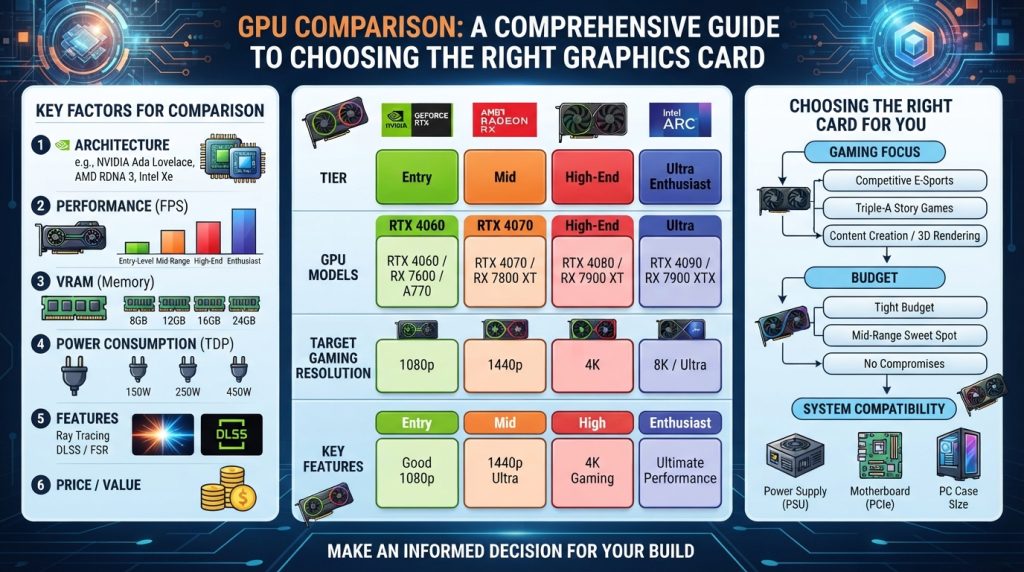
GPUs are typically categorized into different tiers based on their performance, price, and target audience. Understanding these tiers is crucial for effective GPU comparison and ensuring you select a card that aligns with your budget and usage.
Entry-Level GPUs
These GPUs are designed for users with basic computing needs, light gaming, and media consumption. They are often integrated into the CPU (iGPUs) or are standalone cards with lower price points. Examples in 2026 might include cards like the NVIDIA GeForce RTX 4050 or AMD Radeon RX 7500. They are suitable for 1080p gaming at lower settings, esports titles, and general productivity. While they offer a cost-effective solution, they will struggle with demanding AAA games or professional content creation.
Mid-Range GPUs
The mid-range segment offers a balance of performance and price, making it the sweet spot for many gamers and mainstream users. These cards deliver solid 1080p and often excellent 1440p gaming experiences with high frame rates and respectable graphics settings. They are also capable of handling some content creation tasks. In 2026, popular choices in this tier include the NVIDIA GeForce RTX 5070 and AMD Radeon RX 9070 XT, which often compete fiercely for the best performance per dollar at 1440p. The AMD RX 9060 XT 16GB is also a strong contender, offering good value and ample VRAM. These GPUs are ideal for those who want a strong gaming experience without breaking the bank.
High-End/Enthusiast GPUs
This tier comprises the most powerful and expensive GPUs, designed for uncompromising performance in 4K gaming, virtual reality, professional content creation, and AI development. These cards offer the highest frame rates, enable maximum graphical fidelity with ray tracing, and come with substantial VRAM capacities. Leading options in 2026 include the NVIDIA GeForce RTX 5090 and RTX 5080, and AMD Radeon RX 9070 XT for 4K gaming. These GPUs are for users who demand the absolute best performance, where budget is less of a constraint than raw power and advanced features.
Here’s a comparison of some popular GPUs in 2026, highlighting their typical performance tier and VRAM:
| GPU Model (as of mid-2026) | Approximate Tier | VRAM Capacity (Typical) | Primary Use Case | Key Features/Notes |
|---|---|---|---|---|
| NVIDIA GeForce RTX 5090 | High-End/Enthusiast | 24GB GDDR7 | 4K+ Gaming, Pro Creation, AI | Leading Ray Tracing, DLSS 4.5, High Power |
| NVIDIA GeForce RTX 5080 | High-End | 16GB GDDR7 | 4K Gaming, High-End Creation | Excellent Balanced Performance, DLSS 4.5 |
| AMD Radeon RX 9070 XT | High-End/Mid-Range | 16GB GDDR6 | 1440p/Entry 4K Gaming, Value | Strong Rasterization, FSR 4, Competitive Pricing |
| NVIDIA GeForce RTX 5070 Ti | Mid-Range/High-End | 12GB GDDR7 | 1440p/Entry 4K Gaming | Strong DLSS Integration, Good RT |
| NVIDIA GeForce RTX 5070 | Mid-Range | 12GB GDDR7 | 1440p Gaming | Good Balance of Performance & Features |
| AMD Radeon RX 9070 | Mid-Range | 12GB GDDR6 | 1080p/1440p Gaming, Value | Very Competitive at its Price Point |
| NVIDIA GeForce RTX 5060 | Entry-Level/Mid-Range | 8GB/12GB GDDR6 | 1080p Gaming, eSports | Accessible RTX features |
| AMD Radeon RX 7600 XT | Entry-Level/Mid-Range | 16GB GDDR6 | 1080p Gaming, VRAM for Modding | Strong VRAM for its tier, FSR support |
Choosing the Right GPU for Your Specific Needs
The “best” GPU is subjective and entirely dependent on your primary use case, budget, and other system components. A careful GPU comparison takes into account more than just raw power.
For Gaming
- Resolution and Refresh Rate: For 1080p gaming, mid-range cards like the RTX 5060 or RX 7600 XT are excellent choices, offering high frame rates on a 144Hz or 165Hz monitor. For 1440p, the RX 9070 XT or RTX 5070 Ti hits a sweet spot. For uncompromised 4K gaming with ray tracing, high-end cards like the RTX 5090 or RTX 5080 are necessary.
- Game Types: If you primarily play esports titles, a less powerful and more affordable GPU will suffice. For graphically demanding AAA games, especially with ray tracing enabled, investing in a higher-tier card from NVIDIA or AMD is advisable.
- Upscaling Preference: Consider whether you prefer NVIDIA’s DLSS ecosystem or AMD’s FSR, as this might influence your brand choice.
For Professional Content Creation (Video Editing, 3D Rendering, Graphic Design)
- VRAM Capacity: This is paramount for creative workloads. High-resolution video editing (4K, 8K) and complex 3D scenes demand significant VRAM. 12GB is a minimum for 4K, while 20GB+ is recommended for 6K/8K workflows. Cards like the NVIDIA RTX 5090 (32GB GDDR7) or professional-grade GPUs like the NVIDIA RTX PRO 6000 Blackwell (96GB GDDR7 ECC) are ideal for demanding tasks.
- Software Optimization: Many professional applications are optimized for specific GPU architectures. For instance, Adobe Premiere Pro and After Effects often show strong performance with NVIDIA GPUs due to CUDA core optimization and Studio Drivers. Other applications, particularly open-source ones, might leverage AMD’s OpenCL more effectively.
- Hardware Encoding: Features like NVIDIA’s NVENC or AMD’s AMF significantly accelerate video encoding and decoding, dramatically reducing export times.
For AI and Machine Learning
- VRAM and Bandwidth: For AI workloads, VRAM capacity and memory bandwidth are often the first limiting factors. Larger language models (LLMs) require substantial VRAM, with 70B models needing 48-64GB and even more for larger models, potentially requiring multiple GPUs. GPUs like the NVIDIA H100 (80GB HBM3) or RTX PRO 6000 Blackwell are designed for such intensive tasks.
- Software Ecosystem: NVIDIA’s CUDA platform remains dominant in AI development, offering a mature ecosystem of libraries and tools. While AMD and Intel are making strides, NVIDIA generally provides broader software support for AI frameworks.
- Tensor Cores/AI Accelerators: GPUs with dedicated AI acceleration hardware, like NVIDIA’s Tensor Cores, are crucial for efficient AI model training and inference.
For a deeper dive into how GPUs are transforming various industries, particularly in the realm of artificial intelligence and data centers, one can refer to Wikipedia’s comprehensive overview of Graphics Processing Units.
Future Trends in GPU Technology: Beyond Graphics
The landscape of GPU technology is constantly evolving, with significant advancements expected in the coming years that will push the boundaries of computing. These trends will impact not only traditional graphics rendering but also extend the GPU’s role in emerging fields.
One major trend is the continuous increase in computational power and efficiency. Future GPUs are expected to deliver even higher performance, driven by advancements in architecture and processing capabilities. This will enable more realistic graphics, faster simulations, and greater capabilities in complex data processing.
Enhanced ray tracing is another area of ongoing development. As the technology matures, it will offer more realistic lighting, reflections, and shadows in real-time graphics, leading to unparalleled visual immersion in games and professional visualizations. This evolution will likely make ray tracing a standard feature across all GPU tiers.
The integration of AI will play an even more pivotal role in future GPUs. AI-specific hardware, such as advanced Tensor Processing Units (TPUs) or specialized neural processing units (NPUs), will become more prevalent, enabling more efficient and intelligent processing for tasks like image recognition, natural language processing, and autonomous driving. This shift highlights the GPU’s transformation from a graphics accelerator to a general-purpose parallel compute engine, increasingly optimized for AI workloads. Hyperscale companies are even designing their own AI processors to meet these growing demands.
Energy efficiency will remain a critical focus, especially as computational demands increase. Manufacturers will continue to optimize power consumption while maintaining high performance, resulting in more efficient GPUs that offer better performance per watt. This is crucial for both consumer devices and large-scale AI data centers, which are experiencing rapid growth and higher power consumption due to increasing AI workloads.
Furthermore, the future may see closer integration of GPUs with other computing architectures, potentially including quantum computing elements, and a greater emphasis on edge AI deployment, bringing AI processing closer to the data source. The software ecosystems supporting GPUs will also continue to evolve, offering more sophisticated tools and frameworks for developers across various disciplines.
Conclusion
A thorough GPU comparison is far more than just looking at the biggest numbers on a spec sheet. It involves understanding the intricate interplay of architectural design, core specifications, and specialized features like ray tracing and AI upscaling. The choice between NVIDIA, AMD, or even Intel GPUs hinges on your specific needs—whether you’re a hardcore gamer aiming for the highest frame rates in 4K, a content creator demanding ample VRAM and software optimization, or an AI developer requiring massive parallel processing power.
As the GPU landscape continues to evolve, driven by innovations in AI and rendering technologies, staying informed about the latest trends and understanding how to interpret benchmarks will be key. By carefully evaluating these factors against your budget and intended use, you can confidently select the graphics card that will deliver the optimal performance and value for your computing journey in 2026 and beyond.