GPU Core Clock Explained for Gamers and Creators: 7 Powerful Facts You Should Know

Table of Contents
GPU core clock is a fundamental specification of any graphics card, representing the operating frequency of the graphics processing unit (GPU) chip itself. Measured in megahertz (MHz) or gigahertz (GHz), it dictates how many cycles the GPU can perform per second. For gamers and creators alike, understanding the GPU core clock is crucial, as it directly influences the speed at which graphical instructions are executed, ultimately affecting performance in applications ranging from the latest AAA games to demanding 3D rendering tasks. While often highlighted in marketing, the core clock isn’t the sole determinant of a GPU’s prowess, but it is a significant indicator of its raw processing power.
What Exactly is GPU Core Clock?
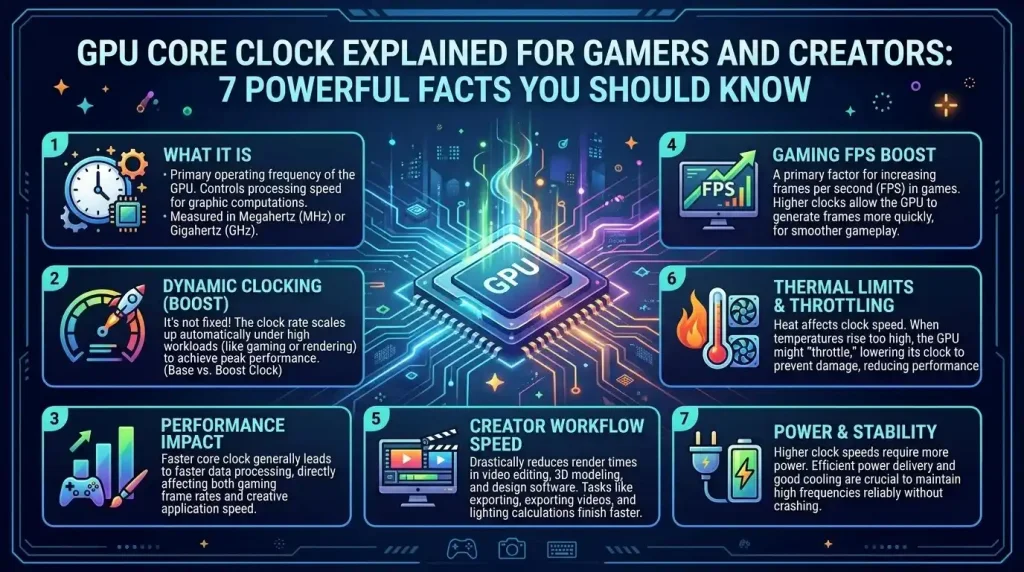
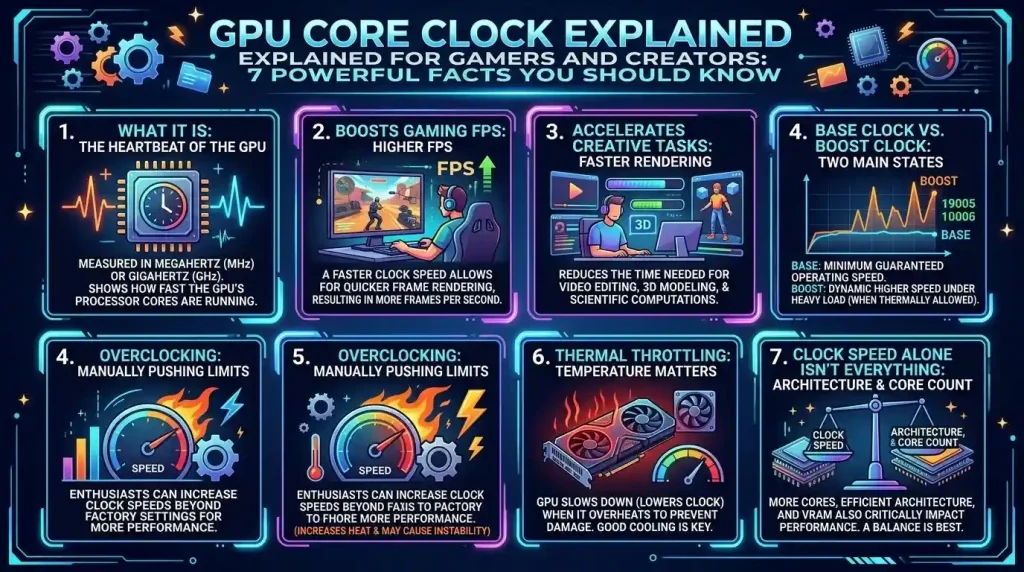
At its heart, the GPU core clock is the speed at which the GPU’s main processing unit operates. Think of it as the heartbeat of your graphics card; a higher clock speed means a faster heartbeat, allowing the GPU to crunch more numbers and execute more instructions per second. These instructions are the backbone of rendering complex visuals, performing calculations for simulations, and accelerating various creative tasks. Every tick of the clock cycle advances the state of the GPU, enabling it to process data and render graphics more quickly. This processing power is critical for handling the intensive demands of modern gaming and professional content creation.
The core clock works in conjunction with other vital components of the GPU, such as the number of CUDA cores (NVIDIA) or Stream Processors (AMD), memory clock speed, and memory interface. While the core clock directly impacts how quickly individual operations are performed, the sheer number of processing units and the speed at which data can be accessed from video RAM (VRAM) also play significant roles in overall performance. A GPU with a 1000MHz core clock, for instance, performs 1,000,000 cycles per second, directly influencing its graphics rendering potential, including metrics like Texture Fill-Rate.
Base, Boost, and Effective Clocks: Understanding the Nuances
When examining GPU specifications, you’ll often encounter different clock speed terminologies: base clock, boost clock, and sometimes “game clock” or “effective clock.” Each term describes a specific aspect of the GPU’s operational frequency.
- Base Clock: This is the manufacturer-specified minimum clock speed at which the GPU is guaranteed to operate under standard conditions and within its thermal design power (TDP) limits. It’s the stable, consistent speed your GPU will maintain when not under heavy load or when operating under less-than-optimal thermal conditions.
- Boost Clock: The boost clock refers to the maximum frequency a GPU can achieve dynamically when under load, provided it has sufficient thermal headroom and power. Modern GPUs, particularly from NVIDIA (GPU Boost) and AMD (Precision Boost), employ intelligent power and thermal management systems that automatically increase the clock speed above the base frequency during intensive tasks. This allows the GPU to deliver additional performance for short periods, optimizing for real-time demands like gaming or 3D rendering. However, it’s important to note that the advertised boost clock is a “maximum” and not a guaranteed sustained speed, as it depends on various factors including cooling and the specific workload. GPUs can even boost higher than their advertised boost clock if conditions are ideal.
- Game Clock: Primarily used by AMD, the “game clock” is the average clock speed the GPU can maintain during typical gaming workloads. It provides a more realistic expectation of sustained performance during extended gaming sessions, often falling between the base and boost clock speeds.
- Effective Clock: While the core clock refers to the actual cycles per second of the GPU’s processing units, the “effective clock” is more commonly associated with memory. For instance, GDDR (Graphics Double Data Rate) memory technologies transfer data multiple times per clock cycle. GDDR5, for example, is “quad-pumped,” meaning it performs four data transfers per cycle. So, a memory chip running at a real frequency of 1000 MHz might have an “effective” memory clock of 4000 MHz (4×1000 MHz), indicating the actual data transfer rate. Although “effective clock” can sometimes refer to the actual clock speed the GPU is performing closer to, as opposed to a “target” clock, its most common usage in GPU discussions relates to memory.
Impact on Gaming Performance: FPS, Smoothness, and Visual Fidelity
For gamers, the GPU core clock is a significant factor in achieving higher frame rates (FPS) and a smoother, more responsive gaming experience. A higher core clock enables the GPU to render frames more quickly, reducing latency and making visuals appear more fluid. In graphics-intensive titles, where the GPU is often the primary bottleneck, an increase in core clock speed can directly translate to a noticeable improvement in FPS.
However, it’s crucial to understand that clock speed isn’t the only metric that matters. Other architectural elements, such as the number of processing cores, memory bandwidth, and the efficiency of the GPU architecture itself, play equally important roles. A GPU with a newer, more efficient architecture might outperform an older card with a higher clock speed due to better instruction per cycle (IPC) performance and specialized features like Tensor Cores or RT Cores. Nevertheless, for GPUs within the same architecture and generation, a higher core clock typically offers a performance advantage, resulting in improved texture resolutions and overall graphical fidelity.
Impact on Creative Workloads: Rendering, Video Editing, and 3D Modeling
For content creators, the GPU core clock significantly influences the speed and efficiency of demanding applications like 3D rendering, video editing, and graphic design. These tasks heavily rely on the GPU’s parallel processing capabilities, where thousands of cores work simultaneously to perform complex calculations. A higher core clock ensures these cores operate more efficiently, improving throughput in compute-heavy tasks.
In video editing software like Adobe Premiere, DaVinci Resolve, or Blender, a faster GPU core clock can lead to smoother scrubbing through timelines, quicker application of effects, and significantly reduced rendering times. For 3D modelers and animators using software such as Blender or Maya, the core clock directly impacts viewport performance and the speed of final image or animation rendering. Faster rendering means creators can complete projects more quickly, iterate designs faster, and ultimately enhance their productivity. While memory capacity and bandwidth are also critical for handling large textures and complex scenes, the core clock provides the raw computational muscle needed to process that data rapidly.
Factors Influencing GPU Clock Speed and Stability
Several factors dynamically influence a GPU’s operating clock speed and its ability to maintain high frequencies. Understanding these elements is key to optimizing performance and ensuring system stability.
| Factor | Description | Impact on Clock Speed |
|---|---|---|
| Thermal Design & Cooling | The efficiency of the GPU’s cooling system (fans, heatsinks, liquid cooling) and overall case airflow. | High temperatures cause thermal throttling, where the GPU automatically reduces its clock speed to prevent overheating, leading to performance drops. Effective cooling is crucial for maintaining boost clocks. |
| Power Limits (TDP) | The maximum power (in watts) the GPU is allowed to consume. | GPUs operate within strict power limits. If a demanding workload requires more power than allotted, the GPU will lower its clock speed to stay within the power envelope, preventing instability and damage. |
| Voltage | The electrical voltage supplied to the GPU core. | Higher voltage generally allows for higher, more stable clock speeds but significantly increases heat generation and power consumption. Improper voltage tuning can cause instability or reduce hardware lifespan. |
| Workload Demands | The intensity and type of tasks being performed by the GPU. | The GPU’s clock speed is dynamically managed; it will only boost to higher frequencies when the workload demands it. Less intensive tasks or CPU-bound scenarios may result in lower sustained clock speeds. |
| GPU Architecture | The underlying design and efficiency of the GPU chip. | Newer architectures often achieve better performance at similar or even lower clock speeds due to improved efficiency, specialized cores (e.g., Tensor Cores), and better overall design. |
| Silicon Lottery | Variations in manufacturing quality between individual GPU chips. | Some GPU chips are inherently capable of reaching higher, more stable clock speeds at lower voltages than others, a phenomenon often referred to as the “silicon lottery”. |
Thermal throttling is a prime example of these factors in action. When a GPU reaches a certain temperature threshold, its built-in protections trigger a reduction in clock speed to prevent damage. This means that even a GPU with a high advertised boost clock might not reach or sustain those speeds if its cooling solution is inadequate or if it’s operating in a poorly ventilated case. Similarly, power limits set by the manufacturer or by user adjustments can cap the maximum achievable clock speed, as the GPU prioritizes staying within safe operating parameters.
Overclocking Your GPU: Pushing the Limits
Overclocking a GPU involves manually increasing its core clock speed (and often memory clock speed) beyond the factory-set limits to gain additional performance. This practice is popular among enthusiasts and competitive gamers seeking to squeeze every bit of power from their hardware without immediately upgrading.
Benefits of Overclocking:
- Increased FPS: The most direct benefit is a boost in frame rates in games, typically ranging from 5-15% depending on the GPU and the game.
- Faster Rendering: For creators, overclocking can significantly reduce rendering times in applications like Blender, Maya, and video editing suites.
- Improved Responsiveness: Smoother gameplay and more fluid interactions in creative applications due to quicker processing.
Risks and Considerations:
- Increased Heat and Power Consumption: Higher clock speeds demand more voltage, leading to increased heat generation and greater power draw. Inadequate cooling can lead to thermal throttling or, in extreme cases, hardware damage.
- System Instability: Pushing a GPU too far can result in crashes, freezes, graphical artifacts, or even data corruption. Stability testing is crucial after any overclock.
- Reduced Hardware Lifespan: While modern GPUs have safeguards, consistently running at higher voltages and temperatures can accelerate wear and tear on components over time.
- Voided Warranty: Many manufacturers do not cover damage resulting from overclocking, although some factory-overclocked cards exist.
Tools like MSI Afterburner, EVGA Precision X1, and AMD Radeon Software provide user-friendly interfaces for adjusting core clock offsets, voltage, and fan curves. NVIDIA also offers an automatic tuning feature within its software that can safely optimize clock speeds for your specific card. When overclocking, it’s essential to proceed in small increments, test stability thoroughly with benchmarks or demanding games, and monitor temperatures closely.
Undervolting for Efficiency: The Smart Approach
While overclocking aims to increase clock speeds, undervolting focuses on reducing the voltage supplied to the GPU core while maintaining or even improving performance. This technique optimizes the GPU’s efficiency, often yielding benefits without sacrificing performance, and sometimes even delivering a “free” performance boost due to increased stability of boost clocks.
Benefits of Undervolting:
- Lower Temperatures: Less voltage directly translates to less heat generated by the GPU. This is particularly beneficial for smaller cases or systems with less robust cooling, and can help prevent thermal throttling.
- Reduced Fan Noise: With lower temperatures, GPU fans don’t need to spin as fast or as loudly, leading to a quieter system.
- Improved Power Efficiency: Consuming less power makes your system more energy-efficient, which can be beneficial for electricity bills and the environment.
- Increased Lifespan: Operating at lower temperatures and voltages can contribute to the longevity of your graphics card and surrounding components.
- More Stable Boost Clocks: By reducing voltage, the GPU can sometimes maintain its boost clock for longer periods without hitting power or thermal limits, leading to more consistent performance.
Tools like MSI Afterburner are commonly used for undervolting, allowing users to adjust the voltage-frequency curve. The process typically involves finding the lowest stable voltage for a desired clock speed, followed by rigorous stability testing to ensure no performance degradation or crashes occur. Undervolting is generally considered safer than aggressive overclocking as it reduces stress on the hardware, making it an attractive option for users prioritizing silence, cooler operation, and component longevity over maximum raw speed.
NVIDIA vs. AMD: Architectural Differences and Clock Speeds
When comparing NVIDIA and AMD GPUs, it’s important to recognize that clock speeds alone don’t tell the whole story. Both companies employ distinct architectural philosophies that influence how their GPUs perform and how they utilize clock speeds.
- NVIDIA’s Approach: Traditionally, NVIDIA’s architectures (like Ampere or Ada Lovelace) have often achieved higher raw clock speeds. Their design often focuses on a tightly integrated ecosystem, with specialized cores like Tensor Cores for AI acceleration (DLSS) and RT Cores for ray tracing. NVIDIA’s GPU Boost technology dynamically scales clock speeds based on workload, power, and thermal conditions to maximize performance.
- AMD’s Approach: AMD’s RDNA (Radeon DNA) architectures tend to feature lower raw clock speeds compared to NVIDIA but often compensate with a different balance of Stream Processors and a focus on efficiency per clock cycle. AMD emphasizes open development and modular scalability, aiming for strong performance per dollar. Their FidelityFX Super Resolution (FSR) technology and ROCm open-source software stack are key differentiators. AMD’s “Game Clock” also provides a more realistic expectation of sustained performance during gaming.
The differing architectures mean that a direct comparison based solely on clock speed can be misleading. What matters more is the overall efficiency of the architecture in processing instructions per clock cycle (IPC) and how effectively all the GPU’s components work together for a given workload. Benchmarks and real-world performance tests are the most reliable indicators when comparing GPUs from different manufacturers or even different generations.
Optimizing GPU Clock Speed for Your Needs
Whether you’re a gamer chasing every last frame or a creator aiming for faster render times, optimizing your GPU’s core clock speed involves a balanced approach.
For gamers, the goal is typically to achieve the highest stable frame rates without compromising system stability or generating excessive heat and noise.
- Monitor & Understand: Use monitoring tools (e.g., MSI Afterburner, HWiNFO, GPU-Z) to understand your GPU’s current clock speeds, temperatures, and power draw during gameplay.
- Consider Overclocking: If you have adequate cooling and a quality power supply, a modest overclock can provide noticeable FPS gains. Start with small increments (e.g., +20MHz on the core clock, then +50-100MHz on memory clock) and test thoroughly.
- Ensure Good Airflow: A well-ventilated PC case is critical to prevent thermal throttling and allow your GPU to maintain higher boost clocks.
- Driver Updates: Keep your GPU drivers up to date, as these often include performance optimizations and stability improvements from the manufacturer.
For creators, stability and consistent performance over prolonged, heavy workloads are often paramount, alongside raw speed.
- Prioritize Stability: While speed is important, instability during a lengthy render can mean lost work. Test any overclock or undervolt extensively with your most demanding creative applications.
- Balance Core and Memory Clocks: For memory-intensive tasks like high-resolution texture work or complex simulations, optimizing memory clock can be as important as the core clock.
- Explore Undervolting: For workstation environments where noise and heat are concerns, undervolting can provide a more efficient GPU, potentially maintaining boost clocks for longer periods without performance loss. This can lead to a cooler, quieter system, which is beneficial during long work sessions.
- Professional Grade Cooling: If your workflow consistently pushes your GPU to its limits, investing in superior cooling (e.g., AIB partner cards with robust coolers, custom liquid cooling) can help maintain peak clock speeds for extended periods.
Ultimately, the optimal GPU core clock setting is a balance between performance, stability, temperature, and power consumption tailored to your specific hardware and usage scenarios.
Conclusion
The GPU core clock is a critical, yet often misunderstood, element of graphics card performance for both gamers and creators. It represents the fundamental speed at which the GPU processes instructions, directly influencing frame rates in games and acceleration in demanding creative applications. Understanding the distinctions between base, boost, and effective clocks provides a clearer picture of how your GPU operates under varying loads. While a higher core clock generally translates to better performance, factors such as cooling, power limits, and architectural efficiency also play pivotal roles. Both overclocking to extract maximum speed and undervolting to enhance efficiency offer viable pathways for optimization, each with its own set of benefits and considerations. By intelligently managing and monitoring your GPU’s core clock, you can unlock its full potential, ensuring a smoother, faster, and more enjoyable experience, whether you’re navigating virtual worlds or bringing digital creations to life.